 PH
PHXena Gabrielle
Eternal Poster
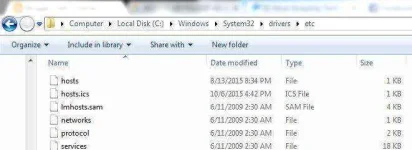
Go to C:\Windows\System32\Drivers\Etc
Find the File named “HOSTS”
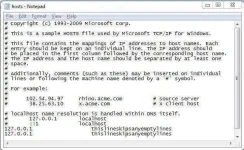
Under “127.0.0.1 localhost” just add the site you want to block
For Example
127.0.0.2 You do not have permission to view the full content of this post. Log in or register now.
Save the file & exit notepad. (Restart your computer for changes.)
Now both website are blocked at all.
Just add anyother website you want to block but remember last number must increase in every website.
e.g.
127.0.0.1 localhost
127.0.0.2 You do not have permission to view the full content of this post. Log in or register now.
127.0.0.3 You do not have permission to view the full content of this post. Log in or register now.
...you're welcome
Find the File named “HOSTS”
Under “127.0.0.1 localhost” just add the site you want to block
For Example
127.0.0.2 You do not have permission to view the full content of this post. Log in or register now.
Save the file & exit notepad. (Restart your computer for changes.)
Now both website are blocked at all.
Just add anyother website you want to block but remember last number must increase in every website.
e.g.
127.0.0.1 localhost
127.0.0.2 You do not have permission to view the full content of this post. Log in or register now.
127.0.0.3 You do not have permission to view the full content of this post. Log in or register now.
...you're welcome