 PH
PHFree apple developer account for side loading apps via xcode or cydia impactor
Creating an Apple developer account
Step 1: Visit You do not have permission to view the full content of this post. Log in or register now.
Step 2: Click Member Center.
Step 3: Sign in with your Apple ID.
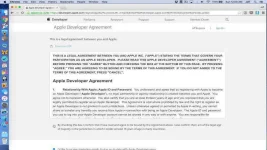
Step 4: On the Apple Developer Agreement page, click the first check box to accept the agreement and click the Submit button.
Your Apple ID now works as a free developer account. As stated at the outset, this account can be used for sideloading apps via Xcode. You will not be able to submit apps to the App Store, or download iOS, OS X, watchOS, or tvOS developer betas. A $99/year ρáíd developer account is still required to enjoy those privileges.
VIDEO WALKTHROUGH
credits to jeffbenjamin original author
i only shared here baka makatulong
like it if you like it dislike if you dont
Creating an Apple developer account
Step 1: Visit You do not have permission to view the full content of this post. Log in or register now.
Step 2: Click Member Center.
Step 3: Sign in with your Apple ID.
- If you already have an Apple ID, you’ll just need to agree to Apple’s Developer Agreement to turn it into a free developer account. Type in your Apple ID and click Sign In.
- If you don’t already have an Apple ID, you’ll need to create one first. Click Create Apple ID, and fill out the required information and click Continue. You’ll then need to sign in with the Apple ID that you just created, and go back to the Member Center.
Step 4: On the Apple Developer Agreement page, click the first check box to accept the agreement and click the Submit button.
Your Apple ID now works as a free developer account. As stated at the outset, this account can be used for sideloading apps via Xcode. You will not be able to submit apps to the App Store, or download iOS, OS X, watchOS, or tvOS developer betas. A $99/year ρáíd developer account is still required to enjoy those privileges.
VIDEO WALKTHROUGH
credits to jeffbenjamin original author
i only shared here baka makatulong
like it if you like it dislike if you dont