PH
PHiOS Kernel
Honorary Poster

 iOS SIDELOADING APPS [ULTIMATE BEGGINER GUIDE 2026]
iOS SIDELOADING APPS [ULTIMATE BEGGINER GUIDE 2026]Sa thread na to, tuturan ko kayo pano mag sideload ng mga apps sa iPhone at iPads ninyo. Ituturo ko sa sa inyo sa paraang madaling maunawaan ng bawat begginer.
Intro:
"CERTIFICATE" ang ginagamit natin para maka pag SIGN at install ng application sa device natin. Merong ρáíd at LEAK or FREE CERT na tinatawag. Ang ρáíd ay kung saan bibili ka ng CERTIFICATE sa 3rd party provider. Like DXSIGN, SIGNULOUS, KRAVASIGN. Depende sa presyo nang pag bibilhan mo.Gagamit tayo ng FREE METHOD sa sideloading. NO PC Requirements. NO PAYMENT. Sundin mo lang ang mga sasabhin ko.
Step 1:
Eto ang pinaka importante sa lahat bago tayo maka pag sideload. Eto ay tinatawag na "ANTI REVOKE DNS".
Question 1: Bakit ba kelangan natin neto?
Answer : Kaylangan natin ma i-block sa network natin ang mga Apple DNS's. Etong mga DNS server ay nag checheck at nag veverify sa kada install natin ng mga application. Chine-check neto kung valid pa ba ang certificate na ginamit natin o kaya kung match ba ang bundle ID ng application sa Appstore.
Question 2: Eh pano naman kung hindi ako nag install ng "ANTI REVOKE DNS"?
Answer : Instant BLACKLISTED ang device mo sa kung anong Certificate ang ginamit mo.
Question 2: Which domains are blocked?
Answer :
- certs.apple.com
- crl.apple.com
- ocsp.apple.com
- ocsp2.apple.com
- valid.apple.com
- vpp.itunes.apple.com
- appldnld.apple.com
- crl.entrust.net
- crl3.digicert.com
- crl4.digicert.com
- metrics.apple.com
- ocsp.digicert.cn
- ocsp.digicert.com
- ocsp.entrust.net
- ocsp.int-x3.letsencrypt.org
- ocsp.usertrust.com
OTA Domains: Blocking iOS updates. - appattest.apple.com
- axm-app.apple.com
- ca.iadsdk.apple.com
- comm-cohort.ess.apple.com
- comm-main.ess.apple.com
- configuration.apple.com
- configuration.apple.com.akadns.net
- configuration.ls.apple.com
- configuration.ls.v.aaplimg.com
- gdmf.apple.com
PPQ Domains: I still experimenting to block these domains on my own, the downside is hindi ka makakapag install ng application because it needs to You do not have permission to view the full content of this post. Log in or register now. Isa to sa mga hinala ko kung bakit na bblacklist/revoke ang device kaagad and yeah I put this on this thread for your additional knowledge at kung gagawa ka ng sarili mong dns block list so you can separete the PPQ domains. These domains are not blocked in the current profile. - ppq-ext.v.aaplimg.com
- ppq.apple.com
- use1-ppq-ext-prod.apple.com
- usw2-ppq-ext-prod.apple.com

 So Anti REVOKE DNS is very important!
You do not have permission to view the full content of this post. Log in or register now.
Steps:
1. Go to Files >> Downloads >> and then just click the downloaded profile.
2. Go to Settings >> General >> VPN & Device Management >> Install the Profile.
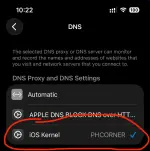
3. Sa DNS, dapat naka check yung DNS profile na ininstall mo which is yung ANTI REVOKE DNS.
* Ginawa ko to gamit ang You do not have permission to view the full content of this post. Log in or register now. sa pag manage ng firewall.
Note: If the dns profile didn't show in the setting or the profile file opened as text/plist. Use this You do not have permission to view the full content of this post. Log in or register now.. Upload the profile and Install/Allow it.
 Disclaimer: Traffic activity logs are disabled.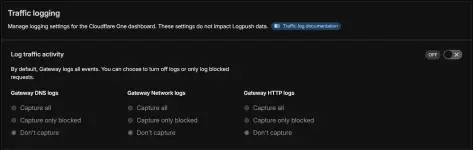
Step 2:
Installing KSIGN.Question: Anong KSIGN?
Answer : Dito tayo mag Si-sign at mag I-install ng applications. Pwede tayo mag inject ng Dylibs/Debs/Tweaks dito. Pwede rin tayo mag palit ng Icon at Names ng apps at pwede rin natin silang i-duplicate. For Example gusto mo dalawang Messenger, yung isa original galing Appstore, yung isa naman Sideloaded kumabaga para sa kabit mo haha.
Note: Decrpyted IPA lang ang pwedeing injectan ng deb/dylibs.
Install KSIGN. Kuha lang kayo ng isa hanggang sa may ma-install. This is a direct link install.
You do not have permission to view the full content of this post. Log in or register now. - Added 03/07/2026
You do not have permission to view the full content of this post. Log in or register now. - Added 03/07/2026
You do not have permission to view the full content of this post. Log in or register now.
You do not have permission to view the full content of this post. Log in or register now.
You do not have permission to view the full content of this post. Log in or register now.
You do not have permission to view the full content of this post. Log in or register now.
You do not have permission to view the full content of this post. Log in or register now.
You do not have permission to view the full content of this post. Log in or register now.
You do not have permission to view the full content of this post. Log in or register now.
You do not have permission to view the full content of this post. Log in or register now.
You do not have permission to view the full content of this post. Log in or register now.
You do not have permission to view the full content of this post. Log in or register now.
You do not have permission to view the full content of this post. Log in or register now.
You do not have permission to view the full content of this post. Log in or register now.
You do not have permission to view the full content of this post. Log in or register now.
You do not have permission to view the full content of this post. Log in or register now.
You do not have permission to view the full content of this post. Log in or register now.
You do not have permission to view the full content of this post. Log in or register now.
You do not have permission to view the full content of this post. Log in or register now.
You do not have permission to view the full content of this post. Log in or register now.
You do not have permission to view the full content of this post. Log in or register now.
You do not have permission to view the full content of this post. Log in or register now.
You do not have permission to view the full content of this post. Log in or register now.
You do not have permission to view the full content of this post. Log in or register now.
You do not have permission to view the full content of this post. Log in or register now.
You do not have permission to view the full content of this post. Log in or register now.
You do not have permission to view the full content of this post. Log in or register now.
You do not have permission to view the full content of this post. Log in or register now.
You do not have permission to view the full content of this post. Log in or register now.
You do not have permission to view the full content of this post. Log in or register now.
You do not have permission to view the full content of this post. Log in or register now.
You do not have permission to view the full content of this post. Log in or register now.
You do not have permission to view the full content of this post. Log in or register now.
You do not have permission to view the full content of this post. Log in or register now.
You do not have permission to view the full content of this post. Log in or register now.
You do not have permission to view the full content of this post. Log in or register now.
You do not have permission to view the full content of this post. Log in or register now.
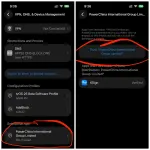
After nyo ma I-install, hindi nyo kagad ma O-open ang KSIGN app. Kelangan I-trust natin settings.
Steps:
Goto Settings >> Settings >> General >> VPN & Device Management >> Click nyo yuung Certificate na inin-stall nyo.
For example na nasa Screenshot ay PowerChina International Group Limited
Before nyo I-Trust. Turn On AIRPLANE MODE first. This very very very Important!
Kapag hidi nyo ginawa to pag open ng phone after restart, malaki ang chansa na ma blacklisted and device.
Trust me, this lesson came from experience.
NOTE:
Note 1: Mag rerestart ang phone nyo at i-install nyo yung PROFILE.
Note 2. After ang successful na restart, antay muna ng 30-40secs bago i-off ang AIRPLANE MODE.
Step 3.
Sign and Installing Apps.Important Step:Go to KSIGN app >> Settings >> Server & SSL >> and CLICK UPDATE SSL CERTIFICATES.
If you don't do this, hindi mag iinstall ang apps.
SIGN AND INSTALLING
Go to Library >> click Import >> Import from files >> Open nyo .ipa na file.
Sa Example na to ang gagamitin kong App ay HDFLIX.
Steps:
Click the HD FLIX app >> Sign & Install >> Start signing.
Note: Ksign has built in certificate inside, no need to import some certificates.
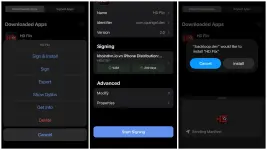
Aaaaannnnddd Taadaaaa! Your first sideloaded app
VERY IMPORTANT NOTES!
VERY IMPORTANT NOTES!- Walang Forever!
- Everytime na mag rerestart kayo ng phone, please always turn on AIRPLANE MODE! Just trust me please. I'm begging.
- Do not use any VPN, it will break the DNS blocking, ma bybypass ang cloudflare natin.
- If you encounter an error "Unable to Verify App: This app will not be available until verified" it means you are blacklisted. New CERT kana.
- Never turn-off the ANTI REVOKE DNS profile.
- The only way to remove the BLACKLIST is by resetting the device.
REPO SOURCES
Question: Para san tong mga links na to?Answer : Eto ang mga repository nga mga .ipa or apps. Pwede ka dito mag download ng mga apps directly sa Ksign/Feather at hindi na mag hahanap sa google. Andito rin yung mga ρáíd/tweaked/premiums/unlocked/decrypted na apps.
Copy all link as one.
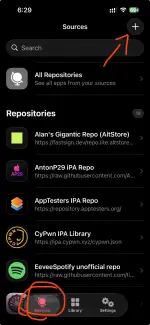
Go to sources >> "+" icon on right top >> Import
Rich (BB code):
https://raw.githubusercontent.com/WhySooooFurious/Ultimate-Sideloading-Guide/refs/heads/main/raw-files/app-repo.json
https://esign.yyyue.xyz/app.json
https://qnblackcat.github.io/AltStore/apps.json
https://wuxu1.github.io/wuxu-complete-plus.json
https://ipa.cypwn.xyz/cypwn.json
https://repository.apptesters.org/
https://aio.yippee.rip/repo.json
https://community-apps.sidestore.io/sidecommunity.json
https://tiny.one/SpotC
https://provenance-emu.com/apps.json
https://altstore.oatmealdome.me/
https://xitrix.github.io/iTorrent/AltStore.json
https://flyinghead.github.io/flycast-builds/altstore.json
https://alt.crystall1ne.dev/
https://fastsign.dev/repo.lite.altstore.json
https://ftrepo.xyz/apps.json
https://raw.githubusercontent.com/AntonP29/AntonP29-Repo/refs/heads/main/repo.json
https://raw.githubusercontent.com/titouan336/Spotify-AltStoreRepo-mirror/refs/heads/main/source.json