PH
PHHow to Get the ᑕᕼᗩTGᑭT Plus Free Offer with PayPal
(Success depends on the details you enter in PayPal)
(Success depends on the details you enter in PayPal)
Follow these steps carefully to trigger the free ᑕᕼᗩTGᑭT Plus offer and get PayPal working smoothly.
Steps:
- Create a new email address. You can use either Outlook or Gmail — both will work for a fresh ᑕᕼᗩTGᑭT account.
- Connect to a VPN – Japan server. Once connected, use that Japan IP to create a new ᑕᕼᗩTGᑭT account with your new email.
- After creating the account, the free offer should appear at the top of the page. If it doesn't show immediately, refresh the page while still connected to the Japan VPN.
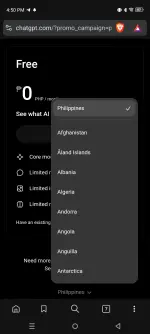
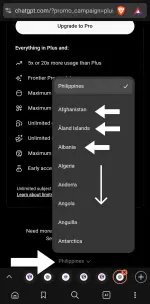
- Go to the Pricing page and scroll all the way to the bottom. Select any country — most of them will show PayPal as a payment option.
- On the payment page, choose PayPal as your payment method. Use a fake address from the Philippines (or any address), then click subscribe.
- Create a brand new PayPal accountwhen prompted — do not log into an existing one.
- Card: You can use a virtual card or any card you have. It does not need to be a real funded card.
- Mobile Number: You must use a real phone number because PayPal will send a verification code. Make sure you can receive the OTP.
- ID Number: It's up to you whether to put your real ID number or a fake one. Either will work.
- If the card gets declined:
- Simply log out of PayPal and log back in.
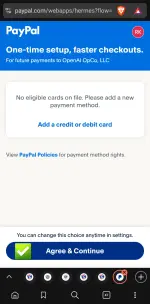
- If you see a “not eligible” message, just continue without adding a card. The subscription will still proceed.
Important Reminders:
- You must be connected to a Japan VPN server before creating the ᑕᕼᗩTGᑭT account — otherwise, the free offer will not appear.
- Always use a fresh email (Outlook or Gmail) and a new ᑕᕼᗩTGᑭT account.
- Even if no valid card is linked, completing the PayPal account setup may still allow the subscription to go through.
- Only one ᑕᕼᗩTGᑭT account should be linked per PayPal account. Avoid using the same PayPal for multiple ᑕᕼᗩTGᑭT accounts to prevent getting flagged or banned.
That's it — enjoy your ᑕᕼᗩTGᑭT Plus free trial!
Obserbahan muna ng 2-3 days kung hindi ma-deactivate.
 ang lupet talaga ni master