 PH
PH? YESS... You can speed up your windows 10 pc
simple requirements lang BRAIN
note need mo lang baguhin yong page size allocated RAM sa hard disk mo
from default given by windows to
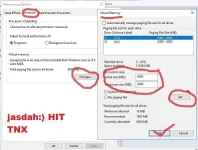
for local disk c= 4000mb upto 8000mb that is 4gb to 8gb
value should be in MEGABYTE 4gb = 4000
same lang din kung ilan lahat ng partitions mo sa pc mo set it all to 4gb-8gb
example may 3 partitions ka c d and e
after mo naiset lahat may total kang 12 GB RAM
and each partitions has its own 4gb minimum RAM
very useful if you have only 4gb hardware RAM installed sa pc mo.
lets started easy lang to
just be openminded
STEPS:
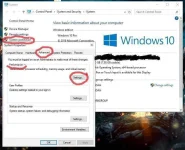
open mo si file explore click mo si MY COMPUTER/ This PC
then right click mo choose PROPERTIES
after nito
follow mo lang yong screen shoots sa ibaba and your good
to customize your values. just click custom add 4000 - 8000
click set to each partitons after that
click OK close windows and
RESTART YOUR PC DONE you just boosted your PCs performance
hit THANKS if YOU find this helpful
STEPS here:
simple requirements lang BRAIN
note need mo lang baguhin yong page size allocated RAM sa hard disk mo
from default given by windows to
for local disk c= 4000mb upto 8000mb that is 4gb to 8gb
value should be in MEGABYTE 4gb = 4000
same lang din kung ilan lahat ng partitions mo sa pc mo set it all to 4gb-8gb
example may 3 partitions ka c d and e
after mo naiset lahat may total kang 12 GB RAM
and each partitions has its own 4gb minimum RAM
very useful if you have only 4gb hardware RAM installed sa pc mo.
lets started easy lang to
just be openminded
STEPS:
open mo si file explore click mo si MY COMPUTER/ This PC
then right click mo choose PROPERTIES
after nito
follow mo lang yong screen shoots sa ibaba and your good
to customize your values. just click custom add 4000 - 8000
click set to each partitons after that
click OK close windows and
RESTART YOUR PC DONE you just boosted your PCs performance
hit THANKS if YOU find this helpful
STEPS here: