PH
PHcloudy8070
Leecher
Good Day,
Alam naman natin na nag-end na yung free windows 10 upgrade last july 2016, pero in-reality hindi pa talaga.
Microsoft F.A.Q:
"When does the free upgrade offer extension end?"
"- We have not announced an end date of the free upgrade offer for customers using assistive technology. We will make a public announcement prior to ending the offer."
In-short - pwede pa.
Requirements:
-Internet Connection required
Notes:
- Hindi ako sure kung makaka-kuha ka ng windows 10 permanent license key gamit ang volume license ng OS na naka-install. Example: Windows 8 and 8.1 activated by KMS), unless may naka-install ng OS nung binili mo yung laptop or PC (Merong license key yun na naka-embed sa BIOS so don't worry)
- Para sa mga Windows 7 users like me na naka-activate ang OS nila gamit ang loader ni DAZ(Credits to him). Yung laptop mo or PC ay magkakaroon ng permanent license key. Kung ang Windows version mo ay Pro/Ultimate, you can get Windows 10 Pro.
Let's start,
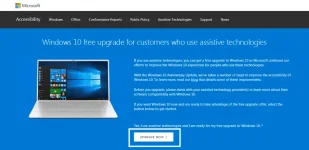
Step 1 - Click this You do not have permission to view the full content of this post. Log in or register now. and click "Upgrade Now" , I-ddl niya yung Windows 10 upgrade assistant. After that, run niyo lang yung app. (See attached Image).
Step 2 - Accept niyo lang yung License Agreement and iche-check niyan kung compatible pa ang PC mo. Kung okay, click next.
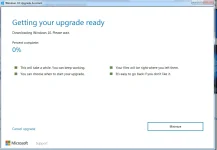
Step 3 - Just click minimize and wait pwede ka na magkape. (maglalagay pa sana ako ng screenshots pero, limited lang ako sa 2. Sorry.)
F.A.Q
Question 1: Paano kung gumamit ako ng Windows 10 iso then ni-reformat ko ang machine ko, magkakaroon ba ako ng permanent license key ?
Answer: Hindi. Kailangan mo muna mag-upgrade gamit ang Windows 10 upgrade assistant para ma-register ng microsoft ang machine mo - (Ito ang magsisilbing authentication para ma-activate ang windows 10 mo permanently.) after that pwede ka na mag-clean install gamit ang windows 10 iso / usb installer etc. without using KMS activation.
Question 2: Paano ko makukuha ang permanent license key ?
Answer: Ang license key mo is generic(ibig sabihin ito yung installer license key na ginagamit para makapag-proceed ka sa pag-install) pero once na nag-upgrade ka gamit ang windows 10 upgrade assistant, i-reregister ng Microsoft ang details ng machine mo, see my answer in Question number 1.
Question 3: Paano ko i-activate ang Windows 10 ko kapag nag-reformat/clean install ako?
Answer: Connect ka lang sa internet. It will automatically activate your copy.
Question 4: Paano ko malalaman kung permanently activated ang Copy ng Windows 10 ko?
Answer: Open mo lang yung C.M.D and type "slmgr /xpr" without quotes.
Kung may tanong pa, reply lang kayo. Enjoy! .
Finally, guys kung ishe-share niyo ito sa ibang forum kindly put credits especially kung Copy and Paste"yung step by step. Thanks.
- ClouDy
Alam naman natin na nag-end na yung free windows 10 upgrade last july 2016, pero in-reality hindi pa talaga.
Microsoft F.A.Q:
"When does the free upgrade offer extension end?"
"- We have not announced an end date of the free upgrade offer for customers using assistive technology. We will make a public announcement prior to ending the offer."
In-short - pwede pa.
Requirements:
-Internet Connection required
Notes:
- Hindi ako sure kung makaka-kuha ka ng windows 10 permanent license key gamit ang volume license ng OS na naka-install. Example: Windows 8 and 8.1 activated by KMS), unless may naka-install ng OS nung binili mo yung laptop or PC (Merong license key yun na naka-embed sa BIOS so don't worry)
- Para sa mga Windows 7 users like me na naka-activate ang OS nila gamit ang loader ni DAZ(Credits to him). Yung laptop mo or PC ay magkakaroon ng permanent license key. Kung ang Windows version mo ay Pro/Ultimate, you can get Windows 10 Pro.
Let's start,
Step 1 - Click this You do not have permission to view the full content of this post. Log in or register now. and click "Upgrade Now" , I-ddl niya yung Windows 10 upgrade assistant. After that, run niyo lang yung app. (See attached Image).
Step 2 - Accept niyo lang yung License Agreement and iche-check niyan kung compatible pa ang PC mo. Kung okay, click next.
Step 3 - Just click minimize and wait pwede ka na magkape. (maglalagay pa sana ako ng screenshots pero, limited lang ako sa 2. Sorry.)
F.A.Q
Question 1: Paano kung gumamit ako ng Windows 10 iso then ni-reformat ko ang machine ko, magkakaroon ba ako ng permanent license key ?
Answer: Hindi. Kailangan mo muna mag-upgrade gamit ang Windows 10 upgrade assistant para ma-register ng microsoft ang machine mo - (Ito ang magsisilbing authentication para ma-activate ang windows 10 mo permanently.) after that pwede ka na mag-clean install gamit ang windows 10 iso / usb installer etc. without using KMS activation.
Question 2: Paano ko makukuha ang permanent license key ?
Answer: Ang license key mo is generic(ibig sabihin ito yung installer license key na ginagamit para makapag-proceed ka sa pag-install) pero once na nag-upgrade ka gamit ang windows 10 upgrade assistant, i-reregister ng Microsoft ang details ng machine mo, see my answer in Question number 1.
Question 3: Paano ko i-activate ang Windows 10 ko kapag nag-reformat/clean install ako?
Answer: Connect ka lang sa internet. It will automatically activate your copy.
Question 4: Paano ko malalaman kung permanently activated ang Copy ng Windows 10 ko?
Answer: Open mo lang yung C.M.D and type "slmgr /xpr" without quotes.
Kung may tanong pa, reply lang kayo. Enjoy! .
Finally, guys kung ishe-share niyo ito sa ibang forum kindly put credits especially kung Copy and Paste"yung step by step. Thanks.
- ClouDy