 PH
PH- Launch Start Menu and navigate to the Control Panel.
- In the Control Panel, just go to the Search field at the top-right of the window and type Performance. Then hit Enter.
- Once the results popup, just choose "Adjust the appearance and performance of windows." This menu can also be accessed by right-clicking on My Computer and then choosing Properties from the context menu.
Windows 10: How to fix sluggish performance and boost overall system speedBidness ETC
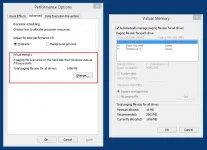
- Go to the Advanced tab and click Change key in the Virtual Memory section.
- Now uncheck the option: "Automatically manage paging file size for all drives."
- Select the drive (default C: drive) where Windows 10 is installed and then choose Custom Size> change Initial Size and Maximum Size to the recommended values by Windows.
- Then click Set and then hit OK to save the settings. Finally, reboot the computer for the changes to take effect.