 PH
PHBoring at hindi organisado ba ang PC mo? Gusto mong pagandahin pero parang di kaya ng capacity ng PC?
Pwes ito, may ibabahagi akong paraan upang makabawi ako sa inyo ka PHC.
Hit Like and Follow for more TIPS
Mas nakakabuti na e apply ang lahat ng ito para maranasan mo ang magandang epekto.
1.) Linisin ang PC mo - Tanggalin mo ang alikabok, siguradohin na hindi basa ang kamay mo mas nakakabuti gumamit ng paintbrush upang makuha ang nasa sulok (dahan2 lang sa cooler at sa CPU) Kung kailangan tanggalin ang mga pyesa ilagay ito sa tuyong papel at siguraduhin na hindi mababasa ang mga ito. Gumamit ng Rubber Eraser sa paglinis ng RAM o yung iba pa(E rub mo sa pansakan yung ginto ) kung need kapa ng guide Search mo sa youtube (cleaning pc and ram ... etc whatever)
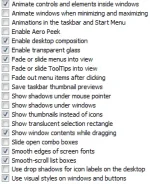
2.) Linisin ang Sistema (Tweaking) - Oplan tokhang sa mga uneccesary na aps, Uninstall mo yung hindi mo kailangan. Sunod naman ay e run mo si msconfig (windows+r) "msconfig". Punta ka sa startup at disable mo lahat ng background processes. At punta ka sa boot > advance options (maximize ang number of processors and maximum memory) need guide pa rin? search mo sa youtube (msconfig disable startup/ msconfig boot maximize) at yung huli dito right click ka sa My Computer > Properties > Advance System settings > Advance Tab > Performance: Settings (at e apply mo itong nasa larawan)
3.) Install time! (Fence at wallpaper engine)
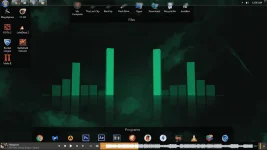
Sa nakikita nyo dito.. tinimplahan ko ang layout (zinoom out ko ang icons para lumiit at may sinet ako sa taskbar para lumiit kayo na bahala ng timpa nyo, inedit ko rin dito ang transparancy ng mga bars kayo bahala sa timpla nyo)
----
(Remove yung arrow sa shortcut icon?
1)"Run" Regedit
2)"Double Click" HKEY_CLASSES_ROOT
3)"Click" lnkfile
4)"Rename" IsShortcut into AriochIsShortcut
"Open" task manager (Hold Ctrl+Shift+Esc)
Processes tab: "End Process" explorer.exe
Applications tab: "Click" New Task and "type" explorer.exe (shortcut arrows will be removed))
-----
No worries hindi ang mga sumusunod na app ay hindi kumakain ng RAM hehe
•Fence download nyo dito >> You do not have permission to view the full content of this post. Log in or register now.
si fence ay nagsisilbing fence ng mga app na nasa desktop para hindi magulo. madali lang yan wag pa spoon feed tol
•Wallpaper Engine download nyo dito >> You do not have permission to view the full content of this post. Log in or register now. or You do not have permission to view the full content of this post. Log in or register now. or You do not have permission to view the full content of this post. Log in or register now.
yung visualizer na wallpaper.. gumagalaw ho yan thanks to Wallpaper engine.. at marami ka pang magugustohan dito.. panooring nyo lang ang vid na ito.
or watch mo sa youtube to may link sa mga wallpapers dito
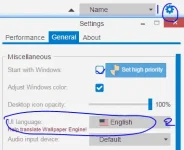
pag di gumana si 64version try mo si 32, at pag intsik lingwahe try mo to:
kayo na bahala mag sa ibang wallpaper marami dyan sa tabi2 search nyo lang.
*tip na antivi? 𝐌𝐚𝐥𝐰𝐚𝐫𝐞𝐛𝐲𝐭𝐞𝐬 lang okay na! icons na kakaiba.. search mo ka google or dito mismo. (tamad ko)
Extra: Alagaan mo yung HD mo napapabilis din nya ang PC mo mag defrag ka (Search mo Dito) O di kayay e check disk mo for bad sectors.. matagal2 ang mga ito pro mabisa talaga.
Hit Like and Follow for more TIPS
thank you
Pwes ito, may ibabahagi akong paraan upang makabawi ako sa inyo ka PHC.
Hit Like and Follow for more TIPS
Mas nakakabuti na e apply ang lahat ng ito para maranasan mo ang magandang epekto.
1.) Linisin ang PC mo - Tanggalin mo ang alikabok, siguradohin na hindi basa ang kamay mo mas nakakabuti gumamit ng paintbrush upang makuha ang nasa sulok (dahan2 lang sa cooler at sa CPU) Kung kailangan tanggalin ang mga pyesa ilagay ito sa tuyong papel at siguraduhin na hindi mababasa ang mga ito. Gumamit ng Rubber Eraser sa paglinis ng RAM o yung iba pa(E rub mo sa pansakan yung ginto ) kung need kapa ng guide Search mo sa youtube (cleaning pc and ram ... etc whatever)
2.) Linisin ang Sistema (Tweaking) - Oplan tokhang sa mga uneccesary na aps, Uninstall mo yung hindi mo kailangan. Sunod naman ay e run mo si msconfig (windows+r) "msconfig". Punta ka sa startup at disable mo lahat ng background processes. At punta ka sa boot > advance options (maximize ang number of processors and maximum memory) need guide pa rin? search mo sa youtube (msconfig disable startup/ msconfig boot maximize) at yung huli dito right click ka sa My Computer > Properties > Advance System settings > Advance Tab > Performance: Settings (at e apply mo itong nasa larawan)
3.) Install time! (Fence at wallpaper engine)
Sa nakikita nyo dito.. tinimplahan ko ang layout (zinoom out ko ang icons para lumiit at may sinet ako sa taskbar para lumiit kayo na bahala ng timpa nyo, inedit ko rin dito ang transparancy ng mga bars kayo bahala sa timpla nyo)
----
(Remove yung arrow sa shortcut icon?
1)"Run" Regedit
2)"Double Click" HKEY_CLASSES_ROOT
3)"Click" lnkfile
4)"Rename" IsShortcut into AriochIsShortcut
"Open" task manager (Hold Ctrl+Shift+Esc)
Processes tab: "End Process" explorer.exe
Applications tab: "Click" New Task and "type" explorer.exe (shortcut arrows will be removed))
-----
No worries hindi ang mga sumusunod na app ay hindi kumakain ng RAM hehe
•Fence download nyo dito >> You do not have permission to view the full content of this post. Log in or register now.
si fence ay nagsisilbing fence ng mga app na nasa desktop para hindi magulo. madali lang yan wag pa spoon feed tol
•Wallpaper Engine download nyo dito >> You do not have permission to view the full content of this post. Log in or register now. or You do not have permission to view the full content of this post. Log in or register now. or You do not have permission to view the full content of this post. Log in or register now.
yung visualizer na wallpaper.. gumagalaw ho yan thanks to Wallpaper engine.. at marami ka pang magugustohan dito.. panooring nyo lang ang vid na ito.
or watch mo sa youtube to may link sa mga wallpapers dito
pag di gumana si 64version try mo si 32, at pag intsik lingwahe try mo to:
kayo na bahala mag sa ibang wallpaper marami dyan sa tabi2 search nyo lang.
*tip na antivi? 𝐌𝐚𝐥𝐰𝐚𝐫𝐞𝐛𝐲𝐭𝐞𝐬 lang okay na! icons na kakaiba.. search mo ka google or dito mismo. (tamad ko)
Extra: Alagaan mo yung HD mo napapabilis din nya ang PC mo mag defrag ka (Search mo Dito) O di kayay e check disk mo for bad sectors.. matagal2 ang mga ito pro mabisa talaga.
Hit Like and Follow for more TIPS
thank you
