 PH
PH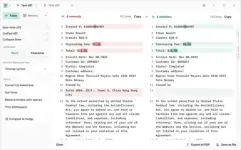
Free Download Diffchecker 7.2.2 Multilingual | 156 Mb
Diffchecker is a Windows desktop application for comparing text, images, documents, spreadsheets, and folders directly on the local computer. Its offline operation is designed for situations where confidential information must remain on the user's machine rather than being transmitted to web servers.
The application can compare source code, legal documents, tax forms, encrypted files, and other sensitive material at character or word level. It also provides visual comparison tools for images and graphics, along with document comparison features for Word and PDF files.
Diffchecker includes additional tools for spreadsheet and folder comparison, syntax highlighting, editing, and exporting comparison results. Its local operation makes it suitable for working with confidential files, including when connected to unsecured networks.
Software Overview
Diffchecker Desktop performs file comparison locally on Windows without interacting with the service's web servers. This offline architecture is intended to keep confidential documents and other sensitive information on the computer while providing comparison and review functions through a dedicated desktop interface.
Text comparison supports detailed inspection of differences by word or individual character, with the ability to make edits while reviewing the results. Syntax highlighting is available for more than 20 programming and markup languages, including JavaScript, Markdown, Python, R, and C++.
For visual content, Diffchecker can compare two images using pixel-by-pixel inspection, fading, or overlay methods. Word and PDF documents can also be compared by extracting their content, while PDFs can be merged to highlight graphical differences. Spreadsheet comparison provides cell-by-cell inspection or side-by-side viewing, and folder comparison helps identify differences in contents and document details.
Key Features
- Compare text files locally on Windows.
- Inspect text differences by word or individual character.
- Edit text while reviewing comparison results.
- Compare images and graphics using pixel-by-pixel, fade, and overlay views.
- Compare Word and PDF documents.
- Extract and compare PDF content using AI-based software.
- Merge PDF files to highlight graphical differences.
- Compare spreadsheets at the individual cell level.
- View spreadsheet files side by side.
- Compare folders and inspect their contents and document details.
- Use syntax highlighting for more than 20 programming and markup languages.
- Compare large code files and complex PDF documents at high speed.
- Export results in Diffchecker format or PDF.
- Operate without advertisements.
Diffchecker is suited to users who need to inspect differences across multiple types of files while keeping their data on a local Windows computer. Its support for text, images, PDFs, Word documents, spreadsheets, and folders makes it useful across software development, legal, financial, and document-management workflows.
The offline design is particularly relevant when handling confidential documents or working on networks where transferring sensitive files to online services is undesirable. Detailed text comparison, visual image inspection, and structured spreadsheet and folder comparisons provide several ways to review changes accurately.
System Requirements
Operating System: Windows
Home Page
Code:
https://www.diffchecker.com/desktop/- Software Name: Diffchecker
- Version: 7.2.2
- Languages: Multilingual
- License type: Full Version
- File Size: 156 Mb
Download ( Rapidgator )
You do not have permission to view the full content of this post. Log in or register now.
UploadCloud
You do not have permission to view the full content of this post. Log in or register now.
DDownload
You do not have permission to view the full content of this post. Log in or register now.
FreeDL
You do not have permission to view the full content of this post. Log in or register now.