 PH
PH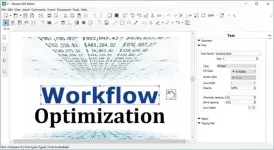
Free Download Free Download Master PDF Editor 5.9.99 (x64) Multilingual | 199 Mb
Master PDF Editor is a desktop application for viewing, creating, and modifying PDF documents. It provides tools for editing text and objects, adding annotations, managing interactive forms, and reorganizing document pages.
The software is suitable for users who need to edit existing PDF files, prepare documents for review, work with forms, or process scanned documents. It can also combine multiple PDF files, split documents, add comments and signatures, and apply encryption.
Software Overview
Master PDF Editor provides direct editing capabilities for PDF content. Users can add formatted text or modify existing text, insert images, move and resize objects, copy content to the clipboard, and save images from documents as separate files.
For document review, the application includes annotation tools such as Sticky Note, measuring tools, shapes, Strikethrough, Underline, and Highlight. Custom stamps can also be created for marking documents or indicating their status during a review process.
Interactive PDF forms can be edited through controls such as buttons, text fields, and checkboxes. The software also supports event handlers for predefined user actions, along with JavaScript-based automatic calculations and data validation.
Key Features
- View, create, and modify PDF documents.
- Add formatted text and edit existing PDF text.
- Insert, move, resize, copy, and save images and other objects.
- Merge multiple PDF files into one document.
- Split a PDF source document into separate files.
- Add Sticky Notes, measurements, shapes, highlights, underlines, and strikethroughs.
- Create custom stamps for document review and status marking.
- Edit interactive PDF form elements such as buttons, text fields, and checkboxes.
- Implement event handlers for predefined form actions.
- Support JavaScript for automatic calculations and data validation.
- Use optical character recognition to search and edit text in scanned documents and image-based files.
- Move, remove, insert, and rotate PDF pages.
- Change the size of PDF pages.
- Add comments, signatures, and encryption to PDF documents.
Master PDF Editor brings PDF editing, annotation, form handling, OCR, and page management into one application. It is useful for working with documents that require content changes, review annotations, form editing, or page-level organization.
The combination of object editing and document management tools makes it suitable for a range of everyday PDF workflows, including modifying existing files, reviewing documents, preparing forms, and working with scanned content.
System Requirements
- Operating System: Windows XP(SP 3), 2003, 2008 , Vista, 7, 8 and Windows 10
Code:
https://code-industry.net/- Software Name: Master PDF Editor
- Version: 5.9.99
- Architecture: x64
- Languages: Multilingual
- License type: Full Version
- File Size: 199 Mb
Download ( Rapidgator )
You do not have permission to view the full content of this post. Log in or register now.
UploadCloud
You do not have permission to view the full content of this post. Log in or register now.
DDownload
You do not have permission to view the full content of this post. Log in or register now.
FreeDL
You do not have permission to view the full content of this post. Log in or register now.