 PH
PH
Review
Macrorit Disk Partition Expert is newest Windows-based PC and Server partition manager software servers that can help the user solve space problems and maximize overall performance. Compare with other Windows partition software in the market; it possesses the world’s unique data disaster tolerance ability and pretty fast working efficiency. The utility supports a wide variety of NTFS drives except for dynamic disks and Apple BOOTCAMP partitions and works with MBR/GPT disk on both 32 and 64 bits.
The idea behind the utility is to provide a user with a quick method to manage all hard drive related aspects from the same location. Therefore, a user can change labels, copy and move partitions to new areas that include unallocated space or check and address for disk defragmentation so that a user can boost the system's performance,
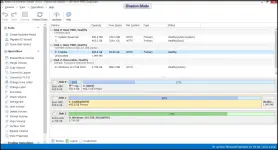
The application has an intuitive and easy to navigate GUI that is structured as a dashboard for faster and more efficient accessing. While on the left side user can find the main operations that user can perform via the utility, in the larger right panel user can do the actual activities. On a side note, the functions can also be accessed via the right-click function. The program enables a user to preview all sorts of details about the partitions and disk on the Windows servers. Consequentially, a user can quickly learn details such as overall health status or the free space available from any volume with just one click.
With virtualization technologies being rapidly adopted, IT professionals find themselves in the position of having to manage multiple servers, preferably remotely and with reduced costs of ownership. Macrorit Disk Partition Expert Server Edition is a utility that can come in handy for resizing and managing partitions on Windows servers without affecting the integrity of the data.
System requirements:
OS: Microsoft Windows 10, 8.1, 8, 7, Vista, XP (both 32 & 64-bit);
Windows Server OS: Windows Server 2019/2016/2012/2008/2003, SBS 2011/2008/2003 (both 32 & 64-bit);
CPU: X86 or compatible CPU with main frequency 500 MHz;
RAM: 512 GB;
HDD: 100 MB.
1024 x 768 display or above;
Display card: Accelerated 3D graphics – 64MB RAM.
What is new in version 5.3.4 (Released on October 19, 2018):
Fix a bug on GPT disk.
Install notes:
1. Kindly read 'Read me.txt' file given in download zip file;
2. Enjoy!
You do not have permission to view the full content of this post. Log in or register now.
