PH
PHmagisk modules
1. You do not have permission to view the full content of this post. Log in or register now.
2. You do not have permission to view the full content of this post. Log in or register now.
3. You do not have permission to view the full content of this post. Log in or register now.
4. You do not have permission to view the full content of this post. Log in or register now.
5. You do not have permission to view the full content of this post. Log in or register now.
6. You do not have permission to view the full content of this post. Log in or register now.
7. You do not have permission to view the full content of this post. Log in or register now.
8. You do not have permission to view the full content of this post. Log in or register now.
install all module
1. open magisk tap action button play integrity fix
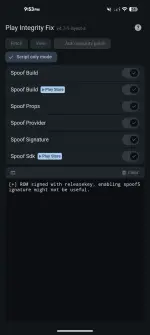
2. open magisk module tap action button Specter
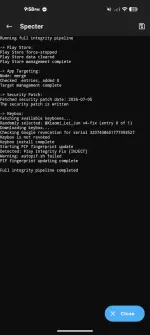
3. configure HMA Managed App Using Preset select all nyo nalang para sure
Using Settings Preset Kung naka on Developers Option
punta magisk settings configure denylist select banking apps
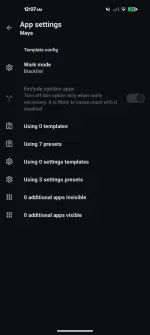
4. install webui app hanapin ang Spectre at i click ang webui option click tools module configs
iclick ang HMA-OSS Config at Set Zygisk Next Config tapos Reboot Device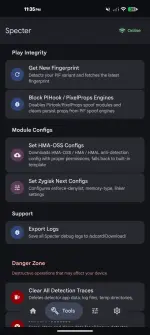
Sana po naka 2long
magulo po instructions ko kayo nalang po bahala umintindi
para magkaroon parin ng root access disable nyo lang Treat non-root apps as denylist webui apk zygisk next webui option
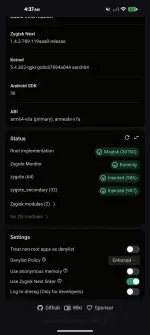


Feedback Po If Working Sa inyo
1. You do not have permission to view the full content of this post. Log in or register now.
2. You do not have permission to view the full content of this post. Log in or register now.
3. You do not have permission to view the full content of this post. Log in or register now.
4. You do not have permission to view the full content of this post. Log in or register now.
5. You do not have permission to view the full content of this post. Log in or register now.
6. You do not have permission to view the full content of this post. Log in or register now.
7. You do not have permission to view the full content of this post. Log in or register now.
8. You do not have permission to view the full content of this post. Log in or register now.
install all module
1. open magisk tap action button play integrity fix
2. open magisk module tap action button Specter
3. configure HMA Managed App Using Preset select all nyo nalang para sure
Using Settings Preset Kung naka on Developers Option
punta magisk settings configure denylist select banking apps
4. install webui app hanapin ang Spectre at i click ang webui option click tools module configs
iclick ang HMA-OSS Config at Set Zygisk Next Config tapos Reboot Device
Sana po naka 2long
magulo po instructions ko kayo nalang po bahala umintindi
para magkaroon parin ng root access disable nyo lang Treat non-root apps as denylist webui apk zygisk next webui option
Feedback Po If Working Sa inyo