PH
PHStaticPhantom
Established
 How to Check Your RAM Health in Windows
Is your PC freezing, crashing, or showing random errors? Your RAM could be the reason.
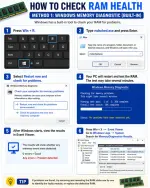
 Use the built-in Windows Memory Diagnostic tool to check your RAM—no third-party software required!
Steps:
 Press Win + R Type mdsched.exe and press Enter Select Restart now and check for problems Let Windows test your RAM Check the results in Event Viewer
 Regular RAM health checks can help identify hardware issues before they become serious.
Credits to: TECH WHIZ AJITH"