👨‍🏫 Tutorial How to Check Your PC Performance Rating (No Apps, No Downloads)

tipsydaug

Fanatic

1769927084071.webp

Step 1: Open PowerShell​

  1. Press Win + X
  2. Select Windows PowerShell or Windows Terminal
Step 2: Run the system assessment
Type this :


winsat formal


Wait until the process finishes.

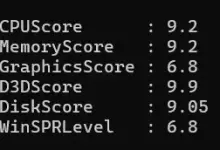
Step 3: View performance scores
After WinSAT completes,
Types these


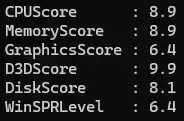
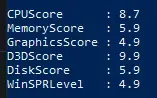
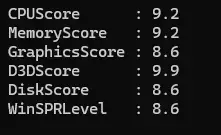
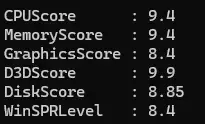
Get-CimInstance Win32_WinSAT |
Select CPUScore, MemoryScore, GraphicsScore, D3DScore, DiskScore, WinSPRLevel
 

About this Thread

  • 13
    Replies
  • 1K
    Views
  • 14
    Participants
Last reply from:
Oppa Damz

Trending Topics

Online now

Members online
1,167
Guests online
1,945
Total visitors
3,112

Forum statistics

Threads
2,314,784
Posts
29,179,535
Members
1,183,304
Latest member
anabel123456789
Back
Top