❓ Help Internet Hub and 2 wifi hubs

jayliga7

Established
Para sa mga master natin diyan na may ganitong internet setup: May Main Hub/Modem ako sa basement, tapos may Coaxial cable na papunta sa isang Interhub (Main router ng ISP) sa 3rd floor. Ang problema ko, gusto kong magdagdag ng WiFi router sa basement, pero nung kinabit ko ito gamit ang LAN cable mula sa Main Hub papunta sa bagong router, namamatay/nawawalan ng koneksyon yung router.

Paano ba ang tamang koneksyon at anong setting ang kailangan kong gawin para mapagana ang bagong WiFi router? Salamat sa mga tutulong!

ito ang mga model nila:

1. Modem( NEtwork Hub)- Technicolor NH20T
2.Arcadyan AX3600 wifi 6
3. Additional Wifi Router - ARRIS TG3482ER3
 
sakin simple lang

1. main isp
2. TP-Link router operational. bali siya na may control
3. gigabit switchub 2pcs lahat 8 Ports
4. 14 bahay connected
5. plan 300mbps

depende talaga yan sa set-up ng ip addresses.
siguro yung sayo sir conflict ip kaya walang internet na binoboga. kadalasan yan naman lagi reason kaya walang internet ang isang router
 
first, itama natin ang terminology. magkakaiba ang hub, switch at router. wala na dapat gumagamit ng hub sa ngayon. to be fair, i have seen some of those NH20T units labeled "Network Hub".

also, kung 'yung "Coaxial cable" ang ginagamit mo to connect the 2 routers, ay hindi coaxial ito kundi ethernet cable.

ngayon, the 3 devices you mentioned are multirole devices depende sa use case, at s'yempre sa configuration. based on what you described, my best guess would be:
  • Technicolor NT20T: mainly performing ONT duties; potentially setup in bridge mode
  • Arcadyan AX3600 (AW1000): your gateway/router that does the authentication with your provider
  • Arris TG3482ER3: istorbo/panggulo :D
kung tama ang assumption ko, you cannot simply insert th Arris between the NH20T and the Arcadyan ("Main router ng ISP"). madali lang testingin in ito. ikabit mo directly si Arcadyan sa NH20T in the basement. kung me internet ka (sa basement), ay ito nga ng "proper/main" router mo.

OPTION 1:
kung isa lang ang cable between basement and 3rd floor, pagpalitin mo 'yung dalawa. Arcadyan sa basement directly connected to the NH20T. 'yung cable sa basement end ikabit mo sa LAN port ng Arcadyan, tapos 'yung kabilang dulo sa 3rd floor ikabit mo sa LAN port ng Arris. Setup the WiFi on the Arris (SSID, etc.). not so much an issue kung LAN port to LAN port and connection with Arcadyan, at wala kang iko-connect na wired device sa Arris, but it will be good to ensure you have DHCP disabled.

kaso lang you will have better wifi sa basement (AX) kesa 3rd floor (AC)... na malamang di mo naman mapapansin if you have less than gigabit internet service, and/or wala ka naman local server/NAS na ina-access ng wireless devices. of course depende rin kung marami sa mga devices mo ang AX-capable.

OPTION 2:
from your current setup na NH20T (basement) - Arcadyan (3rd floor)... use another (new) cable to connect the Arris (basement) to the Arcadyan (3rd floor).

OPTION 3:
kalimutan mo na ang lahat ng ito at bumili ng mesh system. TP-Link Deco, etc.

let us know if you get it to work.
 
first, itama natin ang terminology. magkakaiba ang hub, switch at router. wala na dapat gumagamit ng hub sa ngayon. to be fair, i have seen some of those NH20T units labeled "Network Hub".

also, kung 'yung "Coaxial cable" ang ginagamit mo to connect the 2 routers, ay hindi coaxial ito kundi ethernet cable.

ngayon, the 3 devices you mentioned are multirole devices depende sa use case, at s'yempre sa configuration. based on what you described, my best guess would be:
  • Technicolor NT20T: mainly performing ONT duties; potentially setup in bridge mode
  • Arcadyan AX3600 (AW1000): your gateway/router that does the authentication with your provider
  • Arris TG3482ER3: istorbo/panggulo :D
kung tama ang assumption ko, you cannot simply insert th Arris between the NH20T and the Arcadyan ("Main router ng ISP"). madali lang testingin in ito. ikabit mo directly si Arcadyan sa NH20T in the basement. kung me internet ka (sa basement), ay ito nga ng "proper/main" router mo.

OPTION 1:
kung isa lang ang cable between basement and 3rd floor, pagpalitin mo 'yung dalawa. Arcadyan sa basement directly connected to the NH20T. 'yung cable sa basement end ikabit mo sa LAN port ng Arcadyan, tapos 'yung kabilang dulo sa 3rd floor ikabit mo sa LAN port ng Arris. Setup the WiFi on the Arris (SSID, etc.). not so much an issue kung LAN port to LAN port and connection with Arcadyan, at wala kang iko-connect na wired device sa Arris, but it will be good to ensure you have DHCP disabled.

kaso lang you will have better wifi sa basement (AX) kesa 3rd floor (AC)... na malamang di mo naman mapapansin if you have less than gigabit internet service, and/or wala ka naman local server/NAS na ina-access ng wireless devices. of course depende rin kung marami sa mga devices mo ang AX-capable.

OPTION 2:
from your current setup na NH20T (basement) - Arcadyan (3rd floor)... use another (new) cable to connect the Arris (basement) to the Arcadyan (3rd floor).

OPTION 3:
kalimutan mo na ang lahat ng ito at bumili ng mesh system. TP-Link Deco, etc.

let us know if you get it to work.
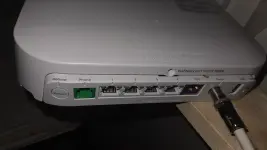
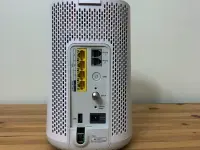
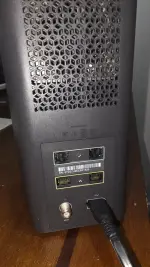
Yung pictures yan yung NH20T, arcadyan, arris,
MOCA (Multimedia over Coax Alliance) network na ang gamit ng Arcadyan router ko. May nakaabang na kasign CoAx sa bahay mula sa TV. Bukod dito, hjndi rin ako makapaglatag ng LAN Cable dahil maxadong malayo ang distansya at walang ceiling opening.

Tungkol namn sa pangatlong option, sayang kasi kung bibili pa ng bago kung may paraan namn mapagana ito.hehehe.may iba pang option?

How about splitter kaya kaya ang 1 gbps na connection, nakabili din ako ng splitter kaso 100mbps lang naibibigay(nasayang lang.)


20260624_173001.webp

PmESkh5svfUYNxYI.huge.webp

20260624_173055.webp
 
By the way, natry ko iconnect yung arris using LAN cable kaso humihina ang arcadyan from 1gbps nagiging 100mbps na lng. Pero si ARRIS parang umaabot ng 900 mbps, ang problema lang pag nag speedtest ako nag eerror ang speedtest.
 
By the way, natry ko iconnect yung arris using LAN cable kaso humihina ang arcadyan from 1gbps nagiging 100mbps na lng. Pero si ARRIS parang umaabot ng 900 mbps, ang problema lang pag nag speedtest ako nag eerror ang speedtest.
posible na isa sa kanila (o pareho sila) na Fast Ethernet (100 Mbps) ports lang ang meron.
 
ah, sorry. i discounted moca kasi 'yung custom version ng Arcadyan na commonly available dito ay tinanggal ang moca port. max throughput will depend on which standard it supports - MOCA 2.0, MOCA 2.0 Bonded, MOCA 2.5.

na-try mo 'yung option 1? as in
NH20T (try Port 1) - <Ethernet (CAT6)> - Arcadyan (WAN/Port4) - <MOCA> Arris

note: di ako sure kung pwedeng maging LAN port 'yung MOCA port ng Arcadyan. and the Arris really being a cable modem, probably means you have to disable DHCP Server on it.

and another thing, Option 4??? check mo sa Arcadyan 'yung mesh option. meron kasing mesh client na ino-offer dito 'yung provider para d'yan. apparently it can also be made to work with 3rd party mesh devices (no experience ako dito). so, isa na lang bibilhin mo. hehehe

regarding "Tungkol namn sa pangatlong option, sayang kasi kung bibili pa ng bago kung may paraan namn mapagana ito.hehehe.may iba pang option?" how much is a stable network connectivity worth to you? hehehe minsanang gastos, good for many years kasi 'yan.

kung me kilala kang IT staff, baka makatyempo ka ng mga nag-upgrade from WiFi 5 to WiFi 6 at nagtatapon ng AC access points. marami sa mga ito ang pwedeng mag-wireless mesh. hingi ka ng tatlo o apat - 1 for each floor. Ruckus, Aruba, Grandstream, Unifi, etc.

actually, i have a bunch of Arubas in a drawer at home. kaso medyo malayo ako, eh. hehehe
 
ang buong bahay meron na connection maliban sa basement, if ever bibili ako ng AC access point pwede dun ko to directly ikakabit sa Lan port sa NH20T(ONT)?

Sa 1st option di ko pwede ipagpalit yung arcadyan kasi wifi 6 na xa yung arris kasi wifi 5 lang tas ako lang gagamit sa baba.

If bibili ba ako ano mas maganda AC access point or Wifi mesh na? Or pareho lang sila?

Sorry basic lang knowledge ko.hehehe.salamat sa sagot
 
Pahingi nung aruba access point.hehehe.padala mo na lng😆
i really wouldn't mind, kaso me shipping cost pa. hahaha dumarami na kalakal ko sa bahay, at dapat na rin maglinis-linis. kabit ko sana sa bahay ng in-laws ko, kaso di naman yun sanay sa enterprise-level gear. baka ma-confuse lang. i have 7 or 8 of them, a couple of Ruckus (R600 + R710), and a Unifi AC Pro that i used for less than a month (it was a letdown after the Ruckus R600).

mesh vs WAP... most WAPs these days can be used as mesh units. whether they work with other brands is what is questionable. s'yempre kung same brand (lalo na kung same model), you benefit from the single management plane for all access points.

'tsaka, 'yung AP naka-connect ito sa gateway router (kung sino 'yung nag-poprovide ng DHCP Server at NAT for your traffic to the internet. best guess in your case - Arcadyan. kung sino 'yung me WAN IP address provided ng ISP, at s'ya ring nagpo-provide ng IP address sa local network mo (usually 192.168.xxx.xxx).
 

Similar threads

About this Thread

  • 10
    Replies
  • 122
    Views
  • 3
    Participants
Last reply from:
jayliga7

Trending Topics

Online now

Members online
1,074
Guests online
2,224
Total visitors
3,298

Forum statistics

Threads
2,288,067
Posts
29,048,761
Members
1,214,908
Latest member
pitchi0407
Back
Top