 PH
PH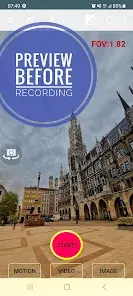
Application Overview: Background Video Recorder Pro (BVR Pro)
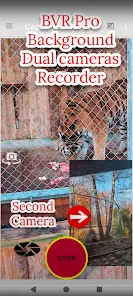
Background Video Recorder Pro (BVR Pro) is an advanced camera utility designed for background video recording, continuous image capturing, and AI-driven motion detection. The application allows users to operate the camera while the device screen is off or while using other applications.Technical Specifications & System Compatibility
| Attribute | Details |
|---|---|
| Current Version | v17.9.59 (Build 17959) |
| Minimum OS Requirement | Android 6.0+ |
| Latest OS Compatibility | Android 14+ / Wear OS 4.0+ |
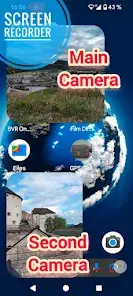
| Hardware Capabilities | Dual camera support (on compatible devices), Android TV compatibility (30 FPS real-time streaming for up to 4 cameras) |
Key Feature Set
- Background Recording & Capturing: Operates video recording, burst image capturing, and motion detection entirely in the background. Camera controls can be mapped to hardware volume buttons or managed via desktop widgets.
- AI-Powered Motion Detection: Includes Object Tracking for real-time identification of people, faces, animals, and text (OCR tracking).
- Home Security & Monitoring: Functions as a baby monitor or security system, allowing users to monitor up to 4 cameras simultaneously via a secured web interface.
- Real-Time Processing: Supports real-time background filters, background removal, and CameraX features such as AI Center Stage and Auto Frame recording.
- Multilingual Support: Available in Hindi, German, Spanish, Portuguese, Arabic, and other languages.
Premium vs. Free Feature Comparison
| Feature / Capability | Free Version | Premium Version |
|---|---|---|
| Core Functions | Basic background recording, burst image capture, basic motion detection | Included |
| Advertisements | Ad-supported (Standard & Pop-up ads) | Ad-free |
| Storage Destination | Internal storage only | Removable SD Card & Google Drive upload |
| Wear OS Support | Not available | Supported (Wear OS 4.0+) |
| Multi-Camera Monitoring | 1 Camera | Up to 4 Cameras simultaneously |
| Motion Detection Action | Image capture & sound notifications | Image capture, sound notifications, & Video Recording |
| Scheduling | Single instance | Repeat schedule recording |
Required Application Permissions
- Camera & Record Audio: Required to execute video and audio recording.
- Write to External Storage: Required for saving recorded media assets.
- Manage Overlay Permission: Required to display the camera preview window over other apps.
- Ignore Battery Optimization: Required to prevent the Android system from terminating the background recording service.
- Location (Optional): Used to append geotagging data to video files.
Critical Operational Notes & Best Practices
- Camera Resource Conflicts: Do not open other camera applications while background recording is active. Disable features like Face Unlock, as two applications cannot access the hardware camera sensor simultaneously.
- Configuration Wizards: Run the built-in Permission Wizard upon initial setup to ensure stable background operations.
- Video Quality Tuning: Long exposure settings will decrease video frame rates. For optimized quality, adjust the bitrate settings. Beta resolutions are available but may impact stability.
- Interface Customization: The application generates 3 distinct feature icons by default; 2 of these can be disabled via the system settings.
Recent Updates & Changelog
- Integrated Gemini-powered voice/AI commands for camera control.
- Added CameraX API features: AI Center Stage and Auto Frame recording.
- Implemented background removal tools and real-time camera filters.
- Resolved Google Drive upload synchronization bugs.
- Optimized orientation checks prior to recording initiation.
- Added wide-camera toggle buttons directly to the control widget.
- Reduced the frequency of pop-up ads and reduced the visual footprint of banner ads for non-premium users.