 PH
PH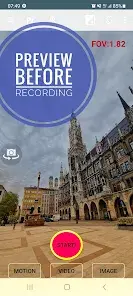
Application Overview
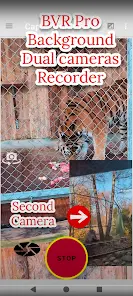
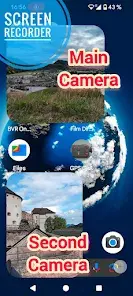
Background Video Recorder Pro (BVR Pro) is an utility application that enables background video recording, continuous image capturing, and advanced AI-driven motion detection. The app allows users to leverage the device camera while the screen is off or during other activities, controlled via on-screen buttons, volume keys, or desktop widgets.Technical Specifications & Compatibility
| Attribute | Details |
|---|---|
| Current Version | v17.9.19 (Build 17919) |
| OS Requirement | Android 6.0+ |
| Extended Platform Support | Android 14, Wear OS 4.0, Android TV (30 FPS real-time streaming for up to 4 cameras) |
| Hardware Capabilities | Dual camera support (on compatible devices), CameraX API with AI Center Stage / Auto frame recording |
Key Features
Motion Detection & AI Capabilities
- Object Tracking & Classification: Real-time background detection and tracking for people, faces, animals, and text OCR.
- Trigger Actions: Configurable automated actions upon motion detection including image capture, audio notifications, and video recording.
- Home Security & Monitoring: Multi-camera monitoring capabilities (up to 4 streams) viewable via a secure web interface.
Control & Capture Modes
- Interface Shortcuts: Three distinct operational icons representing specific modes:
- Red Button: Standard background video recording.
- Green Button: Motion detection mode.
- Orange Button: Burst image capturing.
- Physical Controls: Hardware volume buttons can be mapped to trigger recording functionality.
- Advanced Camera Controls: Real-time background filters, zoom, flash, flip camera, and manual bitrate adjustment.
Premium vs. Free Tier Comparison
| Feature | Free Version | Premium Version |
|---|---|---|
| Advertising | Supported (Banners/Pop-ups) | Completely Ad-Free |
| Storage Options | Internal Storage | Removable SD Card & Google Drive Integration |
| Wear OS Support | No | Yes |
| Baby/Home Monitoring | Single Camera Stream | Simultaneous 4-Camera Monitoring |
| Motion Detection Actions | Image Capture & Audio Alerts | Video Recording upon Detection |
| Scheduling | Single Execution | Repeat Schedule Recording |
Required Permissions
- Camera & Record Audio: Necessary for video and audio capturing.
- Write to External Storage: Required for saving recorded files to device storage.
- System Overlay (Draw over other apps): Required to display the camera preview window.
- Ignore Battery Optimization: Prevents the Android system from terminating the background recording service.
- Location (Optional): Used to embed geotagging data into video metadata.
Important Usage Guidelines
- Camera Access Conflicts: Disable system "Face Unlock" and avoid launching other camera applications while background recording is active. Only one application can access the camera hardware interface at a time.
- Configuration Optimization: For optimal video quality, avoid unstable beta resolutions and manually adjust the bitrate configuration.
- Frame Rate Constraints: Enabling long exposure settings will inherently reduce the video capture frame rate.
Changelog & Recent Updates
- Implemented Google Gemini API integration for voice-commanded camera operations.
- Added background removal capabilities and real-time processing filters.
- Resolved an issue affecting Google Drive background uploads.
- Integrated CameraX API featuring AI Center Stage and Auto-Frame recording.
- Optimized application orientation behavior.
- Reduced frequency of pop-up advertisements and reduced banner advertisement screen footprints.

.webp "(ditto) :(ditto):")
