 PH
PHNapalitan mo na ba password niyan dun sa SSH ng Google Cloud mismo?
Dun ka mag-connect then i-edit mo yung '/etc/ssh/sshd_config'
Napalitan mo na ba password niyan dun sa SSH ng Google Cloud mismo?
pano ko kuya ma edit po yung sshd_config nya ayan lang ba i copy ko then paste? ano po mga eedit ko para makapag login ako sa putty poNapalitan mo na ba password niyan dun sa SSH ng Google Cloud mismo?
Dun ka mag-connect then i-edit mo yung '/etc/ssh/sshd_config'
Wait lang.. ano bang gusto mong ma-achieve? Basics lang yan sa Ubuntu VMs. Teka.. gagawa ako ng tuts para sa precon ng ubuntupano ko kuya ma edit po yung sshd_config nya ayan lang ba i copy ko then paste? ano po mga eedit ko para makapag login ako sa putty po
I-edit mo gamit ang vim or nanomalogin lang sana sa putty para maka gawa ako ng game server panel sana
parang wala naman po sya dito kuyaI-edit mo gamit ang vim or nano
vim /etc/ssh/sshd_config
or
nano /etc/ssh/sshd_config
Mag-connect ka muna sa SSH ng GCP then edit mo itong mga ito sa root.
Edit, uncomment, or change these:
- PasswordAuthentication yes
- PermitRootLogin yes
- PubkeyAuthentication no
- PermitEmptyPasswords no
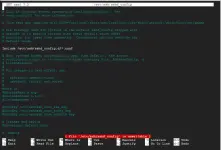
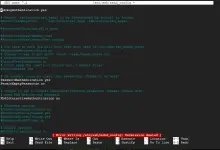
Exit mo then use sudo command para ma-save.kuya inalis ko yung mga # ganyan nya kaso pag nag Control X nako then save ayaw ma save
#PasswordAuthentication yes
#PermitRootLogin yes
#PubkeyAuthentication no
#PermitEmptyPasswords no
View attachment 4201894
nagawa kuna ya pano ulit po i restart ulit si ubuntu dun sa ssh para ma save po talaga lahatExit mo then use sudo command para ma-save.
sudo vim /etc/ssh/sshd_config
or
sudo nano /etc/ssh/sshd_config
Type mo lang ang...nagawa kuna ya pano ulit po i restart ulit si ubuntu dun sa ssh para ma save po talaga lahat
Type mo lang ang...
reboot
Oo. Basta tama nakalagay sa mga sinabi ko kanina.kapag puba na edit kuna lahat pwede kuna ilogin kay putty? using IP tapos root then yung password na bago yung sudo passwd na ginawa kupo?
bakit po kuya ganun parin po ??Oo. Basta tama nakalagay sa mga sinabi ko kanina.
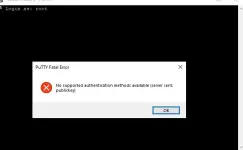
Na-save mo ba? Baka naman hindi mo na-save. Dapat nakalagay ay "PubkeyAuthentication no"
di parin working sakin kuyaNa-save mo ba? Baka naman hindi mo na-save. Dapat nakalagay ay "PubkeyAuthentication no"
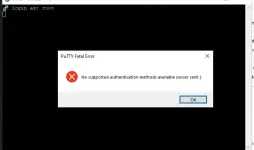
Pinalitan mo ba ang port?di parin working sakin kuya
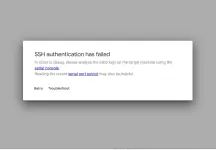
pati sa ssh ayaw narin mag open
View attachment 4201914
View attachment 4201913
22 lang naman ata default nun kuya?Pinalitan mo ba ang port?
Oo, unless pinalitan mo.22 lang naman ata default nun kuya?