PH
PHmangmangkit
Grasshopper
Sa mga hindi makapag portforwarding jan dahil usually si ISP gumamit ng CGNAT para mablock ung mga port 80,443, 22 etc.
So share ko lang itong method ko ng paghost ng website gamit ang Raspberry.
So share ko lang itong method ko ng paghost ng website gamit ang Raspberry.
- Bumili lang ako ng domain for US$5 for 2 ρáíd slot. (as advertised its free-for-life) Dont worry, they have free 1 slot
Create an account first. you can use my link You do not have permission to view the full content of this post. Log in or register now.
also can increase 1 more slot by "Star the repository" on github You do not have permission to view the full content of this post. Log in or register now.
We will be needing your dns later for the next configuration.
Once have an account, create na kayo ng desired domain name nyo. - Next, Register an account sa You do not have permission to view the full content of this post.
Log in or register now.
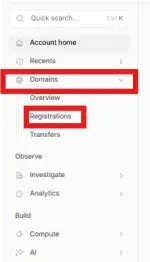
Then go to Domains > Registration on the left side
Then search your domain (domain na ginawa nyo sa digitalplat domain)
Then once you add your domain in the cloudflare, need natin ichange ung nameserver sa digitalplat domain
How to do:
1. Click Domains > Overview (or click Account Home) makikita nyo jan ung domain nyo. click nyo lang
2. Click DNS > Records on the left side. Then sa baba ng page may makikita kayong "Cloudfare Nameservers"
there will 2 atleast 2 name servers listed.
3. Copy each and paste on the digitalplat domain.
In digitalplat domian. Click nyo ung "Domain List" sa left side then lalabas ung domain na nacreate nyo earlier.
Click nyo lang sya.
4. Dun sa Nameservers na tab Paste nyo sa Name Server 1 and 2 ung nameserver from cloudflare
5. Then Click Update nameservers. - Once done, proceed na tayo sa medyo technical parts