 PH
PHXena Gabrielle
Eternal Poster
1. Using FramaRoot
This is the top-most app which comes on Rank 1 when we talk about rooting any phone without PC. This APK is still best APK ever to root any mobile without PC/Computer. This app has rooted thousands of devices which support its exploits. This app is a must try for every phone.
Framaroot has many exploits to root any android device without PC/Computer. Most of the exploits of Framaroot are created for MTK chipset android phones though. Follow below methods to root your android mobile via Framaroot.
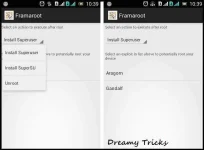
How to use Framaroot:
In case, It shows Exploit failed error, then you have to try any other app to root your android device.
2. Using Universal Android Root:
This app is very popular among geeks for purpose of rooting their phone without pc. Just download this apk and install in your android phone and you are ready to go. This is one of best rooting apk undoubtedly which you can give a shot. If you are unable to root your android mobile using Framaroot, then you must give this app a try once.
This is one of simplest method to root android mobile safely. Universal AndRoot is the basic android app which can root almost every device without any kind of problem. It is best Framaroot Alternative. Follow, below method to root android mobile using AndRoot.
Steps to root phone using Universal AndRoot:
3. Using iRoot
iRoot is one of the best android apk to root android phone without any need of computer/PC. iRoot is a popular name among power-android users. Its a Chinese app, but there are many mods available for this app in English version. In many, last years, iRoot made a great position its users as they are continously providing updates to its users to support more newer models too.
Steps to root android phone using iRoot:
4. Using Z4Root
This app is one of the oldest apps to root android without computer without any risk of hard brick of android mobile. If you own an android phone from a good brand like HTC, Sony, Motorola and Samsung, then this APK is probably the best to root your android phone without computer. This apk has success rate of 99% on all devices of Samsung Galaxy S series.
Steps for rooting android smartphone without computer using Z4Root:
5. Using Towel Root
Using, Towel root , you can root most of the HTC devices like HTC One M7 without using PC. Just Click on Make it rain after installing this apk. Towel Root has good success rate in rooting most of android smartphones without computer. As, I have already told you guys that its safe to use APK as they will not brick your android phone, so you can give this APK a shot without any trouble.
6. Using Baidu Root
BaiduRoot is one of popular app which is available for both PC and mobile to root android phone. BaiduRoot can root almost every device (According to them, BaiduRoot supports more than 6000 devices currently). Moreover, Baidu Root has its own su permission app which is different from SuperSU (SuperSU is offered by other root APKs available for android phone).
7. Using Easy Rooting Toolkit
This app is one of the most working app to root any android smartphone. This app can root almost every Sony device easily. Easy rooting toolkit will install busybox along with su files in your android mobile. Though, this exploit is patched by most of device manufacturer but still you can give this app a try. Recently, Easy Rooting Toolkit has recently updated their app to V3.0 which has fixed many bugs and has added new devices like Xperia C2 , Xperia Z2 etc.
Here comes another apk to root any android device without computer. This app by Chainfire can root your samsung s series smartphones without pc easily. As, recently I got many comments that they are not getting success in rooting their Samsung android mobile, So We Dreamy Tricks has added this new app which can root almost all Samsung mobiles. So for what you are waiting for? Try this apk now.
Steps to root android phone using CF Auto Root:
9. Using Root Master
Root Master One click root is one of effective method to root android without pc easily. If you have tried above method to root your android smartphone and got no success, then I recommend you to use this method. As, this method is totally free to use. Moreover, many users has got success in rooting their android phone using Root Master One Click Root. Moreover, it is first English APK which can root android phone without computer.
How to root android phone using Root Master:
This is the top-most app which comes on Rank 1 when we talk about rooting any phone without PC. This APK is still best APK ever to root any mobile without PC/Computer. This app has rooted thousands of devices which support its exploits. This app is a must try for every phone.
Framaroot has many exploits to root any android device without PC/Computer. Most of the exploits of Framaroot are created for MTK chipset android phones though. Follow below methods to root your android mobile via Framaroot.
How to use Framaroot:
- Download Framaroot from above link. (Just, click on above link to download Framaroot).
- Install APK in your android phone and Open Framaroot from app drawer now.
- Simply, Click on Boromir and Wait until It does not show Su Installed successfully.
In case, It shows Exploit failed error, then you have to try any other app to root your android device.
2. Using Universal Android Root:
This app is very popular among geeks for purpose of rooting their phone without pc. Just download this apk and install in your android phone and you are ready to go. This is one of best rooting apk undoubtedly which you can give a shot. If you are unable to root your android mobile using Framaroot, then you must give this app a try once.
This is one of simplest method to root android mobile safely. Universal AndRoot is the basic android app which can root almost every device without any kind of problem. It is best Framaroot Alternative. Follow, below method to root android mobile using AndRoot.
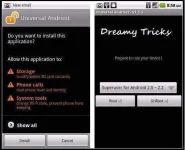
Steps to root phone using Universal AndRoot:
- Just, Download Universal AndRoot from above link.
- Install it in your android mobile. (Make sure you have enabled Unknown Sources in settings).
- Now, Open Universal AndRoot from app drawer.
- Click on Root to begin rooting process.
3. Using iRoot
iRoot is one of the best android apk to root android phone without any need of computer/PC. iRoot is a popular name among power-android users. Its a Chinese app, but there are many mods available for this app in English version. In many, last years, iRoot made a great position its users as they are continously providing updates to its users to support more newer models too.
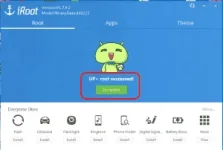
Steps to root android phone using iRoot:
- First of all, Download iRoot from above download button.
- Once, you have successfully download iRoot APK file.
- Tap on this file to install it in your android phone.
- So, now you have installed iRoot in your android mobile.
- Open iRoot application in your android phone.
- Tap on I Agree.
- Now, Simply click on Root button in the iRoot app.
- It will root your android phone successfully now.
4. Using Z4Root
This app is one of the oldest apps to root android without computer without any risk of hard brick of android mobile. If you own an android phone from a good brand like HTC, Sony, Motorola and Samsung, then this APK is probably the best to root your android phone without computer. This apk has success rate of 99% on all devices of Samsung Galaxy S series.
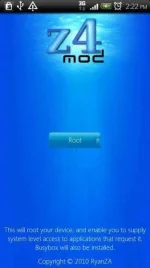
Steps for rooting android smartphone without computer using Z4Root:
- Download Z4Root apk from above download button.
- Install Z4Root APK in your android phone. (Make sure that you have allowed Unknown Sources in Settings).
- Open Z4Root app in your android phone now.
- Click on Root button.
- Wait for couple of seconds to make sure that Z4Root has completed it’s job.
- Now, simply restart your android phone to root it without computer.
5. Using Towel Root
Using, Towel root , you can root most of the HTC devices like HTC One M7 without using PC. Just Click on Make it rain after installing this apk. Towel Root has good success rate in rooting most of android smartphones without computer. As, I have already told you guys that its safe to use APK as they will not brick your android phone, so you can give this APK a shot without any trouble.
- First of all, Take backup of your android device. So that, if you face any problem you can restore your precious data with ease.
- Download Towel Root from link which is given below.
- Once you have downloaded APK of Towel Root, Install it in your android device. (Make sure that you have allowed unknown sources in Settings).
- Open Towel Root and click on Make it Rain.
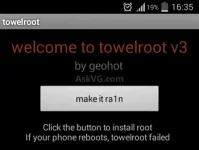
- Now, Just wait. It will take some minutes to install Su library in your android device
6. Using Baidu Root
BaiduRoot is one of popular app which is available for both PC and mobile to root android phone. BaiduRoot can root almost every device (According to them, BaiduRoot supports more than 6000 devices currently). Moreover, Baidu Root has its own su permission app which is different from SuperSU (SuperSU is offered by other root APKs available for android phone).
- Download Baidu Root APK from above button.
- Install APK in your android phone now. (Before installing this APK, make sure you have enabled Unknown sources in settings).
- Open Baidu Root app now.
- Click on Root button now and wait till success bar reaches to 100%.
- Restart your android phone now and look for Baidu Root app in the app drawer now.
7. Using Easy Rooting Toolkit
This app is one of the most working app to root any android smartphone. This app can root almost every Sony device easily. Easy rooting toolkit will install busybox along with su files in your android mobile. Though, this exploit is patched by most of device manufacturer but still you can give this app a try. Recently, Easy Rooting Toolkit has recently updated their app to V3.0 which has fixed many bugs and has added new devices like Xperia C2 , Xperia Z2 etc.
- First of all Download Easy Rooting toolkit apk from above button.
- Now, Install this APK in your android mobile (Make sure Unknown sources is enabled into settings).
- Open app & Click on Root.
- Wait some seconds and when it shows Success message.
- Simply, restart your android mobile to check if you superuser app installed in your app drawer.
Here comes another apk to root any android device without computer. This app by Chainfire can root your samsung s series smartphones without pc easily. As, recently I got many comments that they are not getting success in rooting their Samsung android mobile, So We Dreamy Tricks has added this new app which can root almost all Samsung mobiles. So for what you are waiting for? Try this apk now.
- Download Baidu Root APK from above button.
- Install APK in your android phone now. (Before installing this APK, make sure you have enabled Unknown sources in settings).
- Open Baidu Root app now.
- Click on Root button now and wait till success bar reaches to 100%.
- Restart your android phone now and look for Baidu Root app in the app drawer now.
Steps to root android phone using CF Auto Root:
- First of all, Download CF Auto Root apk from above button.
- Install downloaded APK of CF Auto Root in your android mobile now. (Make sure unknown sources is enabled in the settings).
- Once you have successfully installed CF Auto Root, Open it.
- Click on Root my phone button.
9. Using Root Master
Root Master One click root is one of effective method to root android without pc easily. If you have tried above method to root your android smartphone and got no success, then I recommend you to use this method. As, this method is totally free to use. Moreover, many users has got success in rooting their android phone using Root Master One Click Root. Moreover, it is first English APK which can root android phone without computer.
How to root android phone using Root Master:
- Download Root Master apk from above button.
- Take backup of your device.
- Install APK in your android phone. (Make sure you have enabled Unknown sources in settings)
- Open Root Master application in your android phone and Click on Tap to root.
- Just wait for some minutes and restart your android phone now.