PH
PHSa meron nang You do not have permission to view the full content of this post.
Log in or register now. experience, ano ang mga useful features niya para sa inyo?
Planning to deploy it on a small VPS.
Planning to deploy it on a small VPS.
Yes free to install.Free lang ba sya lods?
parang automation din ba sya lods?Yes free to install.
boss pwede magtanong pano sya iinstall sa mac po? gusto ko sana matryGamit ko as remote enabler via API endpoit. So part sya ng company ko as personal AI features that we can talk to AI to do something in behalf of us sa mga docs.
visit mo lang You do not have permission to view the full content of this post. Log in or register now. may one click install via CLI command. If you are not familiar with cli, better watch tutorial from youtube for easy learning.boss pwede magtanong pano sya iinstall sa mac po? gusto ko sana matry
{
  "agents": {
    "defaults": {
      "model": {
        "primary": "anthropic/claude-opus-4-5",
        "fallbacks": [
          "ollama-cloud/llama-3.1-70b",
          "ollama/llama-3.1-8b",
          "google/gemini-3-flash"
        ]
      },
      "models": {
        "ollama/llama-3.1-8b": { "alias": "local" },
        "ollama-cloud/llama-3.1-70b": { "alias": "cloud" },
        "anthropic/claude-opus-4-5": { "alias": "opus" }
      },
      "heartbeat": {
        "every": "30m",
        "model": "ollama/phi-3-mini",
        "target": "last"
      },
      "subagents": {
        "model": "ollama-cloud/llama-3.1-70b",
        "maxConcurrent": 3,
        "archiveAfterMinutes": 60
      },
      "imageModel": {
        "primary": "google/gemini-3-flash",
        "fallbacks": ["ollama/llava"]
      },
      "contextTokens": 200000
    }
  }
}{
"agents": {
"defaults": {
"model": {
"primary": "ollama-cloud/kimi-k2.6:cloud",
"fallbacks": [
"ollama-cloud/glm-5.1:cloud",
"openrouter/openai/gpt-oss-120b:free",
"ollama/llama-3.1-8b"
]
},
"models": {
"ollama/llama-3.1-8b": { "alias": "local" },
"ollama-cloud/llama-3.3-70b": { "alias": "cloud" },
"ollama/minimax/minimax-m2.5:free": { "alias": "minimax" },
"openrouter/nvidia/nemotron-3-super-120b-a12b:free": { "alias": "nemo" }
},
"heartbeat": {
"every": "20m",
"model": "openrouter/openrouter/free",
"target": "last"
},
"subagents": {
"model": "groq/llama-3.3-70b-versatile",
"maxConcurrent": 5
},
"imageModel": {
"primary": "google/google/gemini-3-flash-preview",
"fallbacks": ["nvidia/google/gemma-4-31b-it"]
}
}
}
}# === CORE SECURITY ===
OPENCLAW_GATEWAY_TOKEN=your_secure_passphrase_here
# === OLLAMA CLOUD (Primary & Fallbacks) ===
# Map to your "ollama-cloud/" JSON prefix
OLLAMA_CLOUD_API_KEY=your_ollama_cloud_key
OLLAMA_CLOUD_BASE_URL=https://your-cloud-endpoint.com
# === OPENROUTER (Heartbeat & Fallbacks) ===
# Handles "openrouter/" prefix
OPENROUTER_API_KEY=sk-or-v1-xxxxxx
# === NVIDIA (Image Model Fallback) ===
# Handles "nvidia/" prefix
NVIDIA_API_KEY=nvapi-xxxxxx
# === GOOGLE GEMINI (Primary Image Model) ===
# Handles "google/" prefix
GOOGLE_API_KEY=AIzaSyxxxxxx
# === GROQ (Subagents) ===
# Handles "groq/" prefix
GROQ_API_KEY=gsk_xxxxxx
# === LOCAL OLLAMA (Local Fallback) ===
# Handles "ollama/" prefix
OLLAMA_BASE_URL=http://localhost:11434
# === SYSTEM SETTINGS ===
OPENCLAW_LOG_LEVEL=infoBasic installation guide using Ollama with OpenClaw:
A. USING OPENCLAW WITH OLLAMA LOCAL AI
Step 1: Install Ollama and launch OpenClaw with your model of choice
Install Ollama from ollama.com, then use the `ollama launch` command to spin up OpenClaw with a specific local model: using @ollama
https://ollama.com/download
Note: Before this, after Ollama installs completely, go to Settings, click signin with an account and connect Ollama to your system
CHOOSE THE MODEL THAT FITS YOUR HARDWARE:
# 8GB VRAM
ollama launch openclaw --model qwen2.5:7b
# 16GB VRAM
ollama launch openclaw --model llama3.3:70b
# 24GB+ VRAM
ollama launch openclaw --model deepseek-r1:32b
The `ollama launch` command handles everything. It pulls the model if you don’t have it, installs OpenClaw if it isn’t on your system, configures the gateway, and opens the terminal interface.
No manual JSON editing or `openclaw onboard` steps needed.
To check other local ollama models installed, just type "ollama list" or "ollama ls"
B. USING OPENCLAW WITH OLLAMA CLOUD AI:
With ollama+openclaw setup finished, with you signed-in with Ollama online, it will be easy:
1. Go here: https://ollama.com/search
Search for the cloud models to try, say "https://ollama.com/library/kimi-k2.6"
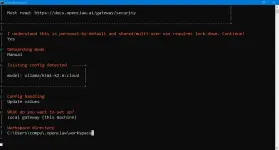
2. The openclaw command for ollama seen at the bottom of the page to integrate is "ollama launch openclaw --model kimi-k2.6:cloud"
Openclaw will now use kimi-k2.6:cloud as your model
This is just the basics to use the Ollama AI with Openclaw....
Refer to the stan[ATTACH type="full" size="1920x1034"]4173672[/ATTACH]dard openclaw guide for more details on its advanced use: https://docs.openclaw.ai/
--Getting started
--Opening the Control UI
--Run Onboarding
.....Salamat po dito sa tip, mukhang maganda rin pag-praktisan.ClawX, get it here: You do not have permission to view the full content of this post. Log in or register now.
Tested on Ubuntu 26.04, na install naman ng maayos.ClawX, get it here: You do not have permission to view the full content of this post. Log in or register now.

Buti't gising pa ako. Kalimitan ng ganyang error, nag-exceed ka ng maximum token limit na i-process ng model mo. Pwede rin mangyari yan kung mababa yung setting ng token limit ng model mo sa ClawX. Example, sa Ollama, pag di mo binago, naka-set lang yan sa minimum na 4K (dahil designed sa local AI for chat), so kahit 256k yung model mo, yayariin ka doon sa setting mo sa model kung heavy coding or document processing ang gagawin nya.Tested on Ubuntu 26.04, na install naman ng maayos.
Configured using OpenRouter API, pero palaging ganito ang output ng chat :|
View attachment 4173973
Yang 64k ay good for 128k models and above. Pag 128k tokens na, the minimum is +256k models. Just choose the right model for a specific job or task. Distinguish the use of Frontier (Premium), Fast, and Balanced models to manage tokens and costs as well as their supported modals.Token Usage Scenarios
- Standard Chatting: 8K – 16K is plenty. You rarely need more unless you have months of conversation history.
- Heavy Coding: 64K is usually the "sweet spot." This allows you to paste several entire code files and still have room for the AI's response.
- Novel Writing/Long Roleplay: 64K is the minimum. Detailed "World Info" or "Lorebooks" eat context fast; 64K prevents the AI from "forgetting" the beginning of the story.
- Analyzing Documents: 128K+ is better. If you are uploading PDFs or long transcripts, 64K can fill up in just one or two uploads.