PH
PHSa meron nang You do not have permission to view the full content of this post.
Log in or register now. experience, ano ang mga useful features niya para sa inyo?
Planning to deploy it on a small VPS.
Planning to deploy it on a small VPS.
Kahit yung Claude Haiku from v3, Gemini Flash models from v1.5 pataas, pati Grok models supported yan. Check nyo sa kanilang site docs para sigurado yung tool calling modal nila, especially kung gagamit kayo ng local models na luma at maliit. Yung mga latest Qwen, Deepseek, Minimax, GLM, Kimi, Cogito (deepseek clone ng US) models..., supported na yan. Verify nyo muna pag may "Experimental" sa hulihan yung free model especially sa openrouter.
- Claude 3.5 Sonnet: High success rate for tool calling and "Claw" logic.
- GPT-4o: Reliable and smart with complex tools.
- Gemini 1.5 Pro: Follows long instructions and uses tools effectively
- Llama 3.1 (70B or 405B): Good tool calling support (available on Groq, Sambanova, and Nvidia).
- GPT-4o-mini: Good at simple tool tasks.
- Gemini 1.5 Flash: Fast and reliable for basic research.
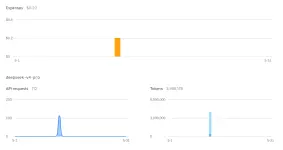
May naaala ako, at baka hindi alam ng iba na may pay-as-you-go bonus sa Openrouter. May free 1000 RPD pag nakagamit ka na ng +$10 credits. Keep that in mind. di ko lang alam kung hanggang saan yan tumagal - maybe after a year with no activity. Normal free credits is ~50 RPD (mataas up to 100 kung low-end models).May free models din sa OpenRouter, ito mostly ang gamit ko.
You do not have permission to view the full content of this post. Log in or register now.
You do not have permission to view the full content of this post. Log in or register now.
...Pakner-in-crime, binalikan ko ulit yung mga dati kong ginamit na working pa rin, baka di mo pa na-test. Same principle sa ds-api. Pandagdag sa openclaw na token-eater he he.yung sa groq.com paps, per token per AI ung limit. If reached na ang limit sa isang model, switch to other model na naman haha. Try ko subukan yung router na nirecommend mo. Thanks!
magkano usually nagagastos mo jan especially sa api ?gamit ko for automation,taking notes daily reminder , code reviewer. running on opi5
yung binili kulang dito 100+ pesos heheh gpt plusmagkano usually nagagastos mo jan especially sa api ?

ahhh pwede pala gpt plus gamitin as api ?yung binili kulang dito 100+ pesos heheh gpt plus
oo upon setup pa pipiliin ka ng model , di advisable local llm di kakayanin ng Ordinary pc setupahhh pwede pala gpt plus gamitin as api ?
salamat sa idea hahahahaha, gagi didnot know na pwede pala.oo upon setup pa pipiliin ka ng model , di advisable local llm di kakayanin ng Ordinary pc setup
Tama. Nagkamali nga ako ng pagkaintindi noon at lately, kaya binalikan ko ulit kahit mahirap intindihin. Free online apis kasi gamit ko kaya hindi ko magamit ng matino siya noon from a single provider. Though pasok naman sa tokens/sec ng models, sa dami ng api calls ng openclaw, hindi na-meet yung required request per minute (rpm) ng tasks dahil sa capping ng free tier. Nagkaka-error pag tumigil yung api requests. Kaya tinigil ho na at inalam ko muna, para magawan ng paraan.oo upon setup pa pipiliin ka ng model , di advisable local llm di kakayanin ng Ordinary pc setup
Sa Local AI, sa TPS at hardware ka titirahin kahit unlimited yung RPM nya. Dahil habang tumataas na yung context window usage, bumababa yung tps ng dahan-dahan hanggang umabot sa dulo na ayaw nating mangyari. Either you use smaller quantized models para bumilis yung tps while making sure your hardware (VRAM and RAM) and kv cache can handle it. Adjust na lang sa context token window kung hanggang saan yung kaya ng tasks ng openclaw na gagamitin natin and the conditions mentioned earlier. Yan yung pagkaintindi ko ngayon.The Core Dilemma: The KV Cache Tax
When running local AI, you are paying for two things in your VRAM:
If Model + KV Cache + Operating System exceeds 12GB, the system offloads data to your 32GB System RAM. This keeps OpenClaw from crashing but significantly slows down performance.
- The Model File: An 8B model takes a flat ~5GB.
- The KV Cache (Context Memory): This grows dynamically. As you feed more tokens into the conversation, the KV cache expands, consuming more VRAM.
The Master Configuration Matrix (For 12GB VRAM / 32GB RAM)
Context Setting Starting Speed Ending Speed (At Max Context) Hardware Behavior (VRAM vs. RAM) OpenClaw Agent Consequence 8k Window ~60 TPS ~50 TPS Fits 100% inside 12GB VRAM. Fast and cool. The "Goldfish" Effect: Too small. The agent will quickly forget its system rules, core memory, or previous code changes, causing loops or failures. 16k Window ~60 TPS ~35 TPS Hugs the 12GB VRAM limit. Minor RAM spill if your PC background tasks spike. The Minimal Baseline: Works well for small scripts. Speed remains decent, but a single large code file can still push it to the memory limit. 32k Window ~60 TPS ~15–20 TPS The Sweet Spot. Model fits in VRAM, but context memory s***** into System RAM at the end. Optimal Local Balance: OpenClaw has enough room to read 2–3 files and remember its instructions. Performance dips at the end, but the agent remains fully functional. 64k Window ~60 TPS ~3–8 TPS The VRAM Wall. Massive context forces heavy reliance on slow System RAM. The Crawl: OpenClaw can handle huge codebases without forgetting anything, but it runs so slowly that background tasks and heartbeats may time out.
Critical Takeaways for a Local OpenClaw Setup
- The TPS is Dynamic: Your engine does not run at a single fixed speed. Every time OpenClaw sends a new request, the LLM must mathematically re-evaluate the entire history. Speed naturally scales down as the conversation length scales up.
- Memory Architecture Matters: Because you have 32GB of System RAM, your system acts as a safety net. You will not experience Out-of-Memory (OOM) crashes at 32k or 64k, but you will experience a processing bottleneck.
- The Recommended Compromise: For the smoothest local experience on a 12GB GPU, configure your local backend (Ollama/LM Studio) to 32k context (
32768). It provides the best balance of required agent memory while keeping your execution speeds fast enough to handle tasks efficiently.
Fixed, ayaw gumana ng OpenROuter option, pero working fine with OpenAI.Tested on Ubuntu 26.04, na install naman ng maayos.
Configured using OpenRouter API, pero palaging ganito ang output ng chat :|
View attachment 4173973
Buti't napagana mo. Mas bagay si OC sa prime models he he. Yang OpenAI, 500 rpm na ang bigay ngayon kaya no problemo. Nasa tier plan ng big providers yung kailangan ni OC. Paningit yung free models to save costs.Fixed, ayaw gumana ng OpenROuter option, pero working fine with OpenAI.
Huli na si free-ds pakner. Lahat ng devs, nag-abandon na. Either buhay yung api., litaw or live yung models, depende sa dev na ginamit mo, pero 100% banned yung accounts pag-load ng api calls he he. Waiting for new updates.View attachment 4177166
di ko mahanap language settings ahahah
bossing free ba ito? opencode kasi gamit ko ngayon ee free model na qwen 3.6 plusClawX is great, mas madali mag-debug kasi may access sa local files at isolated and installed files para hindi makalat sa whole system.
Salamat alist1986 sa pag-suggest nito
View attachment 4189829
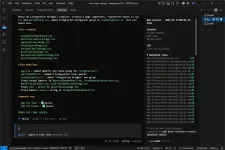
Ito: You do not have permission to view the full content of this post. Log in or register now.bossing free ba ito?