 PH
PH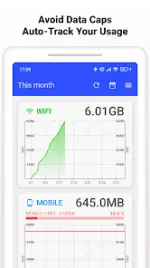
Data Usage Monitor v1.22.2961 [Premium]
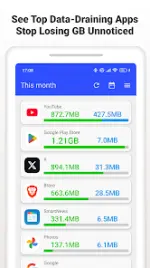
Data Usage Monitor provides automated tracking of mobile and Wi-Fi network traffic. It utilizes background APIs to monitor data consumption across different timeframes and provides granular analytics on a per-app basis.Technical Specifications
| Category | Details |
|---|---|
| Version | 1.22.2961 |
| Requirement | Android 7.0 and up |
| Architecture | armeabi-v7a, arm64-v8a |
| Tracking Method | Android Background API (persistent after reboot) |
Core Features
- Automated Tracking: Continuous measurement of mobile and Wi-Fi traffic with minimal battery impact.
- Granular Analytics: Separate totals for mobile and Wi-Fi, per-SSID statistics, and per-app usage breakdown.
- Visual Reports: Daily, weekly, and monthly trend graphs with color-coded limit proximity indicators.
- Notification System: Push alerts for customizable data thresholds to prevent throttling.
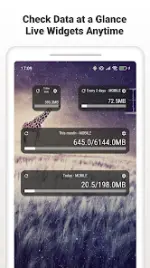
- Interface Tools: Live data remaining widgets for the home screen and a real-time status bar meter.
Premium & Mod Features
- Unlocked Premium: Ad-free interface and enhanced widget functionality.
- Status Bar Integration: Always-on status bar meter for real-time tracking.
- Optimizations: Removed debug codes and unnecessary files for a streamlined build.
- Stability: Improvements to UI and purchase status reflection logic.
Required Permissions
| Permission | Purpose |
|---|---|
| Usage Access | Retrieving per-app data statistics. |
| Wi-Fi & Location | Reading SSID for network-specific usage tracking. |
| Network Access | Anonymized improvement data and basic connectivity. |
| Run at Startup | Resuming background monitoring after a device reboot. |
| Google Play Billing | Management of premium status. |
Changelog (v1.22.2961)
- Top screen UI enhancements.
- Optimized processing for purchase status reflection.
- Minor bug fixes.
Troubleshooting
- Alert Configuration: Accessible via Settings > Data Alerts.
- Widget Refresh Issues: Ensure battery saver is disabled for the app and background activity is permitted.