 PH
PH
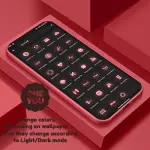

OneYou Dynamic Icon Pack v3.6.0 [Patched]
OneYou is a dynamic icon pack inspired by Samsung One UI 8, designed for Android 12 and higher. The icons feature adaptive coloring based on the system wallpaper/accent colors and automatically adjust between light and dark modes depending on the device theme.Core Features
| Feature | Description |
|---|---|
| Icon Type | Adaptive / Dynamic Icons |
| Widgets | Material You Widgets in One UI Style |
| Icons Added | 980+ new icons in latest update |
| Updates | Redesigned icons and fixed non-applying icon issues |
| Version | v3.6.0 [Patched / Premium] |
Launcher Compatibility & Behavior
The following table outlines how different launchers handle dynamic color updates.| Launcher | Color Update Behavior |
|---|---|
| Hyperion (Beta) | Automatic |
| Niagara Launcher | Automatic |
| AIO Launcher | Automatic |
| Nova Launcher (Beta) | Automatic |
| Smart Launcher (Beta) | Automatic |
| Action / Ruthless / Lawnchair | Manual Re-application Required |
| Stock Samsung One UI | Requires Theme Park |
| Stock Pixel Launcher | Requires Shortcut Maker (Non-root) or Pixel Launcher Mods (Root) |
Technical Implementation Notes
Dynamic Color Updates
For launchers that do not support automatic updates, users must re-apply the icon pack (or toggle to a different pack and back) after changing the system wallpaper, accent color, or light/dark mode.Samsung Monet Activation
- Navigate to System Settings > Wallpaper and Styles.
- Set wallpaper and system color palette.
- Apply the icon pack via launcher settings or Theme Park for the stock launcher.
Pixel Integration
- Non-Root: Icons can be set on the home screen using the Shortcut Maker application.
- Rooted: Full desktop and app drawer support via Pixel Launcher Mods.
Search Widgets
The Google application and Google Lens must be installed for search widget functionality to remain active.Widget Access
Widgets are located under the "OneYou" category within the standard system widget picker (accessible via long-press on the home screen).Main link: Download