 PH
PHdiscuss3387
Established

Description
Release Name: Clean Media Player 2026.4.17.1
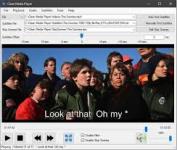
Description: Watch movies and shows without profanity. The app mutes the audio and displays subtitles without offensive words and phrases. Customize profanity filters to your preferences. Skip inappropriate scenes by choosing their start and end times.
The Video File Generator creates video files with clean subtitles, skipped scenes, and pre-muted audio in filtered time spans. The audio processing can be customized to only mute the center channel. There are 2 subtitle tracks included in the video output. You can choose either the track that displays subtitles only when audio is muted or the track that displays all subtitles. The generated output is only for personal use and private viewing.
Stream your favorite movies from personal media servers, files, DVD, or Blu-ray. The media servers must have DLNA enabled.
The profanity filter syncs up video with the downloaded subtitles to detect when to mute the audio. The built-in subtitles search makes it easy to find and download movie subtitles from opensubtitles.com
Choose the offensive words and phrases you want the profanity filter to match. You can also enter the words to display instead of the offensive words in the "Replacement" column. The "Mute Offset Before" setting adjusts how much earlier you would prefer to start muting the audio prior to the subtitles that have offensive words. The "Unmute Offset After" setting adjusts for how long to keep muting the audio after the subtitles with the offensive words end time.
Choose when to display the subtitles on the screen and what subtitles language you prefer to download.
Choose scenes you prefer to skip by selecting their start and end times. Save your skip scenes locally and choose if you want to upload and share them. You can also find and download skip scenes that were uploaded by others. The Auto Sync Scenes feature helps to synchronize the downloaded skip scenes with the selected local video file or the selected local network media server video.
MPEG-1/2, DivX® (1/2/3/4/5/6), MPEG-4 ASP, MKV, XviD, 3ivX D4, H.261, H.263 / H.263i, H.264 / MPEG-4 AVC, Cinepak, Theora, Dirac / VC-2, MJPEG (A/B), WMV 1/2, WMV 3 / WMV-9 / VC-1, Sorenson 1/3, DV, On2 VP3/VP5/VP6, Indeo Video v3 (IV32), Real Video (1/2/3/4).
Details
- File Size: 134.5 MB
Download Links
You do not have permission to view the full content of this post. Log in or register now.
You do not have permission to view the full content of this post. Log in or register now.
You do not have permission to view the full content of this post. Log in or register now.