 PH
devilman2049
Established
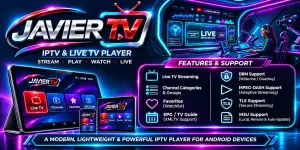
Mga ka PHC share ko lang to ginawa ko na IPTV player..Feed back nalang kayo kung gumana sa inyo.Kayo nalang maghanap ng source at paste nyo lang sa app nato.
You do not have permission to view the full content of this post. Log in or register now.
JAVIER TV — Complete Application Overview
JAVIER TV is a live IPTV and Direct Stream media player built for Android using Kotlin, Jetpack Compose, Material Design 3, and AndroidX Media3 (ExoPlayer). Developed by devilman2049, it is engineered to deliver zero-lag playback, comprehensive DRM decryption, customizable aspect ratios, and responsive orientation handling.1. Core Streaming & DRM Decryption Engine
- Protocol Support:
- MPEG-DASH (.mpd): Full adaptive bitrate streaming with dynamic segment parsing.
- Apple HLS (.m3u8): Master and media playlist resolution with sub-stream switching.
- Direct Streams: Direct HTTP/HTTPS and MPEG-TS stream playback.
- Multi-DRM Decryption:
- W3C ClearKey: Supports 32-character hex pairs (kid:key), multiple key comma-separated pairs (kid1:key1,kid2:key2), and W3C ClearKey JSON payloads.
- Google Widevine: Hardware and software Widevine modular DRM with customizable license server endpoints and custom HTTP headers.
- Microsoft PlayReady: Integration for enterprise and broadcast protection.
- Custom HTTP Headers:
- Custom User-Agent spoofing (pre-configured with modern browser headers compatible with CDN edge servers).
- Custom Referer header support (e.g. for Cignal, Sooka, or Astro streams).
2. Direct Stream URL Player & Custom DRM Management
- Direct URL Player:
- Paste any manifest URL (.mpd, .m3u8, .ts) with optional stream name, channel logo URL, DRM scheme, keys, User-Agent, and Referer.
- Auto-Save & Category Persistence:
- Toggle "Auto-save to Custom DRM category" to automatically archive played streams into your local channels list under the Custom DRM category.
- Dedicated "Save to Custom DRM" button to store configurations without playing immediately.
- Full Channel Editor & Management:
- Edit Custom DRM (Edit icon): Edit channel name, manifest URL, logo URL, DRM scheme & keys, and HTTP headers.
- Delete Custom DRM (Delete icon): Delete custom DRM streams with a safety confirmation dialog.
- Saved Streams List: View, play, edit, or delete saved Custom DRM channels directly from the player tab.
3. Screen Orientation & Auto-Fullscreen System
- Auto Screen Orientation (AUTO):
- Reads physical device rotation using hardware sensors (ActivityInfo.SCREEN_ORIENTATION_SENSOR).
- Auto Fullscreen: Turning the device horizontally into Landscape automatically displays the TV stream in full screen, hiding the top bar, bottom navigation bar, and channel list.
- Rotating the device back to Portrait automatically exits fullscreen back into the embedded view with the channel list.
- Screen Lock Orientation Modes:
- Landscape Locked: Locks the stream into horizontal widescreen mode (SCREEN_ORIENTATION_SENSOR_LANDSCAPE), preventing unwanted flipping when tilting or laying in bed.
- Portrait Locked: Locks the stream in vertical upright orientation (SCREEN_ORIENTATION_PORTRAIT).
- Screen & Touch Controls Lock (Touch Lock):
- Dedicated lock button (LockOpen / Lock) on the player bar.
- Freezes touch gestures, swipe controls, and overlay buttons to prevent accidental touches while watching live TV.
- Unlocks via a floating on-screen button ("Screen Locked • Tap to Unlock") or by pressing the device Back button.
4. Screen Aspect Ratio Control
- Aspect Ratio Modes:
- Stretch: Stretches video to fill 100% of the display (RESIZE_MODE_FILL), eliminating black bars.
- 21:9: Enforces the 21:9 ultrawide cinema format for movie broadcasts.
- Fill: Scales and crops video to fill the screen (RESIZE_MODE_ZOOM) while preserving natural geometry.
- Fit: Displays the original broadcast ratio with standard letterboxing (RESIZE_MODE_FIT).
- 16:9: Standard widescreen television format.
- 4:3: Classic retro television format.
- Zoom: 1.25x magnified view.
- 1-Tap Selector & Centered HUD:
- Dedicated Aspect Ratio button with a dropdown menu listing all modes and descriptions.
- Switching ratios displays a centered animated HUD confirming the active aspect ratio.
- Clickable aspect ratio badge on the bottom player bar for instant cycling.
5. Interactive TV Player Features & Gestures
- On-Screen Touch Gestures:
- Left Side Vertical Swipe: Adjusts screen brightness with a real-time percentage HUD.
- Right Side Vertical Swipe: Adjusts stream volume with a volume HUD.
- Downward Swipe Gesture: Triggers an exit swipe (exits fullscreen or terminates streaming).
- Double Tap: Toggles fullscreen (in fullscreen) or play/pause (in embedded mode).
- Exit & Streaming Termination:
- Prominent red Terminate Streaming button (Close icon) to cleanly release hardware decoders and stop playback.
- Picture-in-Picture (PiP):
- Full Android PiP mode integration.
- Auto-enters PiP mode when navigating to the Android home screen or switching apps.
- Audio & Subtitle Track Selection:
- Bottom sheet to choose between available audio languages, audio channels, and subtitle tracks.
- Technical Diagnostics ("Stats for Nerds"):
- Real-time monitoring of video resolution, bitrate (kbps), audio codec, buffer position, live stream latency, and ExoPlayer playback state.
- Quick Channels Drawer:
- Slide-out drawer over the video player allowing you to change channels without exiting playback.
6. Playlist & Channel Organization
- Playlist Importer:
- Import M3U/M3U8 playlists via URL or by pasting raw M3U text directly.
- Automatic parser for #EXTINF, channel logos (tvg-logo), channel IDs (tvg-id), and group categories (group-title).
- Category Filter Chips:
- Filter channels by category tabs (e.g. All Channels, Cignal, Converge, Ph Live Radio, Custom DRM, Sports, Movies, News).
- Favorites Tab:
- Pin preferred channels with 1-tap heart toggles, stored locally in the Room database.
- Watch History Tab:
- Automatically logs watched streams for quick resumption, with an option to clear history.
- Search bar in the top navigation bar to quickly filter by channel title, category, or stream URL.
- Automatically logs watched streams for quick resumption, with an option to clear history.
You do not have permission to view the full content of this post. Log in or register now.