 PH
PHDiego Mendoza
Elite
How the “play before IMDb” trick works
1. Open IMDb and search for the movie or TV show you want to check.
2. Open the exact IMDb page for that title.
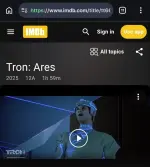
3. Click the address bar where the IMDb URL is shown.
4. Add "play" right before "imdb.com".
For example:
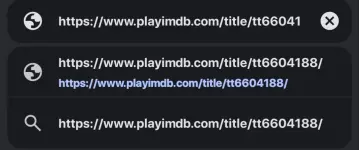
5. Press Enter.
6. A third-party site called PlayIMDb may open and try to load available video sources for that title.

7. If the title is available, choose a working player/source and start watching.
8. If nothing loads, the title may not be available, the source may be down, or the site may not support that specific movie/show.
PS. I used Brave Browser on mobile/incognito mode. But pwede nman kahit hinde.
Important note: This is not an official IMDb feature. It redirects you to a separate third-party site, so use caution with pop-ups, ads, fake buttons, or download prompts. Only use streaming sources you are legally allowed to access in your region.
2. Open the exact IMDb page for that title.
3. Click the address bar where the IMDb URL is shown.
4. Add "play" right before "imdb.com".
For example:
5. Press Enter.
6. A third-party site called PlayIMDb may open and try to load available video sources for that title.
7. If the title is available, choose a working player/source and start watching.
8. If nothing loads, the title may not be available, the source may be down, or the site may not support that specific movie/show.
PS. I used Brave Browser on mobile/incognito mode. But pwede nman kahit hinde.
Important note: This is not an official IMDb feature. It redirects you to a separate third-party site, so use caution with pop-ups, ads, fake buttons, or download prompts. Only use streaming sources you are legally allowed to access in your region.
Your feedback is highly appreciated

Support my other posts 
- Google just KILLED Photoshop!
- 50 Brilliant Ways to Supercharge Creativity with Nano Banana
- Nano Banana Prompt Gallery
- AI Fashion Studio: AI Virtual Try-On Powered By Nano Banana
- Free Image Upscaler up to 16K Quality!
- Travel the World with Nano Banana
- AI Profile Picture Generator
- AI Snapshot Generator
- ᑕᕼᗩTGᑭT Prompt Packs
- Perplexity at Work
- DumPDF: PDF Editor
- LuxPDF: Open Source PDF Tools
- Gemini Edu ID Card Generator
- CanVâ Education Invite Link 2
- Create UNCENS0RED/NSFW AI Characters
- Student ID Card Prompt
- Nano Banana Pro Image And Prompt Gallery
- Create 4K Nano Banana Pro Images
- Create Pro-Grade Infographics
- IHatePDF: Toolkit For Everyday Documents
- Stunning Nano Banana Prompts Gallery
- Lyria 3: Google's AI Music Studio
- Meet Gemini 3.1 Pro
- Create City Map Posters
- Seedream 5.0 Lite: A Smart, Web-Aware AI Image Model
- Nano Banana 2: ProLevel Image Generation at Flash Speed
- GPT‑5.4: OpenAI’s New Flagship GPT‑5‑Series Model
- Inside MAI‑Image‑2
- Meet Luma Uni-1
- Microsoft's New MAI Stack
- VEO 3.1 Free on Google Vids
- StreameX: Free Movies, TV Shows and Anime
- Notebooks in Gemini
- Introducing Meta's Muse Spark
- 10 Google Gemini Photography Gems
- 12K+ Nano Banana Prompts
- Introducing Google Flow Music
- SplitAnImage Image Splitting Tool
- Introducing ChätGPT Image 2
- 1000+ GPT Image 2 Prompts
- Introducing GPT-5.5
- MeiGen Prompts Gallery
 tnku sir pa share naman