 PH
PHKaka-approve lang sa akin kanina, dapat kapag nag-apply kayo ay medyo formal yung damit at maayos yung background.
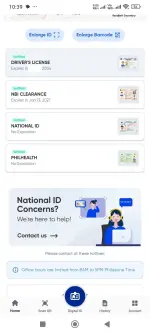
1. Install and Log In to eGov PH App - The client registers or logs into the eGov PH App to access the online driver's license application service.
2. Go to LTO Services - The client taps NGA (National Government Agencies) icon, then selects LTO from the list and choose "Online Driver's License Application" option, then submits a copy of Driver's License. Upon completion of details the client is required to upload live photo and Signature, then proceed to application.
Note: applicants must submit or capture a high-resolution photo with a plain white background, similar to a 2x2 ID picture, where the applicant's shoulders and full face are clearly visible. The photo must be formal, with a neutral facial E×ρréššion - teeth should not be visible.
Additionally, applicants must not wear eyeglasses, earrings, or any accessories that obstruct the face. These requirements are strictly enforced to ensure uniformity and compliance with official standards.
3. Evaluation by verifier - The verifier reviews the initial application:
. If qualified, the application proceeds to the approving evaluator.
. If not qualified, an email is sent to the client stating the reason for disqualification.
4. Electronic Driver's License (eDL) - If the Driver's License is valid the system will automatically generate eDL. The client will then agree to terms and automatically register with the LTO system.
1. Install and Log In to eGov PH App - The client registers or logs into the eGov PH App to access the online driver's license application service.
2. Go to LTO Services - The client taps NGA (National Government Agencies) icon, then selects LTO from the list and choose "Online Driver's License Application" option, then submits a copy of Driver's License. Upon completion of details the client is required to upload live photo and Signature, then proceed to application.
Note: applicants must submit or capture a high-resolution photo with a plain white background, similar to a 2x2 ID picture, where the applicant's shoulders and full face are clearly visible. The photo must be formal, with a neutral facial E×ρréššion - teeth should not be visible.
Additionally, applicants must not wear eyeglasses, earrings, or any accessories that obstruct the face. These requirements are strictly enforced to ensure uniformity and compliance with official standards.
3. Evaluation by verifier - The verifier reviews the initial application:
. If qualified, the application proceeds to the approving evaluator.
. If not qualified, an email is sent to the client stating the reason for disqualification.
4. Electronic Driver's License (eDL) - If the Driver's License is valid the system will automatically generate eDL. The client will then agree to terms and automatically register with the LTO system.