PH
PH1.1 Install Black Myth: Wukong Through Steam Tools
May madaming tut naman dito pano mag install ng laro through steam tools but if gusto niyo mas madali follow niyo lang simplier method below.More convenient way to install lua and manifest follow these steps:
- Download steam tools : You do not have permission to view the full content of this post. Log in or register now.
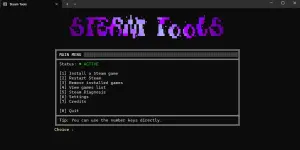
- Open Steam Tools and press ( 1 )
- Paste the Black Myth Wukong App ID: 2358720
- Press ( y )after to restart your steam
Current Steam Tools Issues
Steam Tools may occasionally encounter problems such as purchase errors, Steam not launching, or connection issues.1. To fix No Internet Connection download and launch : You do not have permission to view the full content of this post. Log in or register now.
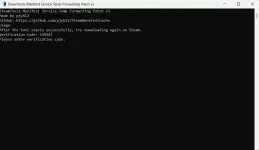
2. To fix Purchase error simply run administrator power shell and run this command :
Code:
irm "https://luatools.vercel.app/manifests.ps1" | iex3. To fix steam not launching run administrator power shell and run this command:
Code:
irm steam.run | iex1.2 2nd Method how to Install Black Myth Wukong
- Go to You do not have permission to view the full content of this post. Log in or register now.
- Create account and press get account
- Click Play game (Play for 2 minutes)
- Click show steam data ,Open Telegram Bot click the link
- Log in steam
- Go back to telegram and click next Click get Code paste it to steam
- Go Download Black Myth Wukong
2. Download Windows Update Blocker
- Go to You do not have permission to view the full content of this post. Log in or register now.
- Click Disable Updates
3. Import File to Game root
- Download the file :
You do not have permission to view the full content of this post. Log in or register now.
- Import to file : C:\Program Files (x86)\Steam\steamapps\common\BlackMythWukong
- Click Play
- Pag nag Lauch yung game Punta ka sa steam and Go offline ( If yong gamit mo na steam is VPesports shared account no need to switch offline if you're using steam tools)