PH
PH
Lyria 3 in the Gemini App: Google’s Playful New AI Music Studio
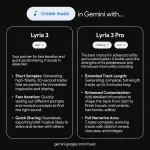
Google has just turned the Gemini app into a mini music studio with the launch of Lyria 3, its latest generative music model. With just a prompt—or even a photo or video—you can spin up a 30‑second track complete with lyrics, vocals, backing music, and custom cover art.
What Is Lyria 3?
Lyria 3 is Google DeepMind’s newest AI music model, now rolling out in beta inside the Gemini app. It’s designed to make music creation feel as simple as chatting with an AI, focusing on fun personal E×ρréššion rather than replacing professional producers.
Instead of needing any musical background, you describe an idea (“a comical R&B slow jam about a sock finding their match”) and Gemini turns that into a catchy, shareable track in seconds. The experience feels closer to brainstorming with a playful co‑writer than programming a traditional music tool.
Key Improvements Over Earlier Lyria Models
Google highlights three big upgrades in Lyria 3 compared to earlier Lyria iterations.
- Automatic lyrics generation
You no longer have to write your own lyrics; Lyria 3 generates lyrics from your prompt and builds the song around them.
- More creative control
You can steer style, vocals, and tempo directly in your text prompt, giving you more control over the overall feel of the track.
- More realistic, musically complex audio
The model aims for richer arrangements and more convincing musical structure, making even short tracks sound fuller and more polished.
These changes shift Lyria from a cool demo into something closer to a general‑purpose “music sandbox” sitting inside Gemini.
How Music Generation Works in Gemini
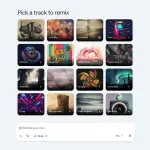
Lyria 3 shows up as a music creation experience in the Gemini app, and you can use it in two main ways: text‑to‑track and media‑to‑track.
Text to track
You start by describing a moment, mood, or story—Gemini then generates a matching song.
Examples from Google’s own prompts:
- “I’m feeling nostalgic. Create a track for my mother about the great times we had as kids and the memories of her home cooked plantains. Make it a fun afrobeat track with a true African vibe.”
- “A comical R&B slow jam about a sock finding their match.”
From there, Gemini creates a 30‑second track with lyrics or purely instrumental audio that fits the vibe you described.
From photos and videos to track
You can also upload images or video clips and ask Gemini to create a song that matches the mood of the visuals.
For instance, you might say: “Use these photos to create a track about my dog Duncan on a hike in the woods.” Gemini will analyze the content and generate lyrics and music that feel aligned with that scenario.
This “soundtrack your memories” angle is a key part of the product: playlists and songs that are tightly connected to your own photos, jokes, or life moments.
30‑second tracks with AI cover art
Each output is a 30‑second track, delivered with custom cover art generated by Google’s Nano Banana image model. You can download or share the result with a link, making it quick to send a song to friends or drop it into a social post.
Google is explicit that the goal here is not to create flawless commercial releases, but to give people a fun, low‑friction way to add a personal soundtrack to daily life.
Integration with YouTube and Shorts
Lyria 3 isn’t limited to the Gemini app. Creators can also access it through YouTube’s Dream Track feature.
Dream Track, available in the U.S. and rolling out to more creators globally, uses Lyria 3 to improve the quality of Shorts soundtracks. With it, YouTube creators can generate unique lyrical verses or atmospheric backing tracks tailored to specific Shorts, instead of relying only on pre‑existing music libraries.
This positions Lyria 3 as both a playful toy inside Gemini and a practical tool for short‑form video creators looking for quick, custom audio.
SynthID and Audio Verification
On the responsible AI side, every track generated in Gemini with Lyria 3 is embedded with SynthID, Google’s imperceptible watermarking technology for AI‑generated content. This watermark helps identify that the audio was created with Google AI, even if the file is re‑encoded or lightly modified.
Beyond watermarking, Google is expanding verification tools inside the Gemini app:
- You can upload an audio, image, or video file and ask whether it was generated with Google AI.
- Gemini checks for SynthID and uses its own reasoning to return a yes/no assessment.
This broader verification layer is meant to help users and platforms distinguish AI content from human‑created media more reliably.
Responsible Development and Artist Protection
Google stresses that Lyria 3 has been developed “in collaboration with the music community” and informed by experiments like Music AI Sandbox. They highlight several principles and safeguards.
- Designed for original E×ρréššion
Lyria 3 is meant to enable people to create original tracks, not to impersonate specific artists.
- Handling prompts with artist names
If you mention a particular artist in your prompt, Gemini treats it as broad inspiration and aims for a similar style or mood rather than direct imitation.
- Filters against existing content
Outputs are checked against existing works to reduce the risk of copying; users can report tracks that may violate their own or others’ rights.
- Policy guardrails
Users must follow Google’s Terms of Service and generative AI prohibited use policies, which explicitly forbid violations of intellectual property and privacy rights.
This combination of policy, filtering, and watermarking is Google’s attempt to balance rapid innovation with creative rights and industry concerns.
Availability, Languages, and Limits
Lyria 3 in the Gemini app is launching with some clear constraints.
- Availability
It’s available to users 1☍+ inside the Gemini app.
- Languages
At launch, it supports English, German, Spanish, French, Hindi, Japanese, Korean, and Portuguese, with plans to improve quality and add more languages over time.
- Platforms
The feature is rolling out on desktop immediately and will reach the mobile Gemini app over the next several days.
- Usage limits
Google AI Plus, Pro, and Ultra subscribers get higher usage limits for music generation.
For casual users, this makes Lyria 3 a lightweight creative tool you can dip into from your browser or phone, with power users getting more room to experiment.
Why Lyria 3 Matters
Lyria 3 represents another step in turning general‑purpose AI assistants into multimedia creation hubs. Instead of hopping between specialized tools, Gemini users can now go from text to images to music within a single interface.
On the user experience side, the product leans into everyday use cases: birthday songs, inside jokes, nostalgic tracks about family memories, or quick soundtracks for your photos and videos. For creators, especially on YouTube Shorts, it offers fast, tailored soundtracks without needing music production skills.
For the broader AI ecosystem, Lyria 3 is a concrete example of how models are being wrapped in safety layers like SynthID and explicit IP policies, while still pushing the boundary of what non‑musicians can do with a single prompt.
Check out Google's Official Keyword for more information:
You do not have permission to view the full content of this post.
Log in or register now.
You do not have permission to view the full content of this post.
Log in or register now.
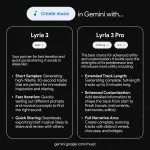
Update: Lyria 3 Pro Brings Longer, Structured Tracks and Wider Access
Google DeepMind has introduced Lyria 3 Pro, an advanced version of Lyria 3 that can generate music tracks up to 3 minutes long with structural awareness for intros, verses, choruses and bridges. This lets creators and musicians prompt for specific song sections and more complex transitions, opening the door to fuller, more customizable compositions beyond the original 30‑second clips.
Lyria 3 Pro is also being embedded across more Google products and surfaces, including Vertex AI, Google AI Studio and the Gemini API for developers, Google Vids for Workspace and Google AI subscribers, and the Gemini app (starting with ρáíd users) for longer generations directly in-chat. ProducerAI, Google’s collaborative music creation tool, now uses Lyria 3 Pro as well, offering an agentic, iterative workflow for artists and songwriters globally.
Google emphasizes ongoing collaboration with musicians and the music industry—via initiatives like Music AI Sandbox—and reiterates its responsible AI stance: Lyria uses training data that Google/YouTube has rights to, avoids mimicking specific artists, checks outputs against existing works, and embeds all Lyria 3 and Lyria 3 Pro audio with SynthID watermarks for provenance.
Your feedback is highly appreciated

Support my other posts

- Google just KILLED Photoshop!
- 50 Brilliant Ways to Supercharge Creativity with Nano Banana
- Nano Banana Prompt Gallery
- AI Fashion Studio: AI Virtual Try-On Powered By Nano Banana
- Free Image Upscaler up to 16K Quality!
- Travel the World with Nano Banana
- Nano Banana Polaroid Trend
- AI Profile Picture Generator
- AI Snapshot Generator
- ᑕᕼᗩTGᑭT Prompt Packs
- Perplexity at Work
- Free AI Image Editor
- DumPDF: PDF Editor
- LuxPDF: Open Source PDF Tools
- Affinity Studio: Free, Powerful Design Tool
- Gemini Edu ID Card Generator
- CanVâ Education Invite Link 2
- Create UNCENS0RED/NSFW AI Characters
- Google Antigravity: Agentic Development Platform
- ᑕᕼᗩTGᑭT For Teachers
- Student ID Card Prompt
- Introducing Nano Banana Pro
- Nano Banana Pro Image And Prompt Gallery
- Create 4K Nano Banana Pro Images
- Introducing GPT-5.2
- Create Pro-Grade Infographics
- IHatePDF: Toolkit For Everyday Documents
- OpenClaw: An AI Agent That Actually Does Things
- Stunning Nano Banana Prompts Gallery