PH
PHNote:
- This isn't free, and you may need to spend 250-500 per month or more, depending on the VPS provider of your choice.
- VPS provider of your choice, should have a low ping, VPS with high ping will have bad results (anything above 100ms will have subpar performance)
- Additional secondary IP for that VPS. Basically MAIN IP will be bound to your VPS, while the secondary IP won't be bound to any interface on your VPS
- Knowledge on setting up Wireguard on that VPS
- Mikrotik Router (I didn't try this on any router or system other than Mikrotik, but you can use this as a reference)
- Download Wireguard on your VPS, and make sure the secondary IP isn't bound on any interface in your VPS
- Configure Wireguard, create a public and private key that you will use for this wireguard instance
- Tutorials include doingwg genkey | tee vps_private.key | wg pubkey > vps_public.keyto create your keys - Create a Wireguard interface conf. at /etc/wireguard/<name>.conf
-<name>can be any of your choice - Example wireguard config:
- This is my configuration on one of my servers, with redacted sensitive info for your reference
- Do not use the main IP of your VPS for the <secondary_public_ip>, as on step 1, the secondary ip must not be bound on any interface
- If your VPS has a firewall, make sure port 51820 is open.
Code:[Interface] Address = 10.0.0.1/24 PostUp = /sbin/sysctl net.ipv4.ip_forward=1 PostUp = /sbin/sysctl net.ipv4.conf.all.proxy_arp=1 PostUp = ip neigh add proxy <secondary_public_ip> dev eth0 PreDown = /sbin/sysctl net.ipv4.ip_forward=0 PreDown = /sbin/sysctl net.ipv4.conf.all.proxy_arp=0 PreDown = ip neigh del proxy <secondary_public_ip> dev eth0 ListenPort = 51820 PrivateKey = <private_key_from_step_2_in_vps_private.key> [Peer] PublicKey = <this_is_generated_from_client> AllowedIPs = <your_secondary_public_ip>/32 - In Mikrotik, go to
WireGuard -> WireGuard Tab -> (click +) icon - Make a new WireGuard interface, name it as you wish, then press OK.
- Open this new WireGuard interface, grab the Public Key, then paste it on
[peer] publickey=in config in step 4 - Go to
WireGuard -> Peers Tab -> (click +) icon, - Make a new peer, name it as you wish, select the interface on the wireguard interface you created in step 6,
- Set the public key of this peer to the generated key on step 2 at
vps_public.key - Set the endpoint to the VPS MAIN IP, not the SECONDARY IP
- Set the Port to the ListenPort on config at step 4
- Set the allowed address to
0.0.0.0/0and::/0 - Optional: Set a keep alive if you want.
- Press OK.
- Now go to
IP -> Adresses -> (click +) icon, set Address to<secondary_public_ip>and network to<secondary_public_ip>, then set the interface on wireguard interface you created in step 6, then press ok. - Now go to
IP -> Routes -> (click +) icon. Set Dst. Address to0.0.0.0/0then gateway to wireguard interface name you created on step 6, then save it. - Now go to
IP -> Firewall -> NAT, set chain to srcnat, set the out interface on wireguard interface name you created on step 6, then go to action tab, set action to masquerade, then save.
Doing step 18, allows you to access internet, through this wireguard interface if you want to tunnel specific traffic onto it. - Now on the VPS. Start the wireguard server via
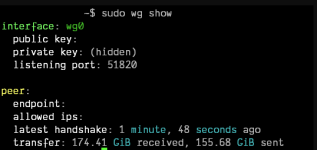
sudo systemctl enable wg-quick@<conf_name>sudo systemctl start wg-quick@<conf_name>where<conf_name>is the name of the config on step 4 at/etc/wireguard. If your config name is wg0, then that should besudo systemctl enable wg-quick@wg0 - If WG is connected, you would see something similar to this on your vps when doing
sudo wg show
- Done, your home should be accessible on the secondary Static IP of the VPS!
- Make sure you setup your firewalls properly as this exposes your whole home network to the internet.
- This also works for users that is on Dynamic IP.
- I prefer this method most of the time, unless your ISP gives you the ability to purchase a static IP from them
- You do not have permission to view the full content of this post. Log in or register now. (Personal File Hosting)
- You do not have permission to view the full content of this post.
Log in or register now. (My personal website that shows how good I am as a front end dev
 )
)