 PH
PH-
Welcome to PHCorner Forums! Sign up for free to unlock full access and exclusive privileges, including:
- Asking questions about computer and mobile issues
- Discovering internet tips for your mobile network and computer
You are using an out of date browser. It may not display this or other websites correctly.
You should upgrade or use an alternative browser.
You should upgrade or use an alternative browser.
🍪 Cookies [Re-Updated] Netflix Premium Account Cookies For Free:
- Thread starter PHC - Raijin-X
- Start date
PHC - Raijin-X
꧁𓊈𒆜° ꒓ꆂꁹ-ꏝꂑ꒒ °𒆜𓊉꧂
Shige-Shige!., Btw Naglagay Po Ulit Ako Sa Post, Latest Working Cookies!., Yan Po Gamit Ko At Pamangkin Ko Po!, Sana Gumana Sa Inyo!., Happy Fiesta! ...Ayaw talaga boss, wait na lang natin feedback ng iba kung may nakapagpagana. Patulong po


PHC - Raijin-X
꧁𓊈𒆜° ꒓ꆂꁹ-ꏝꂑ꒒ °𒆜𓊉꧂
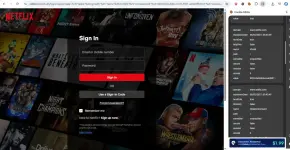
Try Mo Po Itong Mismong TG ID:No results found sa TG
TG Account ID: 7262439933
PHC - Raijin-X
꧁𓊈𒆜° ꒓ꆂꁹ-ꏝꂑ꒒ °𒆜𓊉꧂
Redo Mo Lang Po Then Click Netflix Homepage And Wait The Cookies To Load And The Screen Showed Some Other Languages In Error Click Home Again Done!., Happy Fiesta Guys! ...Master bakit kaya ganitl lang siya na import ko na yung cookies po thanks sa pag share master
View attachment 4005195


PHC-Gambit
Established
patulong master, pagka import walang nangyayari. di po maalam sa ganto
PHC - Raijin-X
꧁𓊈𒆜° ꒓ꆂꁹ-ꏝꂑ꒒ °𒆜𓊉꧂
Master Nandyan Na Po Yung Guide! ...patulong master, pagka import walang nangyayari. di po maalam sa ganto

Engiyearner
Elite
Paano po ma install yung modified na cookie editor sa browser heheh
PHC - Raijin-X
꧁𓊈𒆜° ꒓ꆂꁹ-ꏝꂑ꒒ °𒆜𓊉꧂
Click The Link Of Cookie Editor On My Post!., Or Click The Note Reminder That's Redirected To My Cloud! ...Paano po ma install yung modified na cookie editor sa browser heheh
Engiyearner
Elite
Na DL ko na siya master, d ko lang alam paano siya e install sa kiwi, kasi puro download extension lang naman naka lagay dun, wala yung galing sa storage koClick The Link Of Cookie Editor On My Post!., Or Click The Note Reminder That's Redirected To My Cloud! ...
PHC - Raijin-X
꧁𓊈𒆜° ꒓ꆂꁹ-ꏝꂑ꒒ °𒆜𓊉꧂
Just Look The Guide On YT For Easy Understanding!., Try Here:=>Na DL ko na siya master, d ko lang alam paano siya e install sa kiwi, kasi puro download extension lang naman naka lagay dun, wala yung galing sa storage ko
To put extensions on Kiwi Browser, install the Kiwi app, tap the three dots menu, go to "Extensions," and select "from store" to open the Chrome Web Store where you can search and add extensions just like on a desktop, clicking "Add to Chrome" and then "OK" to confirm. Or Through Here:=>
To install an external (manually downloaded) extension file in Kiwi Browser, you need to enable Developer mode and load the unpacked extension files.
Prerequisites
- Ensure you have the latest version of Kiwi Browser installed from the Play Store.
- The extension file should be downloaded to your phone, ideally as a .zip file which you will need to unzip into a folder of its contents first.
Step-by-Step Instructions
- Open Kiwi Browser on your Android device.
- Access the Extensions menu by tapping the three-dot menu icon in the top right corner and selecting Extensions.
- Enable Developer mode.
- In the address bar, type chrome://extensions/ and hit Enter.
- On the extensions page that appears, look for a toggle or checkbox to enable Developer mode (the exact location might vary slightly based on the version, but it's usually in the top corner).
- Load the extension file.
- After enabling Developer mode, a new button like "Load unpacked" or a similar option will appear. Tap it.
- Your device's file manager will open. Navigate to the folder where you unzipped the extension's contents (not the .zip file itself).
- Select the folder containing the extension's manifest file and other assets.
- The extension should now be installed and listed on the extensions page. You can manage or remove it from this same page.
- Access and use the extension by tapping the three-dot menu again and scrolling down; the newly installed extension should appear in the list.
Similar threads
-
👤 Account NETFLIX PREMIUM ACCOUNT + COOKIES w/ TOKEN LINK #8
- Started by papabanana
- Replies: 6
-
🛠️ Tools Free Streaming Access for Netflix | Prime Video | 𝙲𝚛𝚞𝚗𝚌𝚑𝚢𝚛𝚘𝚕𝚕 v2.0.2
- Started by JoyBoy_
- Replies: 19
-
🛠️ Tools Free Streaming Access for Everyone Netflix, Prime Video & 𝙲𝚛𝚞𝚗𝚌𝚑𝚢𝚛𝚘𝚕𝚕
- Started by JoyBoy_
- Replies: 65
-
-
About this Thread
-
36Replies
-
879Views
-
13Participants
Last reply from:
cixous088
cixous088
New Topics
-
TIDAL INDIVIDUAL w/ DJ EXTENSION | 1 MONTH #67
- Started by Beatriz9
- Replies: 1
- 🆓 Freemium Access
-
Netflix Premium Cookies 450x 10-20-26
- Started by BossHabibi
- Replies: 2
- 🆓 Freemium Access
-
Primevideo Premium Cookies 22x 10-20-26
- Started by BossHabibi
- Replies: 0
- 🆓 Freemium Access
-
HBO MAXX Premium Cookies 34x 10-20-26
- Started by BossHabibi
- Replies: 0
- 🆓 Freemium Access
-
𝙲𝚛𝚞𝚗𝚌𝚑𝚢𝚛𝚘𝚕𝚕 Premium Cookies 85x 10-20-26
- Started by BossHabibi
- Replies: 0
- 🆓 Freemium Access
-
Spotify Family and Mix Plan Premium Cookies 38x 10-20-26
- Started by BossHabibi
- Replies: 2
- 🆓 Freemium Access
-
Netflix Direct Links [PH] | PC | Mobile | TV | #51
- Started by JoyBoy_
- Replies: 1
- 🆓 Freemium Access
-
Prime Video Cookies X10 #35
- Started by JoyBoy_
- Replies: 0
- 🆓 Freemium Access
-
TIDAL INDIVIDUAL w/ DJ EXTENSION | 1 MONTH #66
- Started by Beatriz9
- Replies: 5
- 🆓 Freemium Access
-
E×ρréššVPN Premium #94
- Started by JoyBoy_
- Replies: 0
- 🆓 Freemium Access
Trending Topics
Online now
- Members online
- 604
- Guests online
- 9,451
- Total visitors
- 10,055