 PH
PHcodename-002lab
Elite
Step 1: Download 𝚁𝚘𝚋𝚕𝚘𝚡 Account Manager
First, download 𝚁𝚘𝚋𝚕𝚘𝚡 Account Manager from the link below: Download link:
https://www.mediafire.com/file/70xqhprv8d2v5fh/𝚁𝚘𝚋𝚕𝚘𝚡.Account.Manager.3.6.1_%281%29.zip/file
 Note:
Note:- This is a ZIP file, so make sure you extract it before using.
Step 2: Extract the File
After downloading the ZIP file:
- Go to your Downloads folder
- Right-click the file
- Click Extract All
- Open the extracted folder named 𝚁𝚘𝚋𝚕𝚘𝚡 Account Manager
Make sure you are inside the extracted folder, not the ZIP file.
Step 3: Open the App & Add an Account
- Open the extracted folder
- Double-click 𝚁𝚘𝚋𝚕𝚘𝚡 Account Manager.exe to run the application
- Once the app opens, click Add Account (bottom-left)
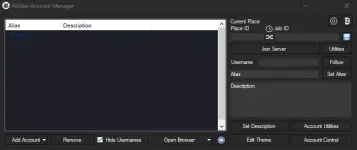
4.Log in to your 𝚁𝚘𝚋𝚕𝚘𝚡 account when the browser opens
5.After logging in, return to 𝚁𝚘𝚋𝚕𝚘𝚡 Account Manager
6.Your account will now appear in the list
Repeat the same steps to add multiple 𝚁𝚘𝚋𝚕𝚘𝚡 accounts.
Step 4: Open the Account & Play- Select the 𝚁𝚘𝚋𝚕𝚘𝚡 account you want to use from the list
- Click Open Browser
- 𝚁𝚘𝚋𝚕𝚘𝚡 will launch using the selected account
 Repeat this step with other accounts to play multiple 𝚁𝚘𝚋𝚕𝚘𝚡 accounts at the same time.
