 PH
PHCarlos2026
Contributor
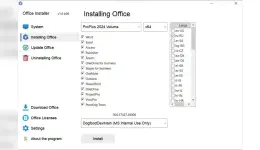
Office Installer 1.32
Created byYou do not have permission to view the full content of this post. Log in or register now.
Version1.32
License typefull_version
Release DateNovember 14, 2025
LanguagesMultilingual
Overview of Ratiborus Office Installer
It is a versatile tool designed to simplify the management of Microsoft Office suites on your PC. Whether you're dealing with Office 2024, 2021, 2019, or 2016, this tool ensures a seamless experience throughout the software's lifecycle. It caters to many needs, from initial installation to regular updates and even uninstallation when necessary.
Streamlined Installation Process
One of the standout features of this software is its user-friendly installation process. With just a few clicks, users can initiate the download and installation of their preferred Office suite. This straightforward approach eliminates the hassle of navigating complex procedures, making it accessible even for users with limited technical expertise.
Effortless Updates
Keeping your software up-to-date is crucial for security and performance. It simplifies the update process, automatically fetching your Office suite's latest updates and patches. This ensures you can access the newest features and improvements without manual intervention.
Uninstallation Made Easy
Need to remove an Office suite? It has you covered. Unlike the traditional uninstallation methods, which may leave behind residual files, this tool ensures a clean removal. Say goodbye to clutter and unnecessary files as it efficiently uninstalls the selected Office suite without leaving a digital trail.
Activation Simplified
Activating your Office suite has never been easier. It streamlines the activation process, guiding users through the necessary steps to ensure their software is fully licensed and ready for use. This removes the complexities often associated with activation, providing a hassle-free experience.
System Requirements
- Operating System: Windows 11/10/8.1/8/7
- Processor: Minimum 1 GHz Processor (2.4 GHz recommended)
- RAM: 2GB (4GB or more recommended)
- Free Hard Disk Space: 200MB or more is recommended
- You do not have permission to view the full content of this post. Log in or register now.
-
- The password for Zip file is:123