PH
PHElyenyenen
Leecher
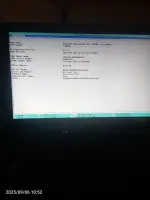
Pa help pa pano tanggalin yung insydeh20 setup utility sa acer lagi na lang lumalabas kapag nag power on
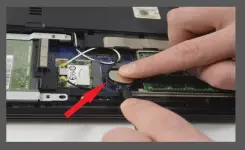
Ano boot priority nyan? Kung di mo sure restore default mo yun bios mo, kung ayaw pa din, malamang need ng palitan cmos battery nyan.View attachment 3887843
Ganyan pa din po
Thanks po try ko ito
- Load defaults
- Pag nasa BIOS ka na, pindutin F9 (Load Setup Defaults) → tapos F10 (Save & Exit).
- Check kung detected ang drive
- Sa Information/Main tab, tingnan kung lumalabas yung HDD/SSD mo.
- Kung “Not Detected,” patayin laptop, tanggalin at balik ang drive, tapos i-test ulit.
- Set boot mode
- Sa Boot tab, siguraduhin naka-UEFI (hindi Legacy).
- Ayusin boot priority
- Piliin Windows Boot Manager o yung SSD mo bilang First Boot Option.
- Disable Secure Boot (kung kailangan)
- Sa Security tab, mag-set ng temporary Supervisor Password.
- Punta sa Boot tab, i-Disable ang Secure Boot.
- Save gamit F10.
- Enable F12 Boot Menu (pang-test)
- Sa Boot tab, i-enable F12 Boot Menu.
- Pag restart, pindutin F12 at piliin yung Windows Boot Manager.
- Kung di pa rin nasasave settings
- Palitan ang CMOS battery, tapos ulitin steps.
- Kung detected ang drive pero walang OS
- Gumamit ng Windows installer USB → piliin Repair your computer → Startup Repair.
- Kung fail pa rin, reinstall Windows.
Hope this helps bro if may d ka ma gets sa sinabi ko just let me know.
Thanks po try koStep 1: Exit and Save Changes
When you’re in the InsydeH20 Setup Utility, choose Exit → Exit Saving Changes.
Restart your PC and see if it boots into Windows normally.
Step 2: Check Boot Order
Go to the Boot tab in InsydeH20.
Make sure Windows Boot Manager (or the drive where Windows is installed) is set as the first boot device.
Save changes → Exit.
Step 3: Disable Fast Boot (Optional)
In the Boot tab, disable Fast Boot.
Sometimes, Fast Boot conflicts and causes the BIOS to show every startup.
Step 4: Check Hard Drive
If the boot order is correct but BIOS still pops up, the drive may not be detected properly.
Ensure your SSD/HDD is securely connected.
Tip: If it keeps appearing despite correct settings, you can reset BIOS to default settings (usually “Load Setup Defaults” under the Exit tab).
hope it helps...
Bumabalik pa din sa bios kahit ano gawin ko pano yung sa CMOS battery pano mapalitan yun
- Load defaults
- Pag nasa BIOS ka na, pindutin F9 (Load Setup Defaults) → tapos F10 (Save & Exit).
- Check kung detected ang drive
- Sa Information/Main tab, tingnan kung lumalabas yung HDD/SSD mo.
- Kung “Not Detected,” patayin laptop, tanggalin at balik ang drive, tapos i-test ulit.
- Set boot mode
- Sa Boot tab, siguraduhin naka-UEFI (hindi Legacy).
- Ayusin boot priority
- Piliin Windows Boot Manager o yung SSD mo bilang First Boot Option.
- Disable Secure Boot (kung kailangan)
- Sa Security tab, mag-set ng temporary Supervisor Password.
- Punta sa Boot tab, i-Disable ang Secure Boot.
- Save gamit F10.
- Enable F12 Boot Menu (pang-test)
- Sa Boot tab, i-enable F12 Boot Menu.
- Pag restart, pindutin F12 at piliin yung Windows Boot Manager.
- Kung di pa rin nasasave settings
- Palitan ang CMOS battery, tapos ulitin steps.
- Kung detected ang drive pero walang OS
- Gumamit ng Windows installer USB → piliin Repair your computer → Startup Repair.
- Kung fail pa rin, reinstall Windows.
Hope this helps bro if may d ka ma gets sa sinabi ko just let me know.
Thanks po try ko ito
Thanks po try ko
Bumabalik pa din sa bios kahit ano gawin ko pano yung sa CMOS battery pano mapalitan yun