 PH
PHSolution 1 – Use DS4Windows
In order to connect PS4 controller to Windows 10, you’ll have to rely on third-party solutions, but the processes itself isn’t as hard as you might think. In order to connect PS4 controller to Windows 10, you need to do the following:
Solution 2 – Download and install InputMapper software
Another third-party solution that can help you use PS4 controller on Xbox One is InputMapper. To configure your controller using InputMapper follow these steps:
Don't forget to likes...tq
In order to connect PS4 controller to Windows 10, you’ll have to rely on third-party solutions, but the processes itself isn’t as hard as you might think. In order to connect PS4 controller to Windows 10, you need to do the following:
- Download DS4Windows from You do not have permission to view the full content of this post. Log in or register now..
- After you’ve downloaded the .zip file, extract it and run DS4Windows.exe.
- When DS4Windows starts, click on Step 1: Install the DS4 Driver.
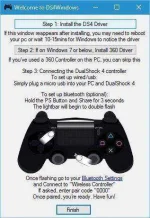
- After the driver installs click on Finish.
- Open You do not have permission to view the full content of this post. Log in or register now., go to Devices > Bluetooth.
- Turn on You do not have permission to view the full content of this post. Log in or register now..
- On your PS4 controller press and hold PS and Share buttons until the light starts flashing.
- In Bluetooth settings Wireless Controller should appear. Click it and choosePair.
- Open DS4Windows application once again. Your PS4 controller should be fully connected now.
- Minimize DS4Windows and start playing.
- Open DS4Windows and click Stop.
- Go to Settings > Devices > Bluetooth and turn Bluetooth on and off.
- If you wish to reconnect your PS4 controller, just start DS4Windows and press the PS button on your controller.
Solution 2 – Download and install InputMapper software
Another third-party solution that can help you use PS4 controller on Xbox One is InputMapper. To configure your controller using InputMapper follow these steps:
- Download InputMapper from You do not have permission to view the full content of this post. Log in or register now..
- Install InputMapper and connect your PS4 controller using USB cable or by using Bluetooth. To pair your Windows 10 PC with PS4 controller via Bluetooth, turn on Bluetooth on your PC and hold PS and Share buttons on the controller.
- Now Open InputMapper and your controller should be recognized and ready to use.
Don't forget to likes...tq
