 PH
PHUpscayl – Free AI Upscaler na sa PC Mo Mismo Tumatakbo
Ilang beses ka na bang nakakuha ng photo na sobrang liit, tapos pag in-zoom mo puro pixels na lang? Lalo na yung mga lumang pics o screenshots na kailangan mo pa i-print o gamitin sa project.
Try mo 'to: Upscayl
Free at open-source na AI image upscaler para sa Windows, macOS, at Linux. Pinapalaki niya yung image gamit AI models na hinuhulaan yung mga kulang na details, at sa PC mo lang lahat napoproseso, walang upload.
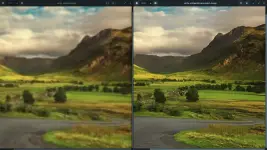
 Before at after ng low-res sample (150px wide) · Image: Upscayl, from the COMPARISONS page sa Upscayl GitHub
 Anong maganda dito
- Pixelated na photo o screenshot → pinapalaki at nililinaw gamit AI, hanggang 16x (4x base, tapos resize)
- Daming images na aayusin → may Batch mode, buong folder sabay-sabay
- Ayaw mo mag-upload online → offline siya, sa PC mo lang napoproseso
- Kulang pa yung isang pasada → may Double Upscayl, dalawang beses ipapadaan
- Gusto mo ng ibang style ng result → maraming AI models, pwede ka pang mag-add ng custom models
- Gusto mo i-compare agad → may side-by-side slider at Lens Viewer
 Paano siya gumagana
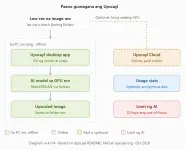 Ano yung nasa PC mo at ano yung online · Diagram made for this thread, based on the Upscayl README, FAQ, at upscayl.org
 Kailangan mo
- OS: Windows 10 pataas, macOS 12 pataas, o Linux
- GPU: Vulkan-compatible na graphics card. Sabi ng dev, maraming iGPU (integrated graphics) ang di gumagana, pero pwede mo pa rin i-try
- Internet: pang-download lang. Pag naka-install na, offline na yung upscaling
- Storage: walang official minimum sa README; nasa 300+ MB yung download sa Flathub
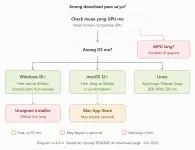 Anong download para sa OS mo · Diagram made for this thread, based on the Upscayl README at download page
Hindi siya magic. Kaya niya ayusin yung low-res at pixelated na images, pero sabi mismo ng FAQ nila, di niya kaya yung blurred o out-of-focus na photo. Hinuhulaan lang ng AI yung details, kaya pwedeng iba sa totoo yung lalabas.
 Take note
- Mac users: may bayad yung version sa Mac App Store. Kung gusto mo yung free, kunin yung .dmg sa GitHub releases o i-install via Homebrew:
brew install --cask upscayl - Windows users: lalabas yung SmartScreen o "unverified publisher" warning. Kung sa official link mo kinuha, click More info → Run anyway, o YES.
- Upscayl Cloud: hiwalay na online service nila, may bayad (credits) pero may free trial. Doon, ina-upload yung images mo. Di mo 'to kailangan para sa desktop app.
- License: AGPL-3.0 yung app. May sariling license yung ilang models, kaya kung pang-negosyo, basahin muna yung FAQ sa official site at yung license ng model na gagamitin mo.
- Stats: since v2.15, may option mag-share ng anonymous stats (GPU model, usage). Optional lang, at sabi ng dev walang personal data.
- Wag gamitin para "ayusin" yung ID, ebidensya, o photo ng ibang tao na parang totoo yung hinulaan ng AI.
Bago ka mag-download
Hindi ako yung dev at hindi ako affiliated sa Upscayl. Galing sa official GitHub README, release notes, at upscayl.org yung info dito (checked October 31, 2026), kaya pwedeng magbago yung features o requirements. Unsigned yung Windows installer, kaya normal na lalabas yung "unverified publisher" warning. Sa official link lang mag-download, wag sa reupload o ibang site, at i-scan muna yung file bago i-run. AI ang humuhula ng details, kaya i-check palagi yung result bago gamitin. Di ko pa personally na-try. Follow niyo yung license ng app at ng models, and use at your own risk.
 Get it here
You do not have permission to view the full content of this post. Log in or register now.
 Results board
Na-try mo na? Post mo yung before/after mo (crop lang ng maliit na part) para makita ng iba kung anong model ang bagay sa anong klase ng image:
Code:
GPU:
Model na ginamit:
Scale (2x / 4x / custom):
Klase ng image (photo / art / screenshot):
Gamitin lang yung sarili mong photo o artwork na walang mukha ng ibang tao, at i-blur muna yung personal info. Yung mga solid na before/after, isasama ko sa main post with credits para di na mag-scroll yung iba.
 Credits
- Developer: Nayam Amarshe at TGS963 (upscayl on GitHub), plus the Upscayl contributors
- Source: Upscayl GitHub README, v2.15.0 release notes, at upscayl.org download at pricing pages, checked October 31, 2026
- License: App AGPL-3.0 · May sariling license ang ilang bundled at custom models
- Image: Before/after sample: Upscayl, from the COMPARISONS page sa Upscayl GitHub
- Diagrams: Made for this thread, based sa Upscayl README, FAQ, at upscayl.org
- Built on: Real-ESRGAN by Xintao Wang · Models credited sa README: HFA2k by Helaman, Remacri by Foolhardy, UltraSharp by Kim2091