 PH
PHAnd ur saying this will get you free internet on any network?@emmandomingo
in Android the service depends on iptables and nfqueue feature, it will or may not support on stock ROM, it will definitely work on custom ROM like lineageOS when rooted.
in windows just we need to Run as Administrator, that's it, it will work flawlessly
-
Welcome to PHCorner Forums! Sign up for free to unlock full access and exclusive privileges, including:
- Asking questions about computer and mobile issues
- Discovering internet tips for your mobile network and computer
You are using an out of date browser. It may not display this or other websites correctly.
You should upgrade or use an alternative browser.
You should upgrade or use an alternative browser.
-Free Internet- on Captive Portals - Works in Any Country -
- Thread starter vivek1
- Start date
frednicker
Enthusiast
psiph
about sa wireguard pano po paganahin or pwede po makahingi config?
master psiphon is working for me but i need to log in first the portal then open psphon. salamat po@dorian2kx
which means u have open port udp 53
use vpn's like
psiphon
vpnbook
wireguard
udpcustom (not sure if it works)
and connect with the port 53 configured
for psiphon, we dont need to configure anything, just start and check untill it gets connectp
about sa wireguard pano po paganahin or pwede po makahingi config?
frednicker
Enthusiast
may modem akong may nka install na na wireguard master baka pwede patulong paganahin dun sa modem ko ung pag setup which is gumana nman psiphon saken mag log in man ako o hnd gumagana sya im willing to pay master please kulang speed pag hindi sa modem nakalagay epsiph
master psiphon is working for me but i need to log in first the portal then open psphon. salamat po
about sa wireguard pano po paganahin or pwede po makahingi config?
no, we should not login into the portal page, we only connect to the network, then we should connect to the vpn-> psiphon or wireguard etc.,psiph
master psiphon is working for me but i need to log in first the portal then open psphon. salamat po
about sa wireguard pano po paganahin or pwede po makahingi config?
if u connect to the login(connect) page of the modem its ok.
in wireguard we should check which port we are connecting means which open port we have, then we connect
in freevpn.us (wireguard) server we have these ports
Protocol: UDP
Port: 53, 143, 443, 587, 1194, 2049, 2050, 8080, 3128, 5353, 30587, 51820
so check which open port we have with droidvpn and then connect
frednicker
Enthusiast
baka po kase ma detech ako IT nmen pag hnd ako nag log in sa portal nkakakonek nman kahit nka log in ako. free lang kase samen messenger at facebook pag gumamit ka ng videocall may bayad na kya gumagamit ako vpn.no, we should not login into the portal page, we only connect to the network, then we should connect to the vpn-> psiphon or wireguard etc.,
if u connect to the login(connect) page of the modem its ok.
in wireguard we should check which port we are connecting means which open port we have, then we connect
in freevpn.us (wireguard) server we have these ports
Protocol: UDP
Port: 53, 143, 443, 587, 1194, 2049, 2050, 8080, 3128, 5353, 30587, 51820
so check which open port we have with droidvpn and then connect
about droid vpn hnd nag kokonek saken puro scanning lang ng port ayaw mag connected na try kona lahat server only psiphon lang working saken gusto ko sana mapagana wireguard ko sa modem master patulong nman bka may sample config ka jan pag gumana im willing to pay.
@frednicker
u r using in pc right, if so use this pc version of droidvpn, You do not have permission to view the full content of this post. Log in or register now.
which has no valid username and password, register urself for username/password in droidvpn website. but the provided droidvpn has all working 'latest server db' file. now try it. also don't use the droidvpn a/c for multiple devices. otherwise they will block the a/c. use one a/c for 1 device only, means if u use in pc version, use that a/c for pc only, if a/c for mobile, then use it that a/c for mobile only.
u are saying that its showing scanning the port without connected. means u r trying UDP, then check for tcp/http setting the ports as 80, 443, 8080, if the socket connected but not connected fully or connected successfully. reply me,
u r using in pc right, if so use this pc version of droidvpn, You do not have permission to view the full content of this post. Log in or register now.
which has no valid username and password, register urself for username/password in droidvpn website. but the provided droidvpn has all working 'latest server db' file. now try it. also don't use the droidvpn a/c for multiple devices. otherwise they will block the a/c. use one a/c for 1 device only, means if u use in pc version, use that a/c for pc only, if a/c for mobile, then use it that a/c for mobile only.
u are saying that its showing scanning the port without connected. means u r trying UDP, then check for tcp/http setting the ports as 80, 443, 8080, if the socket connected but not connected fully or connected successfully. reply me,
frednicker
Enthusiast
im using Android phone master. this error when i change http tcp port.baka po kase ma detech ako IT nmen pag hnd ako nag log in sa portal nkakakonek nman kahit nka log in ako. free lang kase samen messenger at facebook pag gumamit ka ng videocall may bayad na kya gumagamit ako vpn.
about droid vpn hnd nag kokonek saken puro scanning lang ng port ayaw mag connected na try kona lahat server only psiphon lang working saken gusto ko sana mapagana wireguard ko sa modem master patulong nman bka may sample config ka jan pag gumana im willing to pay.
gusto ko sana paganahin ung wireguard ko sa modem master may built in vpn ako sa modem wireguard e. config na working lang sana.
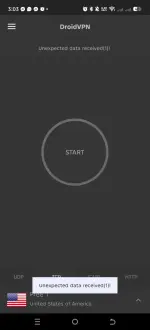
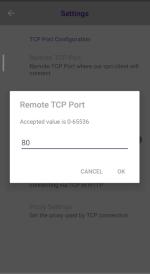
Check with HTTP setting, and configure ports with 80, 443, 8080
use with pc version it should work without that error. in that i provided the latest 'server.db' file, no need to update. droidvpn pc ver.,
also wireguard works on UDP protocol, u said that droidvpn scanning port but not connecting. so wireguard doesn't work with your operator. works only with try tcp/http.
@dorian2kx
Here is the link for GoodByeDPI (DPI bypass configured)
Here is the link for GoodByeDPI (DPI bypass configured)
You do not have permission to view the full content of this post. Log in or register now.
frednicker
Enthusiast
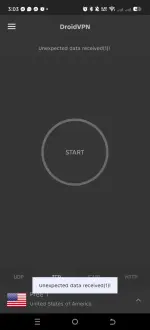
also this kind of error when i change the tcp port to 80.View attachment 3920330
Check with HTTP setting, and configure ports with 80, 443, 8080
use with pc version it should work without that error. in that i provided the latest 'server.db' file, no need to update. droidvpn pc ver.,
also wireguard works on UDP protocol, u said that droidvpn scanning port but not connecting. so wireguard doesn't work with your operator. works only with try tcp/http.
gumagana nman psiphon ko sa laptop gusto ko sana paganahin working server sa wireguard ko master via built in vpn sa modem.
SurelyNotHitler
Established
does it work on pisowif?
@SurelyNotHitler
which ports on open in pisowifi- either tcp or udp
check with pc version of Droidvpn
http://phcorner.org/threads/free-in...ls-works-in-any-country.2369036/post-30631509
check the other(b4) posts of this thread for all ur needs, then reply i will help u...
which ports on open in pisowifi- either tcp or udp
check with pc version of Droidvpn
http://phcorner.org/threads/free-in...ls-works-in-any-country.2369036/post-30631509
check the other(b4) posts of this thread for all ur needs, then reply i will help u...
frednicker
Enthusiast
wireguard sana gusto ko paganahin master kung anong server mag wowork dun bka may sample config ka jan pwede ko itry

@frednicker
here are the wireguard configs - 11 no's
ports- 2408,443,53
Download:
Extract the zip file u will get 11 conf files, connect one by one and check
if u want more ports, goto
freevpn.us, u will get these ports
UDP: 53, 143, 443, 587, 1194, 2049, 2050, 8080, 3128, 5353, 30587, 51820
here are the wireguard configs - 11 no's
ports- 2408,443,53
Download:
You do not have permission to view the full content of this post. Log in or register now.
if u want more ports, goto
freevpn.us, u will get these ports
UDP: 53, 143, 443, 587, 1194, 2049, 2050, 8080, 3128, 5353, 30587, 51820
frednicker
Enthusiast
ayaw pdin master ano kaya server psiphon bat yun lng gumagana vpn saken@frednicker
here are the wireguard configs - 11 no's
ports- 2408,443,53
Download:
[Hidden content]
Extract the zip file u will get 11 conf files, connect one by one and check
if u want more ports, goto
freevpn.us, u will get these ports
UDP: 53, 143, 443, 587, 1194, 2049, 2050, 8080, 3128, 5353, 30587, 51820
@frednicker
wireguard is a UDP vpn, in droidvpn's udp scanning ports doesn't show anything means wireguard will also won't work for u. then just tcp only works.
try the droidvpn in pc and reply
wireguard is a UDP vpn, in droidvpn's udp scanning ports doesn't show anything means wireguard will also won't work for u. then just tcp only works.
try the droidvpn in pc and reply
someone said in this forum that, udp 53 is working for pisowifi, so check with port 53(udp) vpn, withdoes it work on pisowif?
wireguard, psiphon etc..,
don't login. just connect to wifi and run the vpn...
Similar threads
About this Thread
-
269Replies
-
12KViews
-
37Participants
Last reply from:
vivek1
vivek1
New Topics
-
LPB PISO WIFI HELP
- Started by -shutdown-
- Replies: 5
- 🚀 Freenet & Tunneling
-
DNS LOOPING IN LINUX V2RAY TUN
- Started by Hidedeath
- Replies: 2
- 🚀 Freenet & Tunneling
-
MGa BOSS FREE VPN NA MAY PH SERVER PARA DITO SA AFRICA?
- Started by Junbiel 26
- Replies: 1
- 🚀 Freenet & Tunneling
-
PISOWIFI NO HULOG | (26-09-30) | NPV TUNNEL
- Started by Calcifeer
- Replies: 8
- 🚀 Freenet & Tunneling
-
[NOW WORKING] Youtube No Ads & Other Sites! via DNS
- Started by Lerps
- Replies: 37
- 🚀 Freenet & Tunneling
-
Free vpn can bypass captive portal
- Started by Darz2468
- Replies: 6
- 🚀 Freenet & Tunneling
-
Ano po gagawin pag ganto po?
- Started by jokejoke
- Replies: 3
- 🚀 Freenet & Tunneling
Trending Topics
-
Oct. 19, 2026 - GTM NoLoad | STS NoLoad | AllNet and AllCountry NoLoad | OpenCFG
- Noahclanman
Replies: 11 -
-
-
-
-
-
Online now
- Members online
- 678
- Guests online
- 11,834
- Total visitors
- 12,512