 PH
PHwaldopulanco
Enthusiast
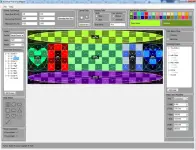
Advance Pixel Grid Mapper - is a tool designed for VJs, motion graphic artists, and stage designers. It simplifies the process of laying out LED panels and exporting the
configuration for use in Resolume Arena. Using an intuitive grid system, you can quickly create 'slices' or layers, add masks, and automatically generate the corresponding
Advanced Output XML file. The goal of this program is to speed up your workflow and reduce the time spent on manual configuration.
==Go beyond basic grids and unlock a new level of creativity and control over your visual projects.==
Key Features:
* Direct Resolume Arena Integration
-Export to Advanced Output: Generate complex .xml files that load directly into Resolume's Advanced Output. Your slices, masks, and transformations are preserved perfectly.
-Export to Composition: Create complete Resolume Compositions (.avc files) from your layout, saving you hours of setup time.
* Powerful & Versatile Masking Tools
-Vector-Based Pencil Tool: Draw freehand, non-grid-aligned masks with precision. Create smooth curves and complex shapes that are impossible with standard grid tools.
-Linear & Bezier Point Modes: Switch between sharp, straight-line polygons and perfectly smooth Bézier curves for ultimate control over your mask's shape.
-One-Click Shape Masks: Instantly apply pre-made vector shapes like circles, squares, hearts, stars, and more as masks to your slices.
-Traditional Grid Masking: Quickly select or deselect individual pixels/panels for classic grid-based masking.
* Precision Editing & Control
-Intuitive Layer Management: Easily manage your slices with a clear, tree-view layer system. Rename, and modify layers on the fly.
-Transform Inspector: Numerically control the position (X, Y) and size (Width, Height) of your slices and masks for pixel-perfect accuracy.
-Vertex Editor: Select individual points of your vector masks and fine-tune their exact coordinates for unparalleled detail.
-Invert Mask: Instantly flip your mask's transparency with a single checkbox, perfect for creating holes or complex layered effects.
* User-Friendly Canvas & Workflow
-Smooth Zoom & Pan: Effortlessly navigate your canvas. Zoom into the exact point your cursor is on for detailed work, and pan around your entire layout with ease.
-Customizable Grid: Define your panel size and total canvas resolution to match any project, big or small.
-Project Files: Save and load your entire workspace, including all layers, masks, and settings, into a single .gproj file.
-Visual Customization: Choose from a wide palette of color pairs to easily distinguish between different slices on your canvas.
* Flexible Export Options
-Beyond Resolume, you can export your work as high-quality PNG images, including options to save the input selection, the transformed output, or individual slices.
+++Advance Pixel Grid Mapper is more than just a tool; it's a complete workflow solution designed to bridge the gap between your creative vision and technical execution.+++
Download Link: You do not have permission to view the full content of this post. Log in or register now.