 PH
PHArissa ofuma
Contributor
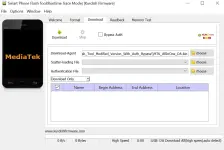
SP Flash Tool is the official MediaTek device flash tool. The official/original version of SP Flash Tool is not support MediaTek Auth bypass while flashing or unlocking. For flashing or unlocking the latest version of MediaTek powered devices using SP flash Tool, you must need to bypass MediaTek Auth using others tool.
On the current page, you will get the direct link to download SP Flash Tool’s modified version that support MediaTek Auth bypass while flashing or unlocking. We have shared it as a zip package including the necessary USB Driver
Edited/Modified SP Flash Tool For Windows
The Edited/Modified version of SP Flash Tool allows bypassing MediaTek Authentication before flashing stock ROM or unlocking. We recommend using the latest version of the Tool.Tool Name: SP_Flash_Tool_Modified_Version_With_Auth_Bypass.zip
Modified By: kurdishfirmware.com
| VERSION | LINK:1 | LINK:2 |
|---|---|---|
| v5.2044 (Latest) | You do not have permission to view the full content of this post. Log in or register now. | You do not have permission to view the full content of this post. Log in or register now. |
How To Flash Using SP Flash Tool?
- Download SP Flash Tool on your computer.
- Install MTK USB Driver on your computer.
- Open the tool (flashtool.exe), then follow the following steps.
- Firstly, click on the scatter-loading button, then locate the firmware.
- Now, click on the “Download” button. Then connect your device to the computer.
- Never disconnect your device during the flashing process.