 PH
PH1. Download Termux apk
- You do not have permission to view the full content of this post. Log in or register now.
2.Open Termux and type this command
3.Download AdGuard Home Use This Command
AdGuard Home For arm64 Devices
- wget You do not have permission to view the full content of this post. Log in or register now.
AdGuard Home For 32bit Devices
- wget You do not have permission to view the full content of this post. Log in or register now.
5.Pagkatapos idownload extract ang file
Use this Command
- tar xvf <package Name>
6.Pagkatapos I extract I open ang file
Use this Command
7.Pumunta sa Browser at itype ang
- 127.0.0.1:3000
8.Set-up AdGuard Home And Log-in
Note: Wag nyo Po iupdate AdGuard Home nyo
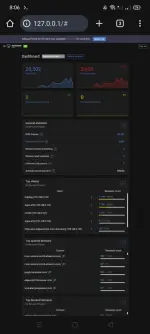
9.Tap nyo yung tatlong linya sa taas at Tap Settings at DNS settings
- Set up Upstream DNS Server
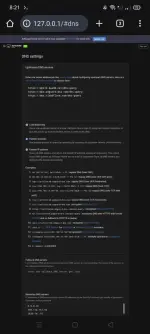
- Tap Test Stream Kung Walang error click apply
- kuha kayo d2 upstream dns Nyo
You do not have permission to view the full content of this post. Log in or register now.
Kung Di maka browse sa Searching Engines
- Tap tatlong linya sa taas tapos
Tap Settings then General Settings
uncheck Use Safe Search
- Kung di maka browse ng P*rn sites
uncheck AdGuard Parental Control web service
Kung Gusto Nyo Mag Add ng DNS Blocklist
- Tap Tatlong Linya Sa Taas
-Fiters tapos DNS Blocklist
Mag Lagay kau kung Anong Gusto nyo
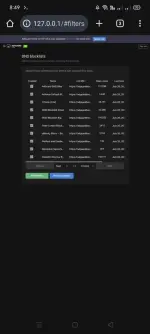
11. Kung Gusto Gamitin AdGuard Home sa Router nyo
- Pumunta sa Log-in Site Ng Router Tapos DHCP at Mag Add ng Static IP
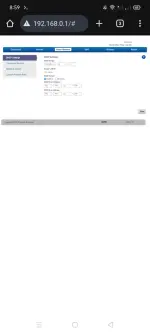
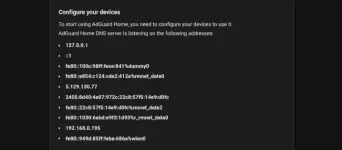
-Kung Walang Static IP sa DHCP ng Router Nyo Gaya Saken
Pumunta Sa AdGuard Home Tap tatlong linya sa Taas
ng Router Icopy nyo sa DHCP ng Adguard
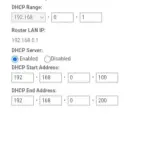
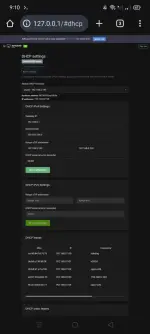
Tap Save Configuration
Tap Check for DHCP servers then Enable DHCP Server
Tapos Disable Nyo lang DHCP Sa Router nyo
Di Ma Bloblock Ads Sa Nag Ho Host Dun lang Po sa Mga Ibang Devices
Kung I ooff AdGuard Home Make sure na
ienable DHCP sa Router
Kung Sa Naka Static IP sa Router
Off Lang Po Static IP or Delete
AdGuard Home turn off
Go to Termux
ctrl+c
AdGuard Home turn on
Go to Termux and type
On
Off
nyo lang wifi ng device yung dating naka konek
Wag i oon off wifi ng host
THATS ALL FOLKS
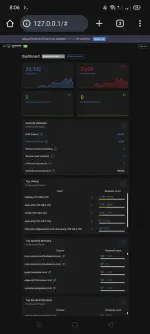
- You do not have permission to view the full content of this post. Log in or register now.
2.Open Termux and type this command
- apt update
- termux-setup-storage
- pkg install wget -y
- pkg install tar -y
- pkg install tsu -y
3.Download AdGuard Home Use This Command
AdGuard Home For arm64 Devices
- wget You do not have permission to view the full content of this post. Log in or register now.
AdGuard Home For 32bit Devices
- wget You do not have permission to view the full content of this post. Log in or register now.
5.Pagkatapos idownload extract ang file
Use this Command
- tar xvf <package Name>
6.Pagkatapos I extract I open ang file
Use this Command
- tsu
- ./AdGuardHome/AdGuardHome
7.Pumunta sa Browser at itype ang
- 127.0.0.1:3000
8.Set-up AdGuard Home And Log-in
Note: Wag nyo Po iupdate AdGuard Home nyo
9.Tap nyo yung tatlong linya sa taas at Tap Settings at DNS settings
- Set up Upstream DNS Server
- Tap Test Stream Kung Walang error click apply
- kuha kayo d2 upstream dns Nyo
You do not have permission to view the full content of this post. Log in or register now.
Kung Di maka browse sa Searching Engines
- Tap tatlong linya sa taas tapos
Tap Settings then General Settings
uncheck Use Safe Search
- Kung di maka browse ng P*rn sites
uncheck AdGuard Parental Control web service
- Check nyo lang
- Block Domains Using Filters And Hosts Files
- Use Adguard Browsing security web service
Kung Gusto Nyo Mag Add ng DNS Blocklist
- Tap Tatlong Linya Sa Taas
-Fiters tapos DNS Blocklist
Mag Lagay kau kung Anong Gusto nyo
11. Kung Gusto Gamitin AdGuard Home sa Router nyo
- Pumunta sa Log-in Site Ng Router Tapos DHCP at Mag Add ng Static IP
- Tapos Pumunta Sa AdGuard
- Tap Tatlong Linya sa taas
- Setup Guide Dun nyo Kunin Static IP nyo
-Kung Walang Static IP sa DHCP ng Router Nyo Gaya Saken
Pumunta Sa AdGuard Home Tap tatlong linya sa Taas
- Settings
- DHCP Settings
ng Router Icopy nyo sa DHCP ng Adguard
Tap Save Configuration
Tap Check for DHCP servers then Enable DHCP Server
Tapos Disable Nyo lang DHCP Sa Router nyo
Di Ma Bloblock Ads Sa Nag Ho Host Dun lang Po sa Mga Ibang Devices
Kung I ooff AdGuard Home Make sure na
ienable DHCP sa Router
Kung Sa Naka Static IP sa Router
Off Lang Po Static IP or Delete
AdGuard Home turn off
Go to Termux
ctrl+c
AdGuard Home turn on
Go to Termux and type
- tsu
- ./AdGuardHome/AdGuardHome
On
Off
nyo lang wifi ng device yung dating naka konek
Wag i oon off wifi ng host
THATS ALL FOLKS