❓ Help Surf2Sawa/S2S Internet Reactivation HELP

-Bypass-

Fanatic
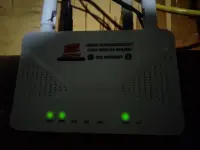
Mga paps, paano po ba mag-reactivate ng S2S Internet? Naka-steady ang phone pero walang INT LIGHT. Ipapa-reactivate ko sana kaso walang nagre-reply sa tech support nila online, at kung tao-tao lang sa Facebook, may bayad din. Kaso short din kasi kababayad lang sa internet.

Baka alam niyo ang website kung saan ma-rereactivate ang S2S account. 🙁

IMG_20250706_180920.webp
 
Hello! I understand your concern about reactivating your S2S Internet. To reactivate your S2S Internet service, you typically need to access the Surf2Sawa website and follow the reactivation process outlined there. Here are the general steps you can take to reactivate your S2S Internet:

1. Visit the Surf2Sawa website: Go to the official Surf2Sawa website provided by your service provider. Look for the section related to account management or reactivation.

2. Log in to your account: Enter your credentials (phone number, password, etc.) to log in to your account. If you forgot your password, there should be an option to reset it.

3. Check for reactivation options: Once logged in, look for the section that allows you to reactivate your S2S Internet service. This may involve selecting a plan, making a payment, or entering a reactivation code.

4. Follow the prompts: Follow the on-screen instructions carefully to complete the reactivation process. Make sure to double-check the details you provide to avoid any errors.

5. Restart your phone: After completing the reactivation process, restart your phone to allow the changes to take effect. Check if the INT LIGHT indicator appears to confirm that your S2S Internet service is active.

If you encounter any issues during the reactivation process or if the INT LIGHT still doesn't appear after reactivation, you may need to reach out to Surf2Sawa customer support for further assistance. It's unfortunate that you're having trouble getting a response from their online tech support, but keep trying or consider visiting a physical store for help if needed.

Remember to prioritize your budget and expenses, especially if there are additional charges for support on platforms like Facebook. Hopefully, these steps will help you reactivate your S2S Internet successfully. Good luck!
 
try mo i contact yung installer or yung contractor na nag install sa S2S nyo boss kasi usually sa S2S hindi na dadaan sa ticket ni converge kasi pwede na mag rekta if ever may contact ka sa mga contractor na nagkabit sa S2S internet nyo
 
agent ng s2s sa lugar nyo
No responds din boss ih nakaka bwisit nanga kung alam kulang website ng activation ng s2s hindi kunayan sila kukulitin

try mo i contact yung installer or yung contractor na nag install sa S2S nyo boss kasi usually sa S2S hindi na dadaan sa ticket ni converge kasi pwede na mag rekta if ever may contact ka sa mga contractor na nagkabit sa S2S internet nyo
Yes boss at first yan din ginawa ko pero pag nagka 2nd problem dedma na sila nakaka bwisit talaga

San po ba makakahanap ng agent para sa lugar ko po? mandaluyong area po ako
Usually boss yong nag install lang sa net mo yon din yong agent at tech
 
No responds din boss ih nakaka bwisit nanga kung alam kulang website ng activation ng s2s hindi kunayan sila kukulitin


Yes boss at first yan din ginawa ko pero pag nagka 2nd problem dedma na sila nakaka bwisit talaga


Usually boss yong nag install lang sa net mo yon din yong agent at tech
d ka nag try sa globe prepaid boss ?
same pla tayo ng unit kaurat d magamit ang lan
 
try mo nalang boss mangontrata ng ibang tech para mag fix ng issue nyo. Just don't forget the golden rule: no service - no pay
Oo nga boss need talaga hulugan ng pera para gumalaw tong mga technician lintik nayan

d ka nag try sa globe prepaid boss ?
same pla tayo ng unit kaurat d magamit ang lan
Nasa isip ko yong Gfibr 699 Per month siguro mas okay service nila hindi pawala² unlike ni S2S daming issue. Pero as of now nag okay na yong S2S namin need lang tanggalin sa saksakan mga 6h tapos saksak ulit para ma okay
 
Nag reset kaba boss

Oo nga boss need talaga hulugan ng pera para gumalaw tong mga technician lintik nayan


Nasa isip ko yong Gfibr 699 Per month siguro mas okay service nila hindi pawala² unlike ni S2S daming issue. Pero as of now nag okay na yong S2S namin need lang tanggalin sa saksakan mga 6h tapos saksak ulit para ma okay
Yung sakin 24 hours boss since December ko pa gamit to 1 time lang ako nawala ng internet nung nag maintenance converge , saka yung nag reset pala ako pero goods naman na fix ko din
 
Nag reset kaba boss


Yung sakin 24 hours boss since December ko pa gamit to 1 time lang ako nawala ng internet nung nag maintenance converge , saka yung nag reset pala ako pero goods naman na fix ko din
As of now boss okay na yong sakin. Bali ang naging issue lang nung unang kabit ay nawala yong WIFI SSID. Hindi talaga sya ma scan sa kahit anong device at naka off din ang WiFi indicator sa modem. Kaya pinalitan ng Tech ang modem kasi sira daw, pagkatapos non na okay na.

Pangalawang naging issue ko ay nong malakas ang ulan tapos kumidlat pagka kidlat matik brownout tapos after 10mins bumalik na ang kuryente pero yong S2S Modem naka RED LOSS na after 15h red loss parin kaya ginawa ko tinanggal ko sa saksakan tapos pagka kinabukasan kuna sinaksak ulit, tapos yon na okay na.

As long as hindi naka open ang Napbox kong saan to naka kabit okay lang si s2s
 

About this Thread

  • 12
    Replies
  • 1K
    Views
  • 5
    Participants
Last reply from:
-Bypass-

Trending Topics

Online now

Members online
1,078
Guests online
1,008
Total visitors
2,086

Forum statistics

Threads
2,273,682
Posts
28,950,867
Members
1,234,918
Latest member
JJMMM21
Back
Top