 PH
PH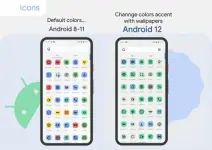
Requirements: 8.0 and up
Overview: Inspired by new android 12, these Adaptive Icons were created in style of Material You.
They have a linear icon and background in various colors. They also change shape.
Android 8-11: icons are pastel colors because there is no Monet support.
Android 12+: colors of icons and widgets depends on wallpaper and use three MaterialYou colors.
Notes (android 12+):
After changing wallpaper, you need to apply icon pack again to change color of the icons.
Available in application:
- Adaptive 20k+ icons.
- Clock Widgets.
- Exclusive thematic Wallpapers.
How to use:
How do I change the colors of the icons?
!Colors change ONLY Android 12+! After changing wallpaper / accent system, you need to reapply icon pack (or apply another icon pack, and then immediately this one).
Where can I find widgets?
On your home screen, long press and select "Widgets", Find "Pix Material You" in list. Typical way, like accessing regular device widgets.
Recommended use Launchers:
- Nova Launcher (Change Colors Avtomaticaly in A12+ (beta 8.0.4+)).
- Smart Launcher (Change Colors Avtomaticaly in A12+ (beta)).
- Hyperion (Change Colors Avtomaticaly in A12+ (beta)).
- Niagara Launcher (Change Colors Avtomaticaly in A12+).
- AIO Launcher (Change Colors Avtomaticaly in A12+).
- Stario Launcher (Change Colors Avtomaticaly in A12+).
- Action Launcher.
- Ruthless Launcher.
- Lawnchair.
- And other.
What's New:
- Added "Icon Widget" for Pixel.
- Redesigned some icons.
- Fixed non apply icons.
This app has no advertisements
Download
Download