 PH
PH
Windows (x64) | File size: 44.1 MB
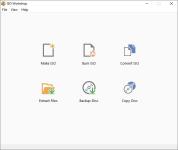
ISO Workshop is a application specifically designed to facilitate disc image management, conversion and burning operations. The program has a very simple user interface and enables you to make ISO images, extract specific files and folders from disc images, create disc backups by copying disc contents to an ISO or BIN image file, convert different disc image files into the ISO or BIN format and, of course, burn ISO and CUE images to blank discs.
Make standard and bootable ISO images
Extract files and folders from disc image
Copy disc to disc image (including Audio CD)
Convert disc image to ISO or BIN format
Burn ISO or CUE/BIN image to disc
Supports common formats (ISO, CUE, BIN, NRG, MDF, CDI etc.)
Supports CD-R/RW, DVD-R/RW, DVD+R/RW, DVD+R DL, BD-R/RE
Supports verification of written files
Benefits:
Supports all types of CD/DVD/BD Recorders
Super easy-to-use user interface
Small installation file size
Very low CPU resource usage
Free for personal and commercial use
Screen :
What's New
Spoiler contents are visible only to Established Members.
HOMEPAGE
Code:
https://www.glorylogic.com/You do not have permission to view the full content of this post. Log in or register now.
You do not have permission to view the full content of this post. Log in or register now.
You do not have permission to view the full content of this post. Log in or register now.