 PH
PH-
Welcome to PHCorner Forums! Sign up for free to unlock full access and exclusive privileges, including:
- Asking questions about computer and mobile issues
- Discovering internet tips for your mobile network and computer
You are using an out of date browser. It may not display this or other websites correctly.
You should upgrade or use an alternative browser.
You should upgrade or use an alternative browser.
❓ Help Router with time scheduling
- Thread starter Erzie
- Start date
-
- Tags
- router scheduling time with
- Status
- Not open for further replies.
Solution
House 1 Main: PLDT MODEM
House 2: RE315 CONNECTED SA PLDT modem VIA WIRELESS REPEATER
House 2: AX1500 COCONNECT SA RE315 VIA LAN CABLE
yes, pwede paganahin. caveat is double-NAT (if you want Time Controls on the AX1500), as mentioned above.
make sure the AX1500 is serving a different subnet to the main modem/router.
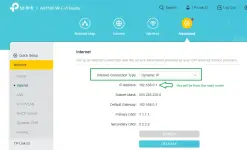
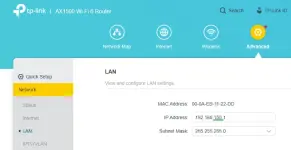
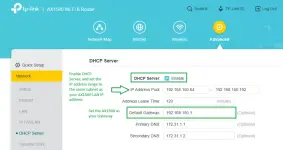
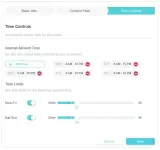
Gagana parin po ba kahit yung main na network namin is wireless wifi repeater, parang ganito ang setup Tplink re315 to tplink ax1500 via lan cable. Yung re315 kasi naka connect sa tito ko kapitbahay namin andon yung main router.no idea about the ones provided by the ISP/RSP, pero halos lahat naman ng 3rd party routers me ganitong capability.
tp-link ax1500 has this:
View attachment 3718816
well, as long as you setup the AX1500 as a router, gagana ito. the disadvantage is you will have a double NAT situation. it won't be an issue unless you have a server (open to the world), or hardcore gamers in the house. considering that you seem to be ok with a wireless repeater, i think you'll be alright.
alternatively, sa main router mo i-configure 'yung Time Controls.
out of curiosity, tama ba ang pagkakaintindi ko sa setup mo?
[house 1 (main router)] - [house 2 (wifi extender)] - [house 2 (clients)]
kung tama, anong speed ng plan sa main router, and what speed do you get in house 2?
alternatively, sa main router mo i-configure 'yung Time Controls.
out of curiosity, tama ba ang pagkakaintindi ko sa setup mo?
[house 1 (main router)] - [house 2 (wifi extender)] - [house 2 (clients)]
kung tama, anong speed ng plan sa main router, and what speed do you get in house 2?
100mbps po and nakukuha ko naman po lahat ng speed sa house 2 gamit yung wireless extenderwell, as long as you setup the AX1500 as a router, gagana ito. the disadvantage is you will have a double NAT situation. it won't be an issue unless you have a server (open to the world), or hardcore gamers in the house. considering that you seem to be ok with a wireless repeater, i think you'll be alright.
alternatively, sa main router mo i-configure 'yung Time Controls.
out of curiosity, tama ba ang pagkakaintindi ko sa setup mo?
[house 1 (main router)] - [house 2 (wifi extender)] - [house 2 (clients)]
kung tama, anong speed ng plan sa main router, and what speed do you get in house 2?
gagana po kaya yon sir?well, as long as you setup the AX1500 as a router, gagana ito. the disadvantage is you will have a double NAT situation. it won't be an issue unless you have a server (open to the world), or hardcore gamers in the house. considering that you seem to be ok with a wireless repeater, i think you'll be alright.
alternatively, sa main router mo i-configure 'yung Time Controls.
out of curiosity, tama ba ang pagkakaintindi ko sa setup mo?
[house 1 (main router)] - [house 2 (wifi extender)] - [house 2 (clients)]
kung tama, anong speed ng plan sa main router, and what speed do you get in house 2?
Setup
House 1 Main: PLDT MODEM
House 2: RE315 CONNECTED SA PLDT modem VIA WIRELESS REPEATER
House 2: AX1500 COCONNECT SA RE315 VIA LAN CABLE
House 1 Main: PLDT MODEM
House 2: RE315 CONNECTED SA PLDT modem VIA WIRELESS REPEATER
House 2: AX1500 COCONNECT SA RE315 VIA LAN CABLE
yes, pwede paganahin. caveat is double-NAT (if you want Time Controls on the AX1500), as mentioned above.
make sure the AX1500 is serving a different subnet to the main modem/router.
Message po ako sainyo if diko po mapagana pag dating ng routeryes, pwede paganahin. caveat is double-NAT (if you want Time Controls on the AX1500), as mentioned above.
make sure the AX1500 is serving a different subnet to the main modem/router.
View attachment 3721161
View attachment 3721162
View attachment 3721163
- Status
- Not open for further replies.
Similar threads
-
Slotter Real-Time Appointment Scheduling and Provider Management Platform
- Started by PHC - Giyu
- Replies: 7
About this Thread
-
6Replies
-
813Views
-
2Participants
Last reply from:
Erzie
Erzie
New Topics
-
Facebook face ver failed, IG Deactivate
- Started by mhiemabhels
- Replies: 0
- ❓ Internet Questions
-
Paturo mga boss
- Started by austin817
- Replies: 2
- ❓ Internet Questions
-
Pahelp mga boss pahingi po ng pisofi image 4.8.8v for rasberry pi
- Started by ayeman
- Replies: 0
- ❓ Internet Questions
-
Pahelp po SheerID ng gemini
- Started by ambitiousnoob
- Replies: 0
- ❓ Internet Questions
-
Ask abt Gfiber prepaid
- Started by LeBlanc
- Replies: 0
- ❓ Internet Questions
-
Cctv camera (same wifi)
- Started by oneal_31
- Replies: 2
- ❓ Internet Questions
-
New User Here, Help me
- Started by jaleeebean
- Replies: 0
- ❓ Internet Questions
-
Disable LOS Blinking HG8415X6-10
- Started by Shannun
- Replies: 0
- ❓ Internet Questions
-
Baka meron kayo solution tiktok paylater?
- Started by White chocolate
- Replies: 2
- ❓ Internet Questions
-
B535-932 firmware downgrade
- Started by Munchlax__
- Replies: 1
- ❓ Internet Questions
Trending Topics
Online now
- Members online
- 1,112
- Guests online
- 8,168
- Total visitors
- 9,280