 PH
PHHow to clear the FPLMN (forbidden network) list on a SIM
The FPLMN list on a SIM tells a device which networks it can’t connect to. It reduces failed connection attempts but sometimes needs to be cleared; here’s how.
The FPLMN list (aka forbidden network list) is stored on a SIM and tells a device which networks it can’t connect to.
The forbidden list reduces attempts to connect to networks that aren’t available, but sometimes it needs to be cleared when debugging.
Debugging
21.04.2023
How to clear the FPLMN (forbidden network) list on a SIM
The FPLMN list on a SIM tells a device which networks it can’t connect to. It reduces failed connection attempts but sometimes needs to be cleared; here’s how.
jason-godfrey-avatar
Jason Godfrey
Customer Success Manager at Onomondo
How to clear the FPLMN list
The FPLMN list (aka forbidden network list) is stored on a SIM and tells a device which networks it can’t connect to.
The forbidden list reduces attempts to connect to networks that aren’t available, but sometimes it needs to be cleared when debugging.
Table of Contents
How does the FPLMN list work?
How can the FPLMN list cause problems?
How do I clear the FPLMN (forbidden network) list?
What if I don’t have access to AT commands?
How does the FPLMN list work?
FPLMN lists are helpful because they tell a device which networks it shouldn’t attempt to connect to. This shortens the time it takes to connect because the device won’t look for networks that aren’t available.
The FPLMN list is a dynamic list that is maintained by the device’s cellular module.
When a module attempts to connect to a network and is denied, it will write that network to the FPLMN list on the SIM, thus preventing it from attempting to connect to that network again.
How can the FPLMN list cause problems?
If a device is turned on when a SIM is not activated or if a device goes into a country that is not on the network safe list (aka allow list), the device will write all local networks it tries to connect to to the FPLMN list.
If the SIM has since been activated and you are still not seeing a connection, you should try clearing the FPLMN list.
This is because the device will not attempt to connect to networks in the FPLMN list while the SIM is in automatic network selection mode.
The SIMs in your IoT devices can assist the radio module in optimising how they scan and attach to networks.
You can achieve this by allowing the radio module to choose the best network in a given area, a function that involves PLMN lists on a SIM.
With automatic network selection, you can also shorten attach times, which will reduce the power consumption of your device.

What is a PLMN?
PLMN stands for Public Land Mobile Network and is a mobile operator’s cellular network in a specific country. Each PLMN has a unique PLMN code that combines an MCC (Mobile Country Code) and the operators’ MNC (Mobile Network Code).
When you receive a SIM from an operator, it will often have PLMN lists on it. These lists are a way to prioritise networks you would like to use on the SIM.
Typically, PLMN lists are based on commercial agreements. So, for example, an operator will have contracts in various countries so your SIM can connect to specific networks when you roam outside their network.

We take a different approach and don’t add PLMN lists to SIMs by default to avoid weak signal selection and reduce registration times.
Instead, we simply allow the radio module to choose a strong enough network according to 3GPP standards.
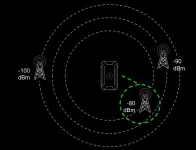
Here’s an example of a device automatically selecting a good connection:
An example of a poor connection.
We take a different approach and don’t add PLMN lists to SIMs by default to avoid weak signal selection and reduce registration times.
Instead, we simply allow the radio module to choose a strong enough network according to 3GPP standards.
Here’s an example of a device automatically selecting a good connection:

The SIMs in your You do not have permission to view the full content of this post. Log in or register now. can assist the radio module in optimising how they scan and attach to networks.
You can achieve this by allowing the radio module to choose the best network in a given area, a function that involves PLMN lists on a SIM.
With automatic network selection, you can also shorten attach times, which will reduce the power consumption of your device.
When you receive a SIM from an operator, it will often have PLMN lists on it. These lists are a way to prioritise networks you would like to use on the SIM.
Typically, PLMN lists are based on commercial agreements. So, for example, an operator will have contracts in various countries so your SIM can connect to specific networks when you roam outside their network. You can read a guide on how to add user defined PLMN lists to your SIMs here: You do not have permission to view the full content of this post. Log in or register now..
A negative consequence of PLMN lists is that your device could prioritise networks with weak signals over networks with strong signals.
Here’s an example of a device prioritising a poor connection:
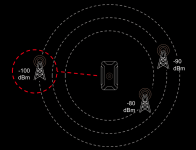 An example of a poor connection.
We take a different approach and don’t add PLMN lists to SIMs by default to avoid weak signal selection and reduce registration times.
Instead, we simply allow the radio module to choose a strong enough network according to 3GPP standards.
Here’s an example of a device automatically selecting a good connection:
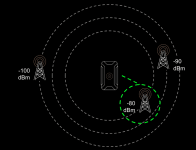 An example of a good connection with automatic network selection.
If there are no PLMN lists, 3GPP states that the radio module should attach to a strong enough network (the signal strength that defines a “strong enough network” is called -85 dBm).
Onomondo SIMs do not dictate what network to connect to. Instead, network switching is determined by the modem’s specific configuration and settings.
Here’s the full explanation of how the PLMN records are used during switch-on according to 3GPP TS 23.122:
4.4.3 PLMN selection<br><br>The registration on the selected PLMN and the location registration are only necessary if the MS is capable of services which require registration. Otherwise, the PLMN selection procedures are performed without registration.<br><br>4.4.3.1 At switch on or recovery from lack of coverage<br><br>At switch on, the MS selects and attempts to perform a Location Registration on the registered PLMN, if it exists. On recovery from lack of coverage, the MS selects the registered PLMN (if it exists) and, if necessary (see subclause 4.6.2) attempts to perform a Location Registration.If successful registration is achieved, the MS indicates the selected PLMN.<br>If there is no registered PLMN, or if registration is not possible due to the PLMN being unavailable or registration failure, the MS follows one of the following two procedures depending on its operating mode.<br><br>A) Automatic Network Selection Mode Procedure<br><br>The MS selects and attempts registration on other PLMNs, if available and allowable, in all of its bands of operation in the following order:i) HPLMN (if not previously selected);<br>ii) each PLMN in the "PLMN Selector" data field in the SIM (in priority order);<br>iii) other PLMNs with received signal level above 85 dBm in random order;<br>iv) all other PLMNs in order of decreasing signal strength.
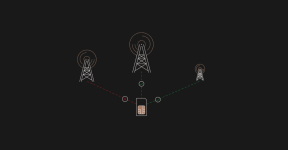
Here’s what that process looks like:
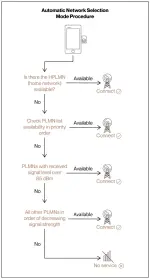
This lack of a PLMN list ensures that we will always connect to the allowed network with the strongest signal in a given location.
sim card info network
Another essential SIM list to keep in mind is the FPLMN list, aka forbidden networks.
The FPLMN list is a dynamic list that is maintained by devices. In automatic selection mode, networks are added to the FPLMN list when an attempt to connect is denied. This prevents the device from trying to connect to that network again. Keep in mind, this is with exceptions; according to 3GPP TS 23.122, a network won’t be added to the FPLMN if it’s on the EHPLMN or HPLMN lists ((equivalent) home network lists) and networks on the FPLMN can be selected when the device is in manual selection mode, for example.
It’s vital that you are aware of FPLMN as it can interfere with registration times. We have, for example, seen networks added to FPLMN lists by devices when a device has tried to connect to networks with unactivated SIM.
In such cases, you’ll want to clear the FPLMN list using AT commands.
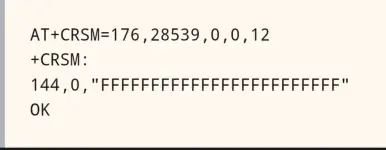
The AT+CRSM command tells the SIM to give us the FPLMN datafile (28539) in binary (176). If you get any response other than 24 Fs (the list’s data prefix) as shown above, then the FPLMN needs to be cleared.
To clear the FPLMN list, you can run the update binary (214) AT+CRSM command with 24 F’s:
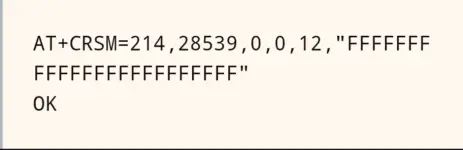
This will set the list back to the prefix only, meaning that the FPLMN list is clear.
Warning: Some cellular modules need to enter a specific mode before clearing the list. Please consult your hardware manual beforehand for information on specific settings – and please remember to change it back to normal operation afterwards.
Manual network selection with AT+COPS
Another way to remove a network from the FPLMN list is to use manual selection mode. Most modules allow manual network connection in their configuration settings.
Run the manual network selection AT command on the forbidden networks:

During manual selection, the module will not look at the FPLMN list. If a successful data connection is made, the module will clear the network from the SIM’s FPLMN list.
Warning: A few cellular modules will not attempt to manually connect to a forbidden network. Please consult the manufacturer’s AT Command Manual for more information
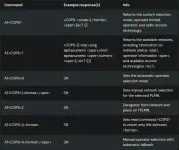
You can read a full overview of the network selection command
The AT+COPS is an AT command for operator selection.
This article is a practical overview of how to use the command.
AT+COPS?
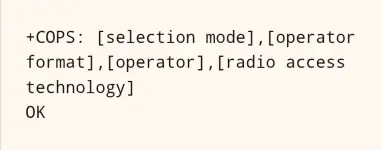
The read command AT COPS? returns the current mode, the registered operator, and radio access technology.
The response will have this syntax:
An example response is:
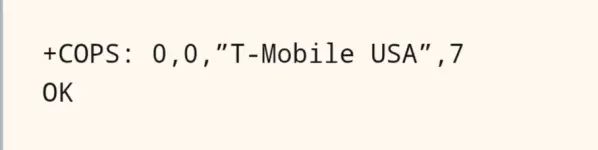
The selection mode is 0, which means automatic, and the radio access technology is 7, which means E-UTRAN, the identifier for LTE.
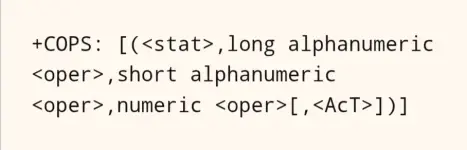
The response format:
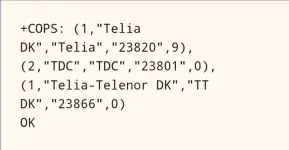
Here’s an example response:
The AT+COPS is an AT command for operator selection.
This article is a practical overview of how to use the command.
The response will have this syntax:
An example response is:
The selection mode is 0, which means automatic, and the radio access technology is 7, which means E-UTRAN, the identifier for LTE.
The response format:
Here’s an example response:
If you get a result that looks like this: “+COPS: ,,(0,1,2,3,4),(0,1,2)”, then unfortunately your device has no available networks to connect to. Check the bands/technologies the device can connect to and a coverage map, if available. You do not have permission to view the full content of this post.
Log in or register now.. Local base station databases or coverage maps from local providers are, however, usually better.
Some modems are set to automatic network selection by default and don’t need to be set manually, and some modules have their own automatic selection mode. Consult your specific modem’s documentation for more information.
You do not have permission to view the full content of this post. Log in or register now.
You do not have permission to view the full content of this post. Log in or register now.
The FPLMN list on a SIM tells a device which networks it can’t connect to. It reduces failed connection attempts but sometimes needs to be cleared; here’s how.
The FPLMN list (aka forbidden network list) is stored on a SIM and tells a device which networks it can’t connect to.
The forbidden list reduces attempts to connect to networks that aren’t available, but sometimes it needs to be cleared when debugging.
Debugging
21.04.2023
How to clear the FPLMN (forbidden network) list on a SIM
The FPLMN list on a SIM tells a device which networks it can’t connect to. It reduces failed connection attempts but sometimes needs to be cleared; here’s how.
jason-godfrey-avatar
Jason Godfrey
Customer Success Manager at Onomondo
How to clear the FPLMN list
The FPLMN list (aka forbidden network list) is stored on a SIM and tells a device which networks it can’t connect to.
The forbidden list reduces attempts to connect to networks that aren’t available, but sometimes it needs to be cleared when debugging.
Table of Contents
How does the FPLMN list work?
How can the FPLMN list cause problems?
How do I clear the FPLMN (forbidden network) list?
What if I don’t have access to AT commands?
How does the FPLMN list work?
FPLMN lists are helpful because they tell a device which networks it shouldn’t attempt to connect to. This shortens the time it takes to connect because the device won’t look for networks that aren’t available.
The FPLMN list is a dynamic list that is maintained by the device’s cellular module.
When a module attempts to connect to a network and is denied, it will write that network to the FPLMN list on the SIM, thus preventing it from attempting to connect to that network again.
How can the FPLMN list cause problems?
If a device is turned on when a SIM is not activated or if a device goes into a country that is not on the network safe list (aka allow list), the device will write all local networks it tries to connect to to the FPLMN list.
If the SIM has since been activated and you are still not seeing a connection, you should try clearing the FPLMN list.
This is because the device will not attempt to connect to networks in the FPLMN list while the SIM is in automatic network selection mode.
The SIMs in your IoT devices can assist the radio module in optimising how they scan and attach to networks.
You can achieve this by allowing the radio module to choose the best network in a given area, a function that involves PLMN lists on a SIM.
With automatic network selection, you can also shorten attach times, which will reduce the power consumption of your device.
What is a PLMN?
PLMN stands for Public Land Mobile Network and is a mobile operator’s cellular network in a specific country. Each PLMN has a unique PLMN code that combines an MCC (Mobile Country Code) and the operators’ MNC (Mobile Network Code).
When you receive a SIM from an operator, it will often have PLMN lists on it. These lists are a way to prioritise networks you would like to use on the SIM.
Typically, PLMN lists are based on commercial agreements. So, for example, an operator will have contracts in various countries so your SIM can connect to specific networks when you roam outside their network.
We take a different approach and don’t add PLMN lists to SIMs by default to avoid weak signal selection and reduce registration times.
Instead, we simply allow the radio module to choose a strong enough network according to 3GPP standards.
Here’s an example of a device automatically selecting a good connection:
An example of a poor connection.
We take a different approach and don’t add PLMN lists to SIMs by default to avoid weak signal selection and reduce registration times.
Instead, we simply allow the radio module to choose a strong enough network according to 3GPP standards.
Here’s an example of a device automatically selecting a good connection:
- You do not have permission to view the full content of this post. Log in or register now.
Coverage
23.06.2023
Improve coverage with automatic network selection
Read this article to find out how leaving PLMN lists blank reduces SIM registration times, saves power, and reduces the chances of a poor-quality connection.Jason Godfrey
Customer Success Manager at OnomondoThe SIMs in your You do not have permission to view the full content of this post. Log in or register now. can assist the radio module in optimising how they scan and attach to networks.
You can achieve this by allowing the radio module to choose the best network in a given area, a function that involves PLMN lists on a SIM.
With automatic network selection, you can also shorten attach times, which will reduce the power consumption of your device.
Table of Contents
- You do not have permission to view the full content of this post. Log in or register now.
- You do not have permission to view the full content of this post. Log in or register now.
- You do not have permission to view the full content of this post. Log in or register now.
- You do not have permission to view the full content of this post. Log in or register now.
- You do not have permission to view the full content of this post. Log in or register now.
What is a PLMN?
PLMN stands for Public Land Mobile Network and is a mobile operator’s cellular network in a specific country. Each PLMN has a unique PLMN code that combines an MCC (Mobile Country Code) and the operators’ MNC (Mobile Network Code).When you receive a SIM from an operator, it will often have PLMN lists on it. These lists are a way to prioritise networks you would like to use on the SIM.
Typically, PLMN lists are based on commercial agreements. So, for example, an operator will have contracts in various countries so your SIM can connect to specific networks when you roam outside their network. You can read a guide on how to add user defined PLMN lists to your SIMs here: You do not have permission to view the full content of this post. Log in or register now..
A negative consequence of PLMN lists is that your device could prioritise networks with weak signals over networks with strong signals.
Here’s an example of a device prioritising a poor connection:
An example of a poor connection.We take a different approach and don’t add PLMN lists to SIMs by default to avoid weak signal selection and reduce registration times.
Instead, we simply allow the radio module to choose a strong enough network according to 3GPP standards.
Here’s an example of a device automatically selecting a good connection:
An example of a good connection with automatic network selection.Automatic network selection
On the SIM, PLMN lists are records for storing priorities of PLMN’s and corresponding technologies. You do not have permission to view the full content of this post. Log in or register now. defines HPLMN, HPLMNwACT, EHPLMN, PLMNsel, PLMNwACT, OPLMNwACT, and others.If there are no PLMN lists, 3GPP states that the radio module should attach to a strong enough network (the signal strength that defines a “strong enough network” is called -85 dBm).
Onomondo SIMs do not dictate what network to connect to. Instead, network switching is determined by the modem’s specific configuration and settings.
Here’s the full explanation of how the PLMN records are used during switch-on according to 3GPP TS 23.122:
4.4.3 PLMN selection<br><br>The registration on the selected PLMN and the location registration are only necessary if the MS is capable of services which require registration. Otherwise, the PLMN selection procedures are performed without registration.<br><br>4.4.3.1 At switch on or recovery from lack of coverage<br><br>At switch on, the MS selects and attempts to perform a Location Registration on the registered PLMN, if it exists. On recovery from lack of coverage, the MS selects the registered PLMN (if it exists) and, if necessary (see subclause 4.6.2) attempts to perform a Location Registration.If successful registration is achieved, the MS indicates the selected PLMN.<br>If there is no registered PLMN, or if registration is not possible due to the PLMN being unavailable or registration failure, the MS follows one of the following two procedures depending on its operating mode.<br><br>A) Automatic Network Selection Mode Procedure<br><br>The MS selects and attempts registration on other PLMNs, if available and allowable, in all of its bands of operation in the following order:i) HPLMN (if not previously selected);<br>ii) each PLMN in the "PLMN Selector" data field in the SIM (in priority order);<br>iii) other PLMNs with received signal level above 85 dBm in random order;<br>iv) all other PLMNs in order of decreasing signal strength.
Here’s what that process looks like:
Network lists
As mentioned earlier, we keep PLMN lists blank by default at Onomondo. Otherwise, we operate with You do not have permission to view the full content of this post. Log in or register now. which are controlled in the Onomondo Mobile Core. These lists are typically created by users in the You do not have permission to view the full content of this post. Log in or register now. and tell the device which networks it can connect to without the order of priority that PLMN lists have.This lack of a PLMN list ensures that we will always connect to the allowed network with the strongest signal in a given location.
sim card info network
Another essential SIM list to keep in mind is the FPLMN list, aka forbidden networks.
The FPLMN list is a dynamic list that is maintained by devices. In automatic selection mode, networks are added to the FPLMN list when an attempt to connect is denied. This prevents the device from trying to connect to that network again. Keep in mind, this is with exceptions; according to 3GPP TS 23.122, a network won’t be added to the FPLMN if it’s on the EHPLMN or HPLMN lists ((equivalent) home network lists) and networks on the FPLMN can be selected when the device is in manual selection mode, for example.
It’s vital that you are aware of FPLMN as it can interfere with registration times. We have, for example, seen networks added to FPLMN lists by devices when a device has tried to connect to networks with unactivated SIM.
In such cases, you’ll want to clear the FPLMN list using AT commands.
How do I clear the FPLMN (forbidden network) list?
The following options require knowledge of how to use AT commands on your device. You may need to speak to the manufacturer or supplier if you are unfamiliar with AT commands.Clear the FPLMN list with AT+CRSM
You’ll need access to the device with the SIM in it and be able to run an AT command. You can first check that it needs clearing by running the standard AT command:The AT+CRSM command tells the SIM to give us the FPLMN datafile (28539) in binary (176). If you get any response other than 24 Fs (the list’s data prefix) as shown above, then the FPLMN needs to be cleared.
To clear the FPLMN list, you can run the update binary (214) AT+CRSM command with 24 F’s:
This will set the list back to the prefix only, meaning that the FPLMN list is clear.
Warning: Some cellular modules need to enter a specific mode before clearing the list. Please consult your hardware manual beforehand for information on specific settings – and please remember to change it back to normal operation afterwards.
Manual network selection with AT+COPS
Another way to remove a network from the FPLMN list is to use manual selection mode. Most modules allow manual network connection in their configuration settings.
Run the manual network selection AT command on the forbidden networks:
During manual selection, the module will not look at the FPLMN list. If a successful data connection is made, the module will clear the network from the SIM’s FPLMN list.
Warning: A few cellular modules will not attempt to manually connect to a forbidden network. Please consult the manufacturer’s AT Command Manual for more information
You can read a full overview of the network selection command
The AT+COPS is an AT command for operator selection.
This article is a practical overview of how to use the command.
AT+COPS?
The read command AT COPS? returns the current mode, the registered operator, and radio access technology.
The response will have this syntax:
An example response is:
The selection mode is 0, which means automatic, and the radio access technology is 7, which means E-UTRAN, the identifier for LTE.
AT+COPS=?
To get the list of available operators, use the test command AT+COPS=?.The response format:
Here’s an example response:
- You do not have permission to view the full content of this post. Log in or register now.
The AT+COPS is an AT command for operator selection.
This article is a practical overview of how to use the command.
Table of Contents
- You do not have permission to view the full content of this post. Log in or register now.
- You do not have permission to view the full content of this post. Log in or register now.
- You do not have permission to view the full content of this post. Log in or register now.
- You do not have permission to view the full content of this post. Log in or register now.
- You do not have permission to view the full content of this post. Log in or register now.
- You do not have permission to view the full content of this post. Log in or register now.
- You do not have permission to view the full content of this post. Log in or register now.
- You do not have permission to view the full content of this post. Log in or register now.
- You do not have permission to view the full content of this post. Log in or register now.
- You do not have permission to view the full content of this post. Log in or register now.
- You do not have permission to view the full content of this post. Log in or register now.
Overview
| AT+COPS? | +COPS: <mode>[,<format>,<oper>,[AcT>]] | Returns the current selection mode, operator format, operator, and radio access technology. |
| AT+COPS=? | +COPS: [(<stat>,long alphanumeric <oper>,short alphanumeric <oper>,numeric <oper>[,<AcT>])] | Returns the available networks, including information on network status <stat>, operator information <oper>, and available access technologies <AcT>. |
| AT+COPS=0 | OK | Sets the automatic operator selection mode. |
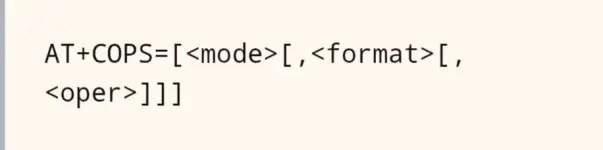
| AT+COPS=1,<format>,<oper> | OK | Sets manual network selection for the selected PLMN. |
| AT+COPS=2 | OK | Deregister from network and place on FPLMN. |
| AT+COPS=3,<format> | OK | Sets read command +COPS? to return only the selected <format>. |
| AT+COPS=4,<format>,<oper> | OK | Manual operator selection with automatic fallback. |
[th]
Command
[/th][th]Example response(s)
[/th][th]Info
[/th]AT+COPS?
The read command AT COPS? returns the current mode, the registered operator, and radio access technology.The response will have this syntax:
Code:
+COPS: [selection mode],[operator format],[operator],[radio access technology]
OK
Code:
+COPS: 0,0,”T-Mobile USA”,7
OKAT+COPS=?
To get the list of available operators, use the test command AT+COPS=?.The response format:
+COPS: [(<stat>,long alphanumeric <oper>,short alphanumeric <oper>,numeric <oper>[,<AcT>])]Here’s an example response:
Code:
+COPS: (1,"Telia DK","Telia","23820",9),(2,"TDC","TDC","23801",0),(1,"Telia-Telenor DK","TT DK","23866",0)
OKAT+COPS=0
The command AT+COPS=0 sets the modem to choose a network operator automatically.Some modems are set to automatic network selection by default and don’t need to be set manually, and some modules have their own automatic selection mode. Consult your specific modem’s documentation for more information.
You do not have permission to view the full content of this post. Log in or register now.
You do not have permission to view the full content of this post. Log in or register now.