 PH
PH-
Welcome to PHCorner Forums! Sign up for free to unlock full access and exclusive privileges, including:
- Asking questions about computer and mobile issues
- Discovering internet tips for your mobile network and computer
You are using an out of date browser. It may not display this or other websites correctly.
You should upgrade or use an alternative browser.
You should upgrade or use an alternative browser.



🤖
🤖
Hello! I can try to help you troubleshoot the issue you're facing in Termux. The error message you provided, "Pair Rip Removal from Clown Tricks to," seems to be a bit unclear. It doesn't match any common error messages in Termux or programming languages that I'm familiar with.
To better understand and troubleshoot the problem, could you please provide more details or context? For example:
1. What command were you running when you encountered this error?
2. Are you working on a specific project or task in Termux?
3. Can you describe the steps you took before the error occurred?
4. Is there any other error message or information displayed along with this message?
The more information you can provide, the easier it will be for me to assist you in resolving the issue. Let me know, and I'll do my best to help you out!
To better understand and troubleshoot the problem, could you please provide more details or context? For example:
1. What command were you running when you encountered this error?
2. Are you working on a specific project or task in Termux?
3. Can you describe the steps you took before the error occurred?
4. Is there any other error message or information displayed along with this message?
The more information you can provide, the easier it will be for me to assist you in resolving the issue. Let me know, and I'll do my best to help you out!
Hello! I can try to help you troubleshoot the issue you're facing in Termux. The error message you provided, "Pair Rip Removal from Clown Tricks to," seems to be a bit unclear. It doesn't match any common error messages in Termux or programming languages that I'm familiar with.
To better understand and troubleshoot the problem, could you please provide more details or context? For example:
1. What command were you running when you encountered this error?
2. Are you working on a specific project or task in Termux?
3. Can you describe the steps you took before the error occurred?
4. Is there any other error message or information displayed along with this message?
The more information you can provide, the easier it will be for me to assist you in resolving the issue. Let me know, and I'll do my best to help you out!
I run this first:
Code:
pkg i python git -y && pip install git+https://github.com/TechnoIndian/RK_Pairip.gitThen this:
Code:
RKPairip -h
🤖
🤖
It seems like you are trying to install a Python package calledI run this first:
Code:pkg i python git -y && pip install git+https://github.com/TechnoIndian/RK_Pairip.git
Then this:
Code:RKPairip -h
RK_Pairip using pip from a specific GitHub repository (https://github.com/TechnoIndian/RK_Pairip.git) and then running the RKPairip command with the -h flag to display help information.Based on the commands you provided, it looks like there might be a typo in the package name. The correct package name should be
RK_Pairip with an underscore (_) instead of RKPairip without the underscore. To resolve the issue, you can try the following steps:
1. Reinstall the package with the correct name:
Bash:
pip install git+https://github.com/TechnoIndian/RK_Pairip.git2. Run the command again with the correct package name:
Bash:
RK_Pairip -hMake sure to use the correct package name with the underscore when running the command. If you continue to encounter issues, please provide any error messages or output that you receive so I can further assist you in troubleshooting the problem.
It seems like you are trying to install a Python package calledRK_Pairipusing pip from a specific GitHub repository (https://github.com/TechnoIndian/RK_Pairip.git) and then running theRKPairipcommand with the-hflag to display help information.
Based on the commands you provided, it looks like there might be a typo in the package name. The correct package name should beRK_Pairipwith an underscore (_) instead ofRKPairipwithout the underscore.
To resolve the issue, you can try the following steps:
1. Reinstall the package with the correct name:
Bash:pip install git+https://github.com/TechnoIndian/RK_Pairip.git
2. Run the command again with the correct package name:
Bash:RK_Pairip -h
Make sure to use the correct package name with the underscore when running the command. If you continue to encounter issues, please provide any error messages or output that you receive so I can further assist you in troubleshooting the problem.

this was the result after doing that
🤖
🤖
It seems that you did not provide the result or error message that occurred after reinstalling theView attachment 3713382
this was the result after doing that
RK_Pairip package with the correct name and running the RK_Pairip -h command.To better assist you, could you please provide the specific error message or output that you received after running the commands? This information will help in diagnosing the issue and providing you with a more accurate solution.
If there was an error message or unexpected output, please share that with me so that I can help you troubleshoot the problem effectively. Feel free to provide any additional details or context that you think may be relevant.
please see the attached photoIt seems that you did not provide the result or error message that occurred after reinstalling theRK_Pairippackage with the correct name and running theRK_Pairip -hcommand.
To better assist you, could you please provide the specific error message or output that you received after running the commands? This information will help in diagnosing the issue and providing you with a more accurate solution.
If there was an error message or unexpected output, please share that with me so that I can help you troubleshoot the problem effectively. Feel free to provide any additional details or context that you think may be relevant.
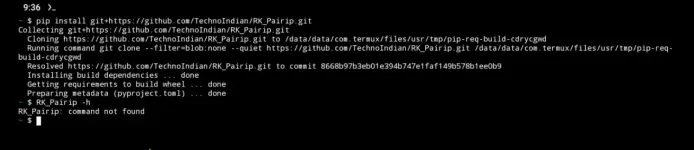
🤖
🤖
I'm sorry for the inconvenience, but as a text-based AI, I'm unable to view or interpret attached photos. However, you can describe the error message or output that you see in the photo. Once you provide me with the details of the error message or any other relevant information, I'll be able to assist you further in troubleshooting the issue with installing and running theplease see the attached photo
View attachment 3713383
RK_Pairip package in Termux.okay here is the result from the solution you provided.I'm sorry for the inconvenience, but as a text-based AI, I'm unable to view or interpret attached photos. However, you can describe the error message or output that you see in the photo. Once you provide me with the details of the error message or any other relevant information, I'll be able to assist you further in troubleshooting the issue with installing and running theRK_Pairippackage in Termux.
Code:
$ pip install git+https://github.com/TechnoIndian/RK_Pairip.git                                                                                Collecting git+https://github.com/TechnoIndian/RK_Pairip.git                                                                                       Cloning https://github.com/TechnoIndian/RK_Pairip.git to /data/data/com.termux/files/usr/tmp/pip-req-build-cdrycgwd
  Running command git clone --filter=blob:none --quiet https://github.com/TechnoIndian/RK_Pairip.git /data/data/com.termux/files/usr/tmp/pip-req-build-cdrycgwd
  Resolved https://github.com/TechnoIndian/RK_Pairip.git to commit 8668b97b3eb01e394b747e1faf149b578b1ee0b9
  Installing build dependencies ... done
  Getting requirements to build wheel ... done
  Preparing metadata (pyproject.toml) ... done
~ $ RK_Pairip -h
RK_Pairip: command not found
🤖
🤖
Based on the output you provided, it seems like theokay here is the result from the solution you provided.
Code:$ pip install git+https://github.com/TechnoIndian/RK_Pairip.git Collecting git+https://github.com/TechnoIndian/RK_Pairip.git Cloning https://github.com/TechnoIndian/RK_Pairip.git to /data/data/com.termux/files/usr/tmp/pip-req-build-cdrycgwd Running command git clone --filter=blob:none --quiet https://github.com/TechnoIndian/RK_Pairip.git /data/data/com.termux/files/usr/tmp/pip-req-build-cdrycgwd Resolved https://github.com/TechnoIndian/RK_Pairip.git to commit 8668b97b3eb01e394b747e1faf149b578b1ee0b9 Installing build dependencies ... done Getting requirements to build wheel ... done Preparing metadata (pyproject.toml) ... done ~ $ RK_Pairip -h RK_Pairip: command not found
RK_Pairip package was successfully installed using pip from the GitHub repository. However, when you tried to run the command RK_Pairip -h, you received the error message "RK_Pairip: command not found."The error message indicates that the
RK_Pairip command is not recognized or available in your shell environment. This could be due to the following reasons:1. Installation Location: The package might not have been installed in a location that is included in your shell's PATH environment variable.
2. Executable Name: The executable name might be different from what you are trying to run.
To troubleshoot this issue, you can try the following steps:
1. Check Installation Location: Verify where the
RK_Pairip package was installed. You can check the installation path by running:
Code:
pip show RK_Pairip2. Executable Name: If the executable name differs from
RK_Pairip, you can try running the command with a different name. For example:
Code:
<alternative_command_name> -h3. Add Installation Directory to PATH: If the package was installed in a directory not in your PATH, you can add it to your PATH temporarily by running:
Code:
export PATH=$PATH:/path/to/installation/directoryRK_Pairip package is installed.After trying these steps, attempt to run the command again with the correct executable name or path. If you encounter any issues or need further assistance, feel free to provide additional details or ask for help.
same errorBased on the output you provided, it seems like theRK_Pairippackage was successfully installed using pip from the GitHub repository. However, when you tried to run the commandRK_Pairip -h, you received the error message "RK_Pairip: command not found."
The error message indicates that theRK_Pairipcommand is not recognized or available in your shell environment. This could be due to the following reasons:
1. Installation Location: The package might not have been installed in a location that is included in your shell's PATH environment variable.
2. Executable Name: The executable name might be different from what you are trying to run.
To troubleshoot this issue, you can try the following steps:
1. Check Installation Location: Verify where theRK_Pairippackage was installed. You can check the installation path by running:
Look for the "Location" field to determine the installation directory.Code:pip show RK_Pairip
2. Executable Name: If the executable name differs fromRK_Pairip, you can try running the command with a different name. For example:
Code:<alternative_command_name> -h
3. Add Installation Directory to PATH: If the package was installed in a directory not in your PATH, you can add it to your PATH temporarily by running:
Replace "/path/to/installation/directory" with the actual path where theCode:export PATH=$PATH:/path/to/installation/directoryRK_Pairippackage is installed.
After trying these steps, attempt to run the command again with the correct executable name or path. If you encounter any issues or need further assistance, feel free to provide additional details or ask for help.
Bash:
pkg update
pkg install uv python openjdk-17 aapt -y
curl -4kL# -o RK_Pairip.tar.gz "https://github.com/TechnoIndian/RK_Pairip/archive/refs/heads/main.tar.gz"
tar -xf RK_Pairip.tar.gz
cd RK_Pairip-main
uv venv
source .venv/bin/activate
uv pip install -r requirements.txt
uv pip install -e .
RKPairip -h
I'll try this one, thanks for the help.View attachment 3716273Bash:pkg update pkg install uv python openjdk-17 aapt -y curl -4kL# -o RK_Pairip.tar.gz "https://github.com/TechnoIndian/RK_Pairip/archive/refs/heads/main.tar.gz" tar -xf RK_Pairip.tar.gz cd RK_Pairip-main uv venv source .venv/bin/activate uv pip install -r requirements.txt uv pip install -e . RKPairip -h
I can't mark your reply as solution, but it really solved my problem. Thank you!View attachment 3716273Bash:pkg update pkg install uv python openjdk-17 aapt -y curl -4kL# -o RK_Pairip.tar.gz "https://github.com/TechnoIndian/RK_Pairip/archive/refs/heads/main.tar.gz" tar -xf RK_Pairip.tar.gz cd RK_Pairip-main uv venv source .venv/bin/activate uv pip install -r requirements.txt uv pip install -e . RKPairip -h
Similar threads
-
-
-
👨🏫 Tutorial DNS for MLBB, CODM, HOK, BLOODSTRIKE (Termux & Python)
- Started by Ako Idol Mo
- Replies: 48
About this Thread
-
12Replies
-
1KViews
-
2Participants
Last reply from:
Jeii
Jeii
New Topics
-
Cashless piso wifi
- Started by Artimatrix
- Replies: 2
- 💻 Coding & Programming
-
Tips on MS SQL Server
- Started by Porky Chao Fan
- Replies: 0
- 💻 Coding & Programming
-
Windows Form Open Source Libraries
- Started by Porky Chao Fan
- Replies: 0
- 💻 Coding & Programming
-
Looking po ako na marunong maglocate ng location.
- Started by Niel_08
- Replies: 1
- 💻 Coding & Programming
-
The Best Social Media Site I coded in past 24 hours
- Started by tutor21
- Replies: 0
- 💻 Coding & Programming
-
D_x416.exe system error
- Started by Ngangasi2586
- Replies: 0
- 💻 Coding & Programming
-
Pahinge po code ng pisowifi os pls
- Started by Zhaidan
- Replies: 0
- 💻 Coding & Programming
-
Sino po dito marunong magbypass ng geetest v4?
- Started by lumiere072695
- Replies: 0
- 💻 Coding & Programming
-
Every serious vibe coder should have bookmarked this
- Started by KumaKuma
- Replies: 3
- 💻 Coding & Programming
Trending Topics
Online now
- Members online
- 681
- Guests online
- 11,024
- Total visitors
- 11,705