 PH
PH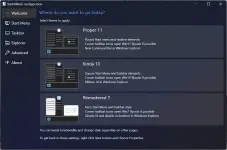
Startallback familiar to us program that returns to Windows 11 full-featured Start menu launch button. StartAllBack significantly improves the usability of the desktop and makes the new screen ordered, the most convenient.
Features of the program:
The menu, button and settings are exactly the same as in Windows 7.
A Windows session will always start with a desktop. Unlike other solutions, StartIsBack opens the desktop without delay and blinking the Metro interface.
Restores the main menu from Windows 7 with all the usual functions: search, drag and drop icons, fixed and recently used applications.
Allows you to resolve the dilemma of the two interfaces in Windows 11 by clearly dividing them.
Work programs will be on the desktop, and the new «Start » screen will only show applications from the Windows store.
You can turn the screen «Start » into «Applications » and you will not need to manage both at once.
Integrates into the system and does not install additional services or programs.
The installation does not require additional utilities and can be made without administrative privileges. The main menu is fully localized in the system language, with the same names as in Windows 7.
Allows you to configure the display and behavior of the «Start » menu and the Windows 11 interface: skins, button image, active screen angles and much more.
You do not have permission to view the full content of this post. Log in or register now.
e