 PH
PH
File size: 7.39 MB
When sheets are exported from Autodesk® Revit® to DWG, each sheet is typically saved as a separate file. Combining these files into a single DWG with all drawings and sheets requires a time-consuming manual process of merging or importing layouts in CAD
.
This plugin simplifies the workflow by providing two powerful export commands
"To Multiple Layouts" Command
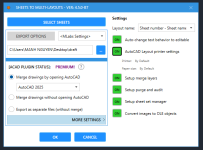
Export and merge all sheets into a single DWG file, where each sheet is placed in its layout tab.
"To 1 Layout" Command
Export multiple sheets into a single DWG file. All drawings are placed in the model tab, while all sheets are combined into a single layout tab.
Compatible with
Autodesk Revit
Version: 2025 , 2024 , 2023 , 2022 , 2021 , 2020
Screen :
What's New
Spoiler contents are visible only to Established Members.
HOMEPAGE
Code:
https://apps.autodesk.com/RVT/en/Detail/Index?id=849509114565997396&appLang=en&os=Win64
You do not have permission to view the full content of this post. Log in or register now.
You do not have permission to view the full content of this post. Log in or register now.
You do not have permission to view the full content of this post. Log in or register now.