 PH
PH
File size: 11.6 MB
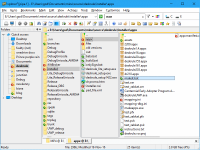
Xplorer is what windows explorer should have been. We've kept the best bits and threw away the inconsistencies and irritations, all in a small and nimble, easy to use package. At first glance everything looks familiar: the classic tree/view user interface, clean and clutter free, should get you started immediately.
xplorer? will get you in all places you keep your digital wealth, including namespace extensions like FTP, zipfolders, webfolders etc. xplorer? browsing model scales up well to large folders with thousands of files. It reads fast, offers visual filters and a variety of selection mechanisms that allow you to manage your files effectively.
xplorer2 is a file and information manager that adheres to the philosophy "efficiency through simplicity". Without reinventing the wheel, it integrates the best features of Windows' shell architecture in a small, resource efficient package that's instantly familiar to work with. But look a little closer and you'll discover a whole new world under the surface that offers power, precision and flexibility, and will boost your everyday productivity no end! All the shell goodies from windows explorer - none of the hassle! Plus all the features you would expect from a powerful tabbed dual-pane file manager, including Omni-Finder, a find files module that simply outclasses all known search tools. Don't take our word for it, seeing is believing!
xplorer? is what windows explorer should have been. We've kept the best bits and threw away the inconsistencies and irritations, all in a small and nimble, easy to use package. At first glance everything looks familiar: the classic tree/view user interface, clean and clutter free, should get you started immediately. xplorer? will get you in all places you keep your digital wealth, including namespace extensions like FTP, zipfolders, webfolders (webDAV) etc.
But that's where the similarities end. Unlike explorer, xplorer? allows you to browse more than one folder at a time, using tabs and dual panes. Sorting out and copying files becomes a breeze. You can navigate your shell namespace quickly using favorites, clickable paths (breadcrumbs), easy access to root folders, a tree and a bookmark pane (drop box) etc. You can even save and restore folder groups whenever your workflow deems necessary. xplorer? browsing model scales up well to large folders with thousands of files. It reads fast, offers visual filters and a variety of selection mechanisms that allow you to manage your files effectively.
Main features
» Browsing the shell namespace
» Managing files and folders
» Scrap containers
» Examine and maintain your filesystem
» Search for files and folders
» Automation of DOS (and windows) commands
» User Interface customization
Screen:
What's New
Spoiler contents are visible only to Established Members.
HOMEPAGE
Code:
http://zabkat.com
You do not have permission to view the full content of this post. Log in or register now.
You do not have permission to view the full content of this post. Log in or register now.
You do not have permission to view the full content of this post. Log in or register now.
You do not have permission to view the full content of this post. Log in or register now.
You do not have permission to view the full content of this post. Log in or register now.
You do not have permission to view the full content of this post. Log in or register now.